

- expertise:
- Platform Testing, Cryptocurrency, Retail Investing
- credentials:
- Active investor since 2013 · 11+ years experience
- tested:
- 50+ platforms · 200+ guides authored

- expertise:
- Broker Comparison, ISA Strategy, Portfolio Management
- credentials:
- Active investor since 2013 · 11+ years experience
- tested:
- 40+ brokers with funded accounts
How We Test
Real accounts. Real money. Real trades. No demo accounts or press releases.
What we measure:
- Spreads vs advertised rates
- Execution speed and slippage
- Hidden fees (overnight, withdrawal, conversion)
- Actual withdrawal times
Scoring:
Fees (25%) · Platform (20%) · Assets (15%) · Mobile (15%) · Tools (10%) · Support (10%) · Regulation (5%)
Regulatory checks:
FCA Register verification · FSCS protection
Testing team:
Adam Woodhead (investing since 2013), Thomas Drury (Chartered ACII, 2018), Dom Farnell (investing since 2013) — 50+ platforms with funded accounts
Quarterly reviews · Corrections: info@theinvestorscentre.co.uk
Disclaimer
Not financial advice. Educational content only. We're not FCA authorised. Consult a qualified advisor before investing.
Capital at risk. Investments can fall. Past performance doesn't guarantee future results.
CFD warning. 67-84% of retail accounts lose money trading CFDs. High risk due to leverage.
Contact: info@theinvestorscentre.co.uk
Quick Answer: How to Trade Crypto with Leverage in the UK
- Use Bitpanda — the only FCA-registered platform offering UK retail traders up to 3x leverage on 100+ cryptos.
- Deposit funds and pass the FCA appropriateness test.
- Select your asset in the margin section and choose your leverage (up to 3x).
- Set take-profit and stop-loss levels, then confirm — your position opens immediately.
- Costs: 0.18% daily funding fee + 0.3% closing fee. No opening fee.
 Most Coins
Don’t invest unless you’re prepared to lose all the money you invest. This is a high-risk investment and you should not expect to be protected if something goes wrong. Take 2 mins to learn more. This marketing communication does not constitute investment advice, a solicitation, or an offer to buy or sell any cryptoassets. In no way are performance or results guaranteed. You should keep yourself informed and understand the risks involved in buying and holding cryptoassets.
Is Crypto Leverage Trading Legal in the UK?
The short answer is yes — with a critical qualification that most guides get wrong.
In January 2021 the FCA introduced Policy Statement PS20/10, banning the sale of crypto derivatives to retail clients. The ban covers crypto CFDs, crypto futures, crypto options, and crypto exchange-traded notes. Every FCA-regulated broker — IG, CMC Markets, Capital.com — can only offer these products to clients who qualify as professional investors. If you are a retail client, those routes are closed.
What the ban does not cover is spot margin trading. Spot margin involves borrowing funds to increase your exposure to an actual crypto asset — you hold the underlying coin directly, not a derivative contract referencing its price. This structural distinction is why Bitpanda's margin product is available to UK retail clients when crypto CFDs are not.
The result: one legitimate retail route in the UK — Bitpanda, 3x maximum — and a professional-only tier above that.
For a detailed breakdown of which platforms are available at each tier, see our best crypto platforms for leverage trading UK guide.
How Does Crypto Leverage Trading Actually Work?
Before opening any position it is worth being clear on the mechanics. These terms appear in every guide but are rarely explained in plain English.
Margin is the collateral you put up — your own funds. It is the amount you risk.
Leverage is the multiplier. At 3x, your margin controls a position three times its size.
Position size = margin x leverage. £100 margin at 3x = £300 position.
Liquidation is what happens if the market moves against you far enough that your margin can no longer support the position. The platform automatically closes the trade to prevent your balance going negative. At 3x leverage, a move of approximately 33% against your position triggers liquidation and you lose your entire margin.
Daily funding fee is the cost of borrowing the additional capital beyond your margin. On Bitpanda this is 0.18% per day on the full position value — not just your margin. On a £300 position that is £0.54 per day.
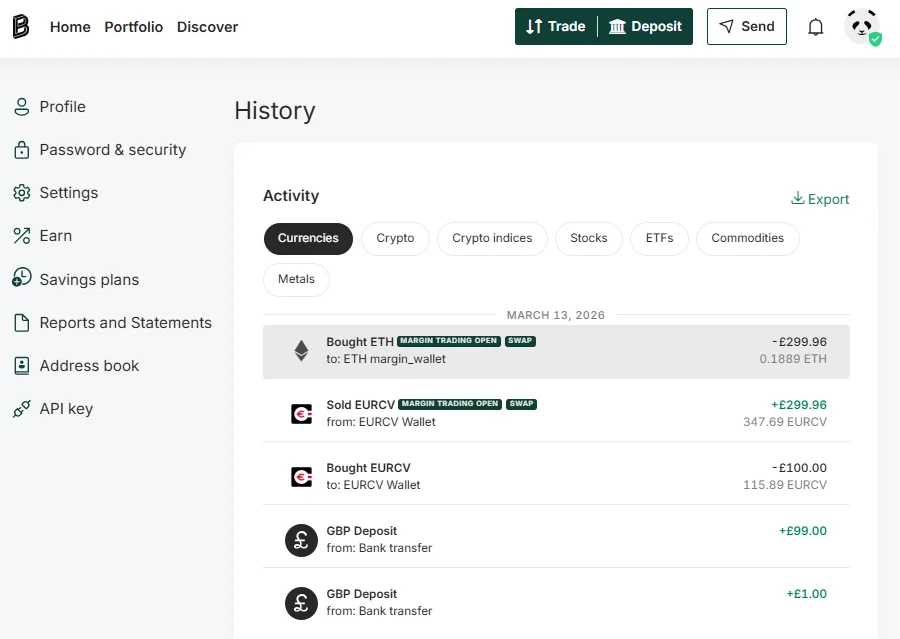
How Bitpanda executes spot margin — what the transaction history reveals:
This is a detail no other guide documents. When you open a leveraged position on Bitpanda's UK platform, the mechanics work as follows:
- Your GBP is converted to EURCV (Bitpanda's in-house stablecoin)
- The EURCV is used to fund the leveraged position at 3x
- Crypto is purchased via swap into your margin wallet
- When the position closes, the crypto is swapped back, EURCV is repaid, and proceeds return to your GBP balance
I can confirm this from my own transaction history on 13 March 2026. My £100 GBP deposit converted to EURCV, which funded a £299.96 ETH position at 3x. When the position closed, the margin was repaid via the same EURCV mechanism. The process was automatic — I did not need to manage the currency conversions manually.
How to Open a Leveraged Crypto Trade on Bitpanda — Step by Step
Step 1: Sign Up with Bitpanda
Create a free account at Bitpanda. You will need to complete identity verification (typically 15–30 minutes) before you can deposit or trade. Bitpanda's UK entity is Bitpanda Broker UK Ltd, FCA registered under reference number 925234. Once verified, you have full access to the platform including margin trading.
Step 2: Deposit Funds
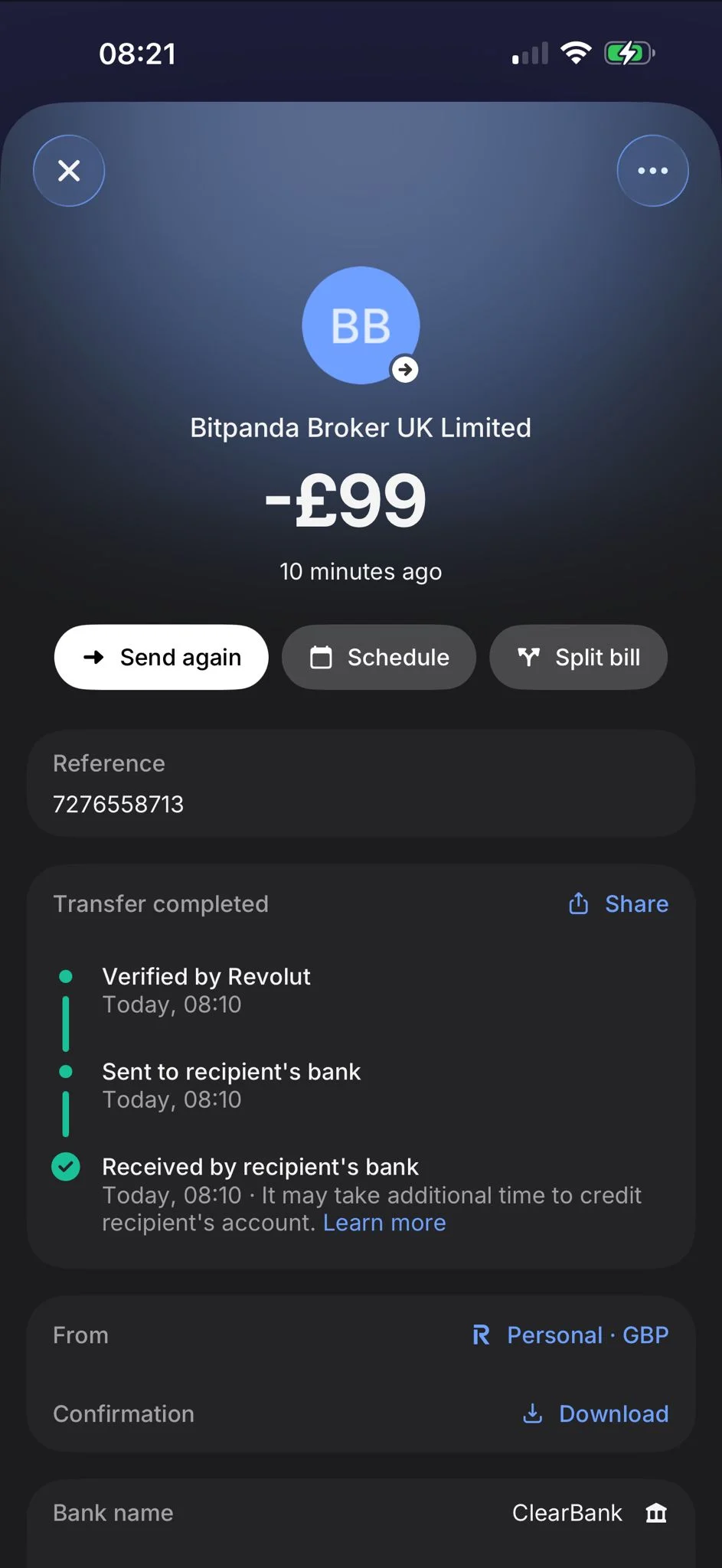
I deposited £99 via Revolut bank transfer into Bitpanda Broker UK Ltd. The funds arrived within the same minute — processed via ClearBank. I had also deposited £1 separately as a test, giving me £100 total available.
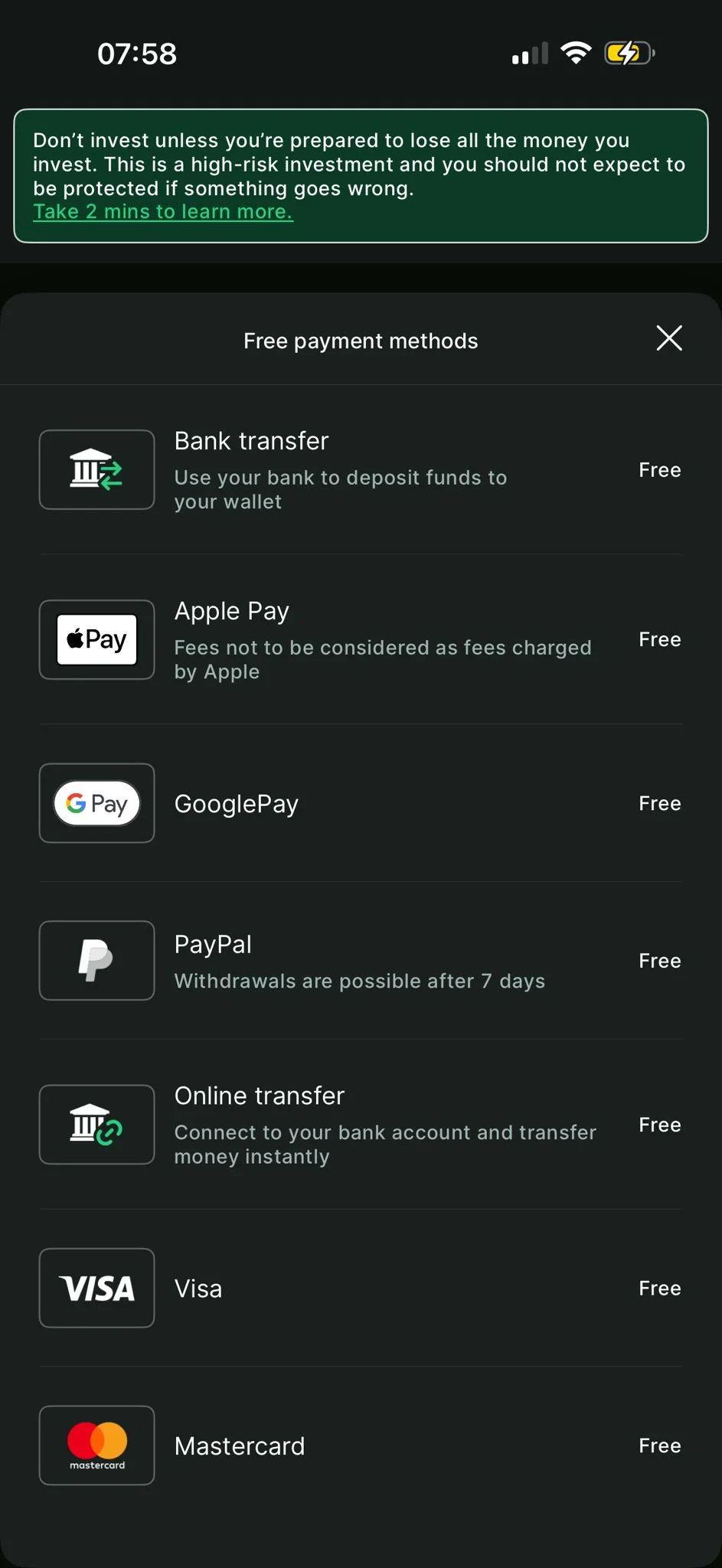
Deposit methods available — all fee-free:
| Method | Speed |
|---|---|
| Bank Transfer (Faster Payments) | Under 1 minute in my testing |
| Debit / Credit Card | Instant |
| Apple Pay | Instant |
| Google Pay | Instant |
| PayPal | Instant |
Step 3: Pass the FCA Appropriateness Test
Before placing any trade on Bitpanda's UK platform, you must pass an FCA-required appropriateness test. This is not optional and cannot be bypassed.
The test covers 8 multiple-choice questions on:
- Crypto market volatility
- The unregulated nature of cryptoassets in the UK
- FSCS non-protection
- Leverage and financial risk
It took me approximately 5 minutes. Medium difficulty — straightforward if you have read any introductory content on crypto markets. If you fail, there is a waiting period before you can retake it. You cannot trade until you pass.
Step 4: Navigate to Margin Trading
On the Bitpanda mobile app: Trade → Leverage. On desktop: the margin section is accessible from the main trade menu.
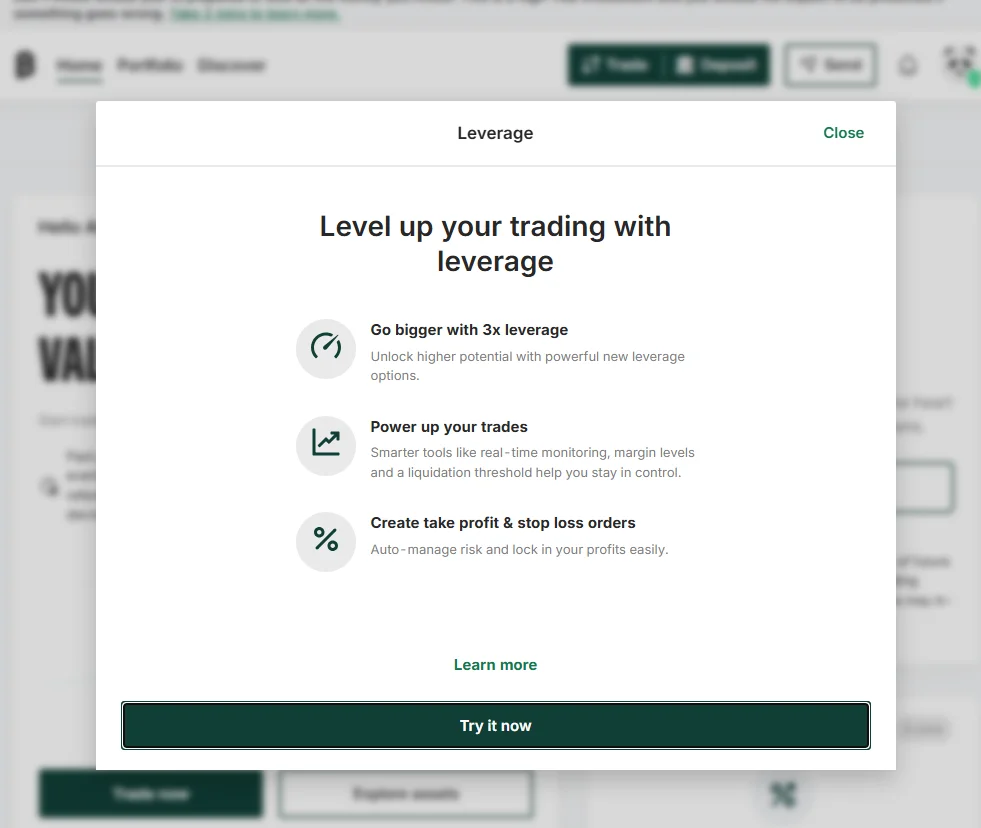
Note: during my March 2026 test, the 'Try It Now' button on the desktop margin modal failed to load. I switched to the mobile app, where the full process worked without issue. If you encounter this on desktop, use the mobile app.
Step 5: Select Your Asset
The leverage asset screen shows all coins available for margin trading on the UK platform — Bitcoin, Ethereum, BNB, XRP, Solana, and others, all showing the maximum leverage available (up to 3x for UK users) and current GBP price.
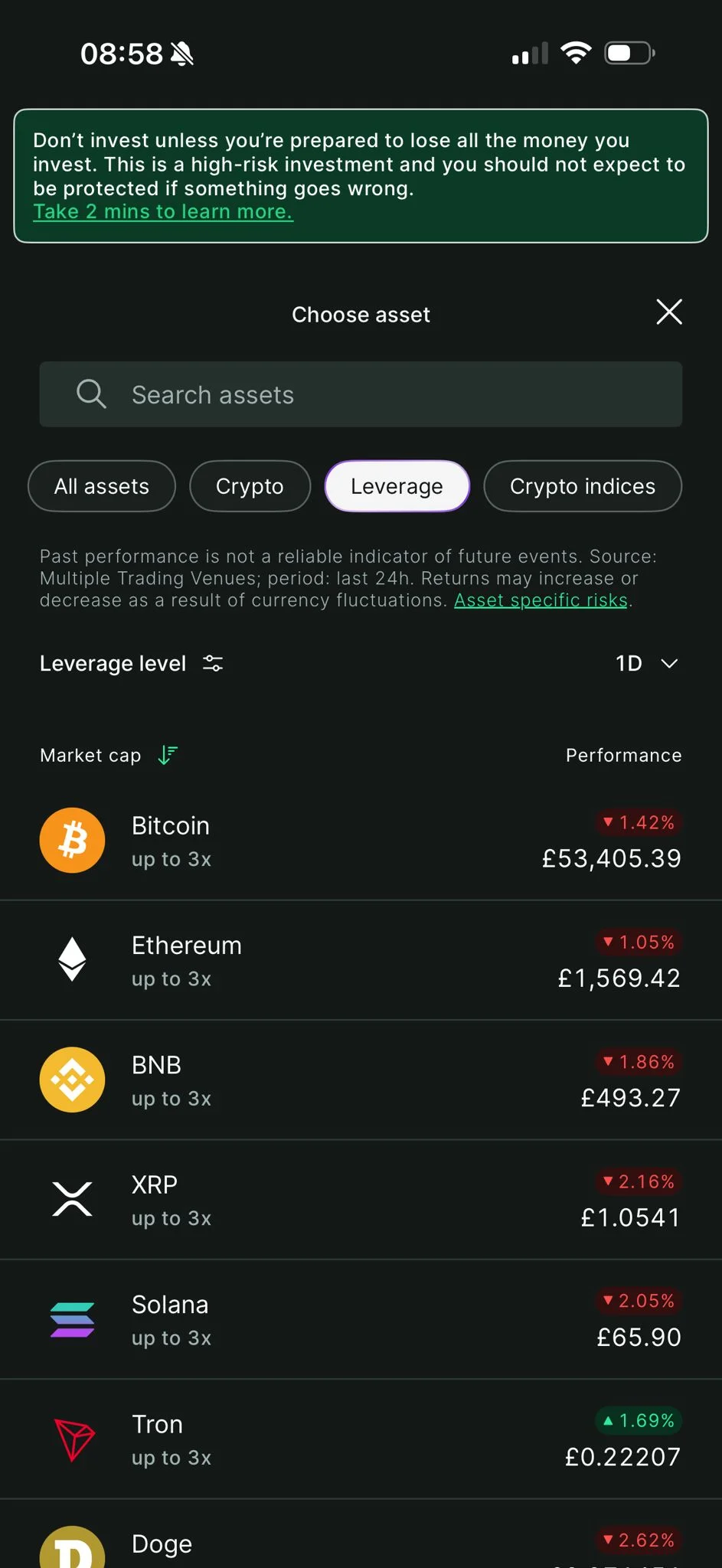
I selected ETH/GBP. For a first leveraged trade, major assets (BTC or ETH) carry tighter spreads and deeper liquidity than smaller altcoins — a relevant consideration when leverage amplifies every cost.
Step 6: Choose Your Leverage and Enter Your Margin
The position entry screen lets you select 2x or 3x leverage, enter your margin amount in GBP, and review the estimated liquidation price before confirming.
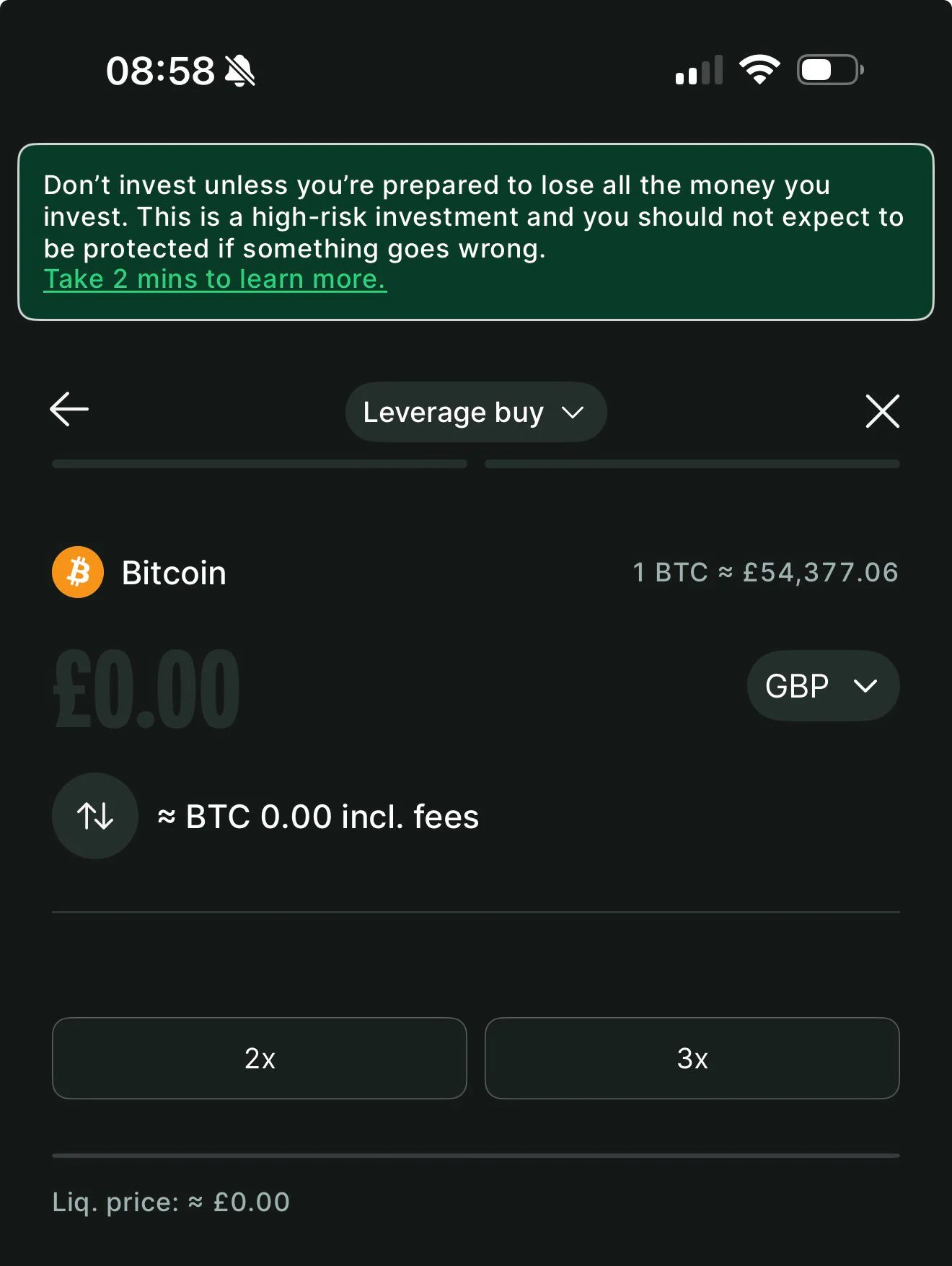
I selected 3x leverage and used approximately £100 as my margin. The platform calculated:
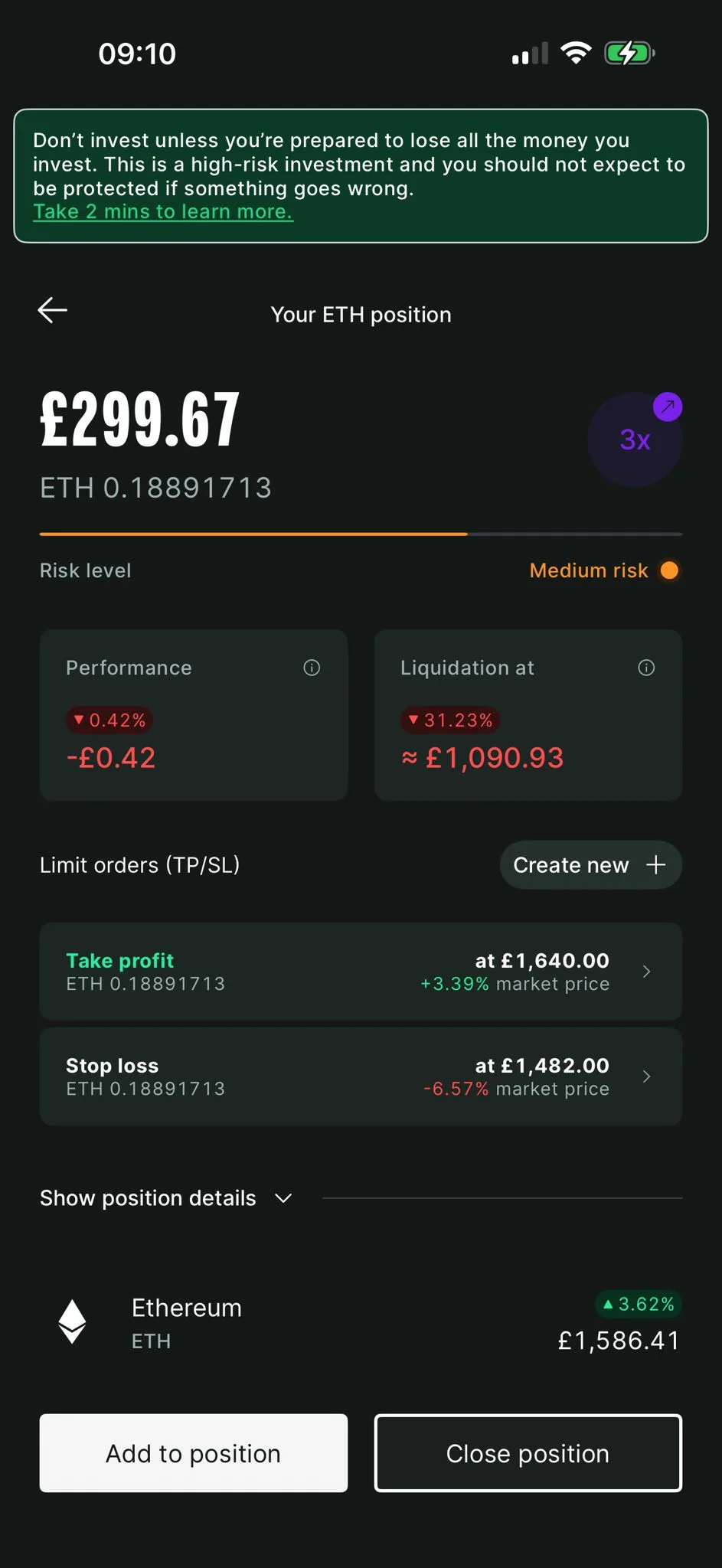
- Position size: 0.1889 ETH at £1,586.41 — total £299.96
- Liquidation threshold: approximately £1,090.93 on ETH/GBP
Step 7: Set Take-Profit and Stop-Loss
Before confirming the trade, set your take-profit and stop-loss levels. This is the most important step.
I set:
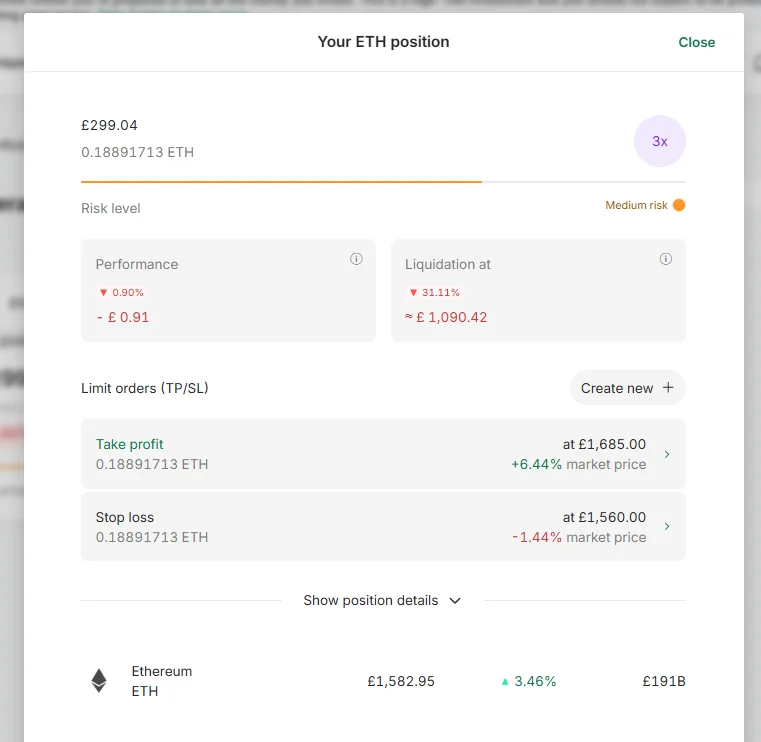
- Take-profit: £1,640.00 per ETH
- Stop-loss: £1,482.00 per ETH
Critical: once the position is open, you cannot modify these levels. Set them before you confirm — not after. If you want to adjust your TP/SL, you must close the position and reopen it.
Step 8: Confirm the Position
Review: position size, entry price, leverage, daily funding fee, liquidation threshold. When satisfied, confirm. The position opens immediately. There is no opening fee.
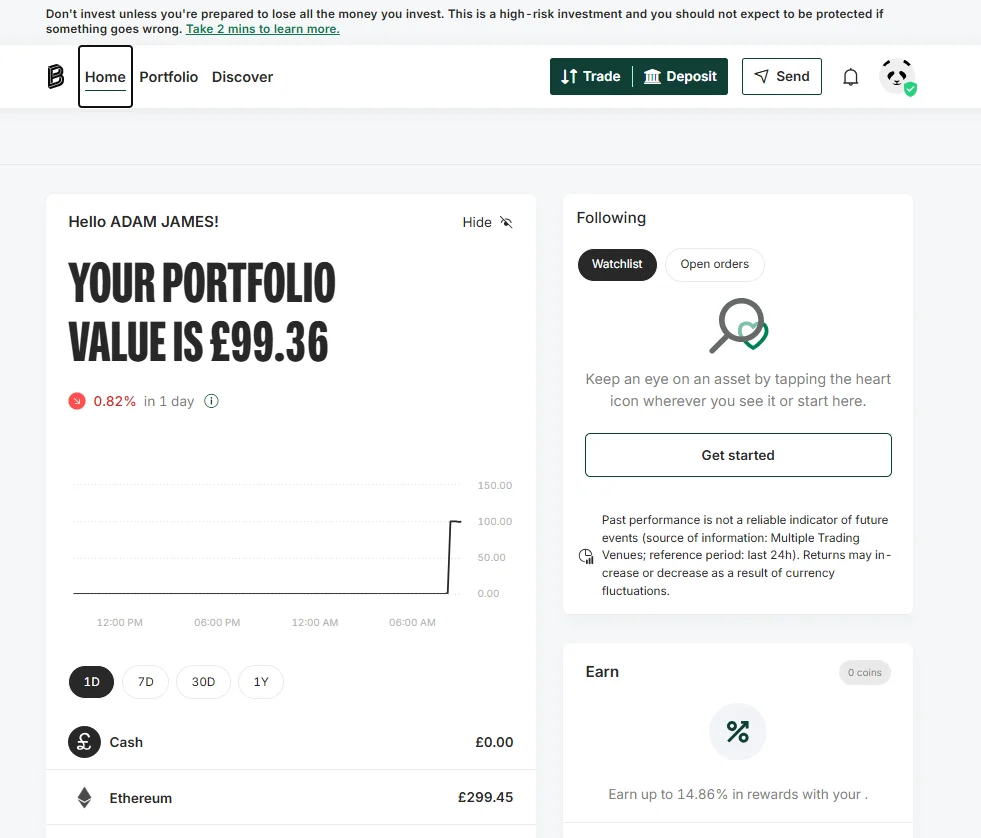
The platform showed my live position in the portfolio dashboard alongside my other holdings.
How to Close a Leveraged Position on Bitpanda
A leveraged position on Bitpanda can be closed in two ways: manually, or automatically when a take-profit or stop-loss level is triggered.
My Position — Closed by Take-Profit the Same Day
My take-profit at £1,640 per ETH triggered on 13 March 2026 — the same day I opened the position. Here is what happened in the transaction history:
Open:
- Bought EURCV: -£100.00 (115.89 EURCV) — my GBP converted to EURCV to fund the margin
- Sold EURCV via swap: +£299.96 (347.69 EURCV) — full 3x position funded
- Bought ETH via swap: -£299.96 (0.1889 ETH) — ETH position opened in margin wallet
Close (triggered by take-profit):
- Sold ETH via swap (Margin Trading Repay): +£200.53 (0.1224 ETH) — partial repayment
- Bought EURCV (Margin Trading Repay): -£200.53 (231.79 EURCV) — margin repaid
- Sold ETH (remaining): +£108.02 (0.0658 ETH) — profit portion
Net result:
- Total ETH proceeds: £200.53 + £108.02 = £308.55
- Position cost: £299.96
- Gross profit on position: £8.59
- Return on margin (£100): approximately 8.59%
The closing process was fully automatic — when my take-profit level was hit, Bitpanda unwound the position, repaid the borrowed EURCV, and returned the net proceeds to my account. I did not need to manually intervene.
To Close Manually
If you want to close a position before TP/SL triggers: navigate to your open positions, select the position, and choose Close. Review the closing fee (0.3% of position size) and confirm. Proceeds return to your GBP wallet.
What Does Leverage Trading on Bitpanda Actually Cost?
All fees confirmed from the official Bitpanda Cost Transparency document (v3.0.0, February 2026):
| Fee Type | Rate | Example — £100 margin at 3x (£300 position) |
|---|---|---|
| Opening (Buy) | 0% | £0 |
| Daily funding | 0.18% per day of position value | £0.54 per day |
| Closing | 0.3% of position size | £0.90 |
| Liquidation fee | 1% of position size (only if triggered) | £3.00 |
The daily fee is charged every 4 hours (0.03% per 4-hour period), starting from position open.
Worked cost examples:
Same-day trade (under 24 hours, as in my test):
- Opening fee: £0
- Daily funding (under 24 hours): £0.54 or less
- Closing fee: £0.90
- Total cost: approximately £1.44 on a £300 position
One-week hold:
- Opening fee: £0
- Daily funding: £0.54 x 7 = £3.78
- Closing fee: £0.90
- Total cost: approximately £4.68 on a £300 position
One-month hold:
- Opening fee: £0
- Daily funding: £0.54 x 30 = £16.20
- Closing fee: £0.90
- Total cost: approximately £17.10 on a £300 position
The daily fee applies to the full position value, not just your margin. For longer holds the funding fee becomes the dominant cost — this product is most cost-effective for short-to-medium term positions.
My actual trade: the position opened and closed within the same day. The daily funding accrued was minimal — less than £0.54. My gross profit was £8.59 on £100 margin. After estimated fees, the net return was approximately 8% on my margin. This is not typical — it reflects a favourable same-day price movement to my take-profit level.
What Are the Risks of Trading Crypto with Leverage?
This section is not optional reading. Understanding the risks before opening a position is the difference between a managed trade and an unexpected total loss of margin.
Liquidation: If the asset price moves against your position far enough, Bitpanda automatically closes the trade. At 3x leverage the liquidation threshold is approximately 33% adverse price movement. In my position, ETH was at £1,586.41 at entry — a drop to approximately £1,090.93 would have triggered liquidation and I would have lost my entire £100 margin.
Crypto assets are capable of 20–30% moves in a single session during volatile periods. Liquidation is not a theoretical risk.
Bitpanda sends a margin level alert before liquidation. In fast markets the gap between alert and execution can be narrow. Set your stop-loss at a level that closes the position before liquidation is reached.
The relationship between leverage and loss:
At 3x leverage:
- A 10% adverse price move equals a 30% margin loss
- A 20% adverse price move equals a 60% margin loss
- A 33% adverse price move triggers liquidation and full margin loss
The same multiplier applies to gains — which is why my 2.86% ETH price move to take-profit produced an approximately 8.59% return on margin.
Daily funding fee accumulation: 0.18% per day sounds small. Annualised it is approximately 65.7% of the position value per year. A leveraged position is not a cost-free hold — the longer it is open, the more the daily fee erodes returns. Know your holding period before you open.
TP/SL cannot be modified after opening: This is a current platform limitation. Plan your take-profit and stop-loss levels carefully before confirming. If market conditions change and you need different levels, you must close the position and reopen it — incurring another closing fee.
No FSCS protection: Crypto investments are not covered by the Financial Services Compensation Scheme regardless of FCA registration status. If Bitpanda were to fail while you held an open position, there is no government-backed compensation. For more detail on Bitpanda's security measures, see our guide on whether Bitpanda is safe.
The summary: crypto leverage is a tool for traders who understand what they stand to lose before they open a trade. The FCA appropriateness test is a floor, not a ceiling, on the knowledge required to use this product responsibly.
Leverage Trading Tips From My March 2026 Test
These are the practical observations from my actual session — not generic advice.
Set your stop-loss before you care about the take-profit. Your stop-loss defines your maximum loss. Set it first, at a level you are genuinely comfortable losing, before you think about where you want to take profit. I set my stop-loss at £1,482 — a level where I would have lost approximately £30 on £100 margin if hit. That was a loss I had deliberately accepted before opening the position.
Start with a smaller margin than you think. My first leveraged position was approximately £100 margin. That gave me meaningful exposure to the mechanics — deposit, test, position entry, monitoring, close — without overexposing myself to a single trade outcome. Learn the platform with a small amount before scaling.
Understand the EURCV conversion. Your GBP is converted to EURCV to fund the position. This is automatic and invisible in the trade interface, but it is visible in your transaction history. It is not an additional cost — it is how the platform's margin mechanism works. Do not be alarmed when you see EURCV entries in your activity feed.
Use the mobile app if desktop features fail to load. During my testing, the 'Try It Now' button on the desktop margin modal failed to load. The mobile app worked without issue. If you encounter loading problems on desktop, switch to the mobile app to complete your trade.
Final Thoughts
On 13 March 2026 I deposited £100, opened a 3x ETH/GBP leveraged position on Bitpanda's UK platform, and closed it the same day when my take-profit triggered at £1,640 per ETH. The position returned approximately 8% on my margin after a same-day price move of under 3% on the underlying asset. That is what 3x leverage does when it works in your favour.
What it does when it works against you is equally mechanical: a 33% adverse move wipes the margin entirely. That is the trade-off. The FCA's 3x cap for UK retail users is conservative by global standards for a reason.
Bitpanda's margin product is the only regulated retail crypto leverage option available in the UK. It works. The fee structure is transparent. The risk parameters are clearly displayed before you confirm a trade. For retail investors who understand leverage and want regulated access to it, it is a credible and functional product.
Go in with a defined stop-loss, a position size you can afford to lose, and a clear plan for when you will take profit or exit. Those three things separate a managed trade from an expensive lesson.
For a complete overview of Bitpanda's features, fees and security, see our full Bitpanda review.
FAQs
Don’t invest unless you’re prepared to lose all the money you invest. This is a high-risk investment and you should not expect to be protected if something goes wrong. Take 2 mins to learn more