

- expertise:
- Platform Testing, Cryptocurrency, Retail Investing
- credentials:
- Active investor since 2013 · 11+ years experience
- tested:
- 50+ platforms · 200+ guides authored

- expertise:
- Broker Comparison, ISA Strategy, Portfolio Management
- credentials:
- Active investor since 2013 · 11+ years experience
- tested:
- 40+ brokers with funded accounts
How We Test
Real accounts. Real money. Real trades. No demo accounts or press releases.
What we measure:
- Spreads vs advertised rates
- Execution speed and slippage
- Hidden fees (overnight, withdrawal, conversion)
- Actual withdrawal times
Scoring:
Fees (25%) · Platform (20%) · Assets (15%) · Mobile (15%) · Tools (10%) · Support (10%) · Regulation (5%)
Regulatory checks:
FCA Register verification · FSCS protection
Testing team:
Adam Woodhead (investing since 2013), Thomas Drury (Chartered ACII, 2018), Dom Farnell (investing since 2013) — 50+ platforms with funded accounts
Quarterly reviews · Corrections: in**@*******************co.uk
Disclaimer
Not financial advice. Educational content only. We're not FCA authorised. Consult a qualified advisor before investing.
Capital at risk. Investments can fall. Past performance doesn't guarantee future results.
CFD warning. 67-84% of retail accounts lose money trading CFDs. High risk due to leverage.
Contact: in**@*******************co.uk
Quick Answer — Is Coinbase Wallet Safe?
Yes — Coinbase Wallet is a secure, non-custodial crypto wallet. It gives you full control of your private keys, meaning only you can access your funds. It's powerful for Web3, NFTs, and self-custody, but requires careful key management: if you lose your recovery phrase, your crypto is permanently inaccessible. Coinbase Wallet is separate from the Coinbase exchange — it has no FSCS protection and no password reset option.
What's New in 2026: Coinbase Wallet now offers smoother multi-chain support, clearer transaction previews, and improved warnings around risky smart contract approvals — all designed to reduce common Web3 security mistakes.

Don’t invest unless you’re prepared to lose all the money you invest. This is a high-risk investment and you should not expect to be protected if something goes wrong. Take 2 mins to learn more
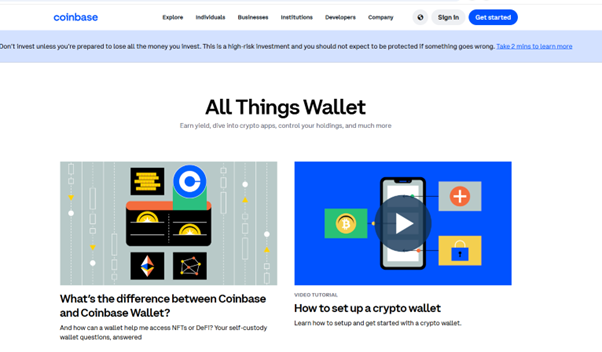
My Experience Sending Crypto to Coinbase Wallet — March 2026
To test the full self-custody journey, I sent Bitcoin from the Coinbase exchange to my MetaMask wallet on 6th March 2026. Here's what the process actually looked like.
How Did the Withdrawal Process Work?
The process was straightforward. I navigated to Send in the Coinbase app, pasted my MetaMask Bitcoin address, confirmed the amount, and reviewed the network fee — approximately £0.23, paid to the Bitcoin network rather than Coinbase. Before I could confirm, Coinbase displayed a clear on-screen warning that the transaction is irreversible once submitted. This is good practice and worth taking seriously.
How Long Did It Take?
The transaction was initially pending with an estimated window of a few hours. It completed the same morning — transaction hash 41343d...769abb, publicly verifiable on the Bitcoin block explorer. Anyone can confirm this transaction happened by searching the hash.
What Does This Tell You About Coinbase Wallet Safety?
The withdrawal process was clean, transparent about fees, and completed without issues. The irreversible transaction warning is a meaningful safeguard. The key takeaway: once you've confirmed a crypto send, there is no recall. Coinbase cannot reverse it, freeze it, or recover funds sent to the wrong address. This is the nature of self-custody — and it's why getting the recipient address right matters.
What Is Coinbase Wallet and How Is It Different?
Coinbase Wallet is a separate product from the Coinbase exchange. It's a non-custodial crypto wallet app that lets you store, manage, and transfer digital assets — including NFTs and dApp interactions — while keeping full control of your private keys. Unlike the Coinbase exchange, Coinbase cannot access your Wallet funds.
Custodial vs Non-Custodial: What's the Difference?
The Coinbase exchange is custodial — Coinbase holds your private keys on your behalf, similar to how a bank holds your money. If you forget your password, Coinbase can help you recover access. Coinbase Wallet is non-custodial — you hold your own private keys. Only you can access your funds. If you lose your recovery phrase, your crypto is gone permanently. No one can retrieve it.
| Feature | Coinbase Exchange | Coinbase Wallet |
|---|---|---|
| Custody | Custodial (Coinbase holds keys) | Non-custodial (you hold keys) |
| Password recovery | Yes | No — recovery phrase only |
| FSCS protection | No (crypto) | No |
| FCA regulation | Yes (CB Payments Ltd, FRN 900635) | Separate product |
| Web3 / dApp access | No | Yes |
| NFT support | Limited | Full |
| Best for | Trading, buying, selling | Long-term holding, Web3, NFTs |
What Coins and Tokens Does Coinbase Wallet Support?
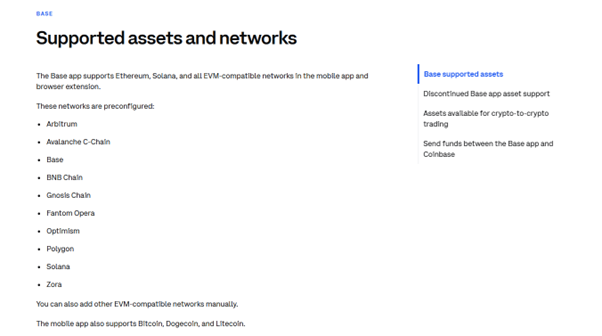
Coinbase Wallet supports a wide range of cryptocurrencies across multiple blockchains including Bitcoin, Ethereum and ERC-20 tokens, Solana assets, stablecoins like USDC, and NFTs. Its multi-chain architecture makes it versatile for DeFi users, NFT collectors, and long-term holders.
| Network | Token Standard | Examples |
|---|---|---|
| Ethereum | ERC-20 | USDC, LINK, AAVE |
| Solana | SPL | SOL, BONK, USDT |
| Base | Native ETH compatible | ETH, USDC |
| Bitcoin | Native | Bitcoin |
| Polygon | ERC-20 compatible | MATIC, USDT, DAI |
What Security Features Protect Coinbase Wallet?
Coinbase Wallet uses biometric authentication (Face ID / fingerprint), encrypted local storage of private keys, and open-source code for independent security auditing. In 2026, the app added clearer transaction previews and improved warnings before interacting with smart contracts — which is where many users have historically lost funds to scams or errors.
Private Key Control
Your private keys are generated and stored on your device — not on Coinbase's servers. Coinbase has no access to them. This eliminates the exchange as a single point of failure for your funds, but places all security responsibility on you. If your device is lost, stolen, or broken, your recovery phrase is the only way to restore access.
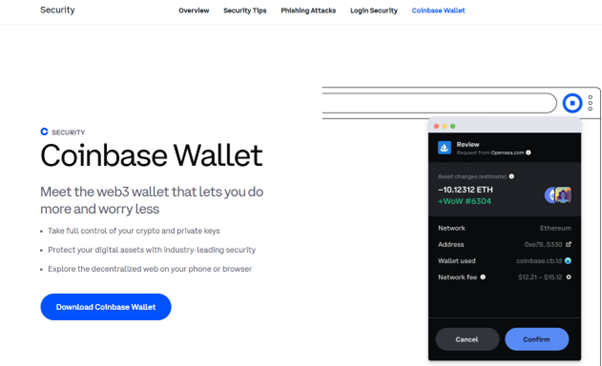
Recovery Phrase — The Critical Safeguard
When you set up Coinbase Wallet, you're given a 12-word recovery phrase. This is the only way to restore your wallet if you lose access to your device. Write it down on paper and store it in a secure physical location — never store it digitally, never photograph it, never store it in cloud services. If someone else finds your recovery phrase, they have full access to your funds.
How Much Does Coinbase Wallet Cost?
Coinbase Wallet is free to download and use. There are no subscription fees and no platform charges. The costs you do pay are blockchain network fees — gas fees paid to miners or validators when you send or swap tokens. These vary by network congestion. As noted above, Bitcoin network fees were approximately £0.23 in March 2026 testing — but Ethereum gas fees can vary significantly.
| Fee Type | Cost | Notes |
|---|---|---|
| Wallet setup | Free | No subscription |
| Bitcoin network fee | ~£0.23 (March 2026) | Paid to Bitcoin miners — varies |
| Ethereum gas fees | Varies | Can be significant during congestion |
| Transfer to Coinbase exchange | Free (no Coinbase fee) | Network fees still apply |
| Token swaps | Spread + network fee | Built into swap quotes |
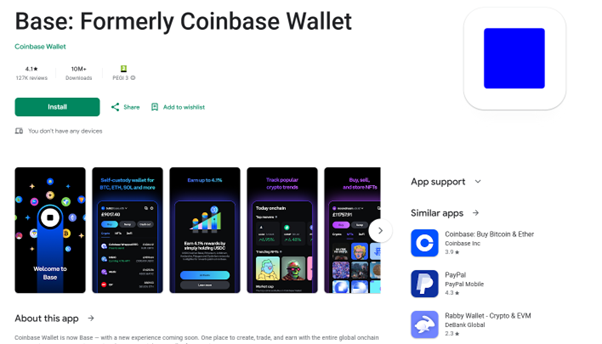
Key Features of Coinbase Wallet
Coinbase Wallet supports NFTs, staking, Web3 dApps, and connects to Ethereum, Solana, Bitcoin, and more. Its built-in dApp browser and multi-chain architecture make it one of the more versatile self-custody options available.
| Feature | Available |
|---|---|
| NFT support | Yes |
| dApp browser | Yes |
| Staking | Yes |
| Web3 access | Yes |
| Multi-chain | Yes |
| Biometric login | Yes |
| Transaction previews | Yes (improved in 2026) |
| Smart contract warnings | Yes (improved in 2026) |

Coinbase Wallet vs MetaMask — Which Is Better?
Both are non-custodial and Web3-compatible. Coinbase Wallet offers a cleaner mobile-first interface, while MetaMask is more flexible for advanced dApp interactions and browser extensions. For most UK users new to self-custody, Coinbase Wallet's interface is the easier starting point.
| Feature | Coinbase Wallet | MetaMask |
|---|---|---|
| Platforms | Mobile & browser extension | Browser extension (mobile available) |
| Ease of use | More beginner-friendly | More complex |
| Token support | Broad multi-chain | Broad, Ethereum-focused |
| Custody | Non-custodial | Non-custodial |
| NFT support | Yes | Yes |
| dApp browser | Yes | Yes |
Coinbase Wallet — Pros and Cons
Pros
- Full private key control — only you can access your funds
- Multi-chain support across Bitcoin, Ethereum, Solana, and more
- Built-in dApp browser and NFT support
- Improved smart contract warnings (2026)
- Backed by Coinbase's reputation and development track record
- Free to use — no subscription fees
Cons
- No password recovery — lost recovery phrase means permanent loss
- No FSCS protection
- Gas fees can be significant on Ethereum during congestion
- Requires user security awareness — not suited to complete beginners
- Limited fiat on-ramp options compared to the main exchange
Common Issues Users Face
- Lost recovery phrase leading to permanent loss of funds
- High Ethereum gas fees during network congestion
- dApp connection or transaction errors
- Confusion between Coinbase Wallet and the Coinbase exchange
- Approving malicious smart contracts via phishing dApps
Final Verdict — Is Coinbase Wallet Safe and Worth Using?
Coinbase Wallet is a strong, secure choice for users who want genuine self-custody, Web3 access, and NFT support. Having used it to receive Bitcoin from the Coinbase exchange in March 2026, the withdrawal process was clean, the transaction completed promptly, and fees were transparent. The irreversible transaction warning is a meaningful user protection.
The main risk with Coinbase Wallet isn't the software — it's the responsibility that comes with holding your own keys. If you're comfortable managing a recovery phrase securely, it's one of the better self-custody options available. If you're a complete beginner, start with the Coinbase exchange first, and move to Wallet when you're ready for self-custody.
For a full review of the Coinbase exchange, fees, and our live 2026 test, see our Coinbase Review. For a dedicated safety guide, see Is Coinbase Safe? For how Coinbase stacks up against alternatives, see our best UK crypto exchanges and best crypto apps roundups.
FAQs
References
Don’t invest unless you’re prepared to lose all the money you invest. This is a high-risk investment and you should not expect to be protected if something goes wrong. Take 2 mins to learn more