

- expertise:
- CFD Trading, Forex, Derivatives, Risk Management
- credentials:
- Chartered ACII (2018) · Trading since 2012
- tested:
- 40+ forex & CFD platforms with live accounts

- expertise:
- Broker Comparison, ISA Strategy, Portfolio Management
- credentials:
- Active investor since 2013 · 11+ years experience
- tested:
- 40+ brokers with funded accounts
How We Test
Real accounts. Real money. Real trades. No demo accounts or press releases.
What we measure:
- Spreads vs advertised rates
- Execution speed and slippage
- Hidden fees (overnight, withdrawal, conversion)
- Actual withdrawal times
Scoring:
Fees (25%) · Platform (20%) · Assets (15%) · Mobile (15%) · Tools (10%) · Support (10%) · Regulation (5%)
Regulatory checks:
FCA Register verification · FSCS protection
Testing team:
Adam Woodhead (investing since 2013), Thomas Drury (Chartered ACII, 2018), Dom Farnell (investing since 2013) — 50+ platforms with funded accounts
Quarterly reviews · Corrections: in**@*******************co.uk
Disclaimer
Not financial advice. Educational content only. We're not FCA authorised. Consult a qualified advisor before investing.
Capital at risk. Investments can fall. Past performance doesn't guarantee future results.
CFD warning. 67-84% of retail accounts lose money trading CFDs. High risk due to leverage.
Contact: in**@*******************co.uk
We tested over a dozen budgeting apps to find the best options for UK users. From Emma's subscription tracking to Bilance's multi-country account view and Plum's automated saving, here are our top picks for managing your money in 2026.
Quick Answer – What's the Best Budgeting App in the UK?
After personally testing and comparing over a dozen budgeting apps available in the UK, Emma stands out as our top choice for 2026. It combines an intuitive interface with powerful spending analysis, subscription tracking, and secure Open Banking integration — all within a generous free tier.
If your money doesn't sit in one country, Bilance connects over 2,300 banks across 31 European countries, including around 100 in the UK. For users seeking cost-cutting insights, Snoop offers excellent spending alerts and personalised suggestions, while Plum provides smart rules that help you build savings effortlessly. Emma, Snoop, Plum and HyperJar are all FCA-regulated, and Bilance connects through EU-licensed Open Banking providers with the same read-only access.
| If You Want... | Choose... | Why? |
|---|---|---|
| Best overall budgeting | Emma | Clean interface, strong free plan, excellent subscription tracking |
| Accounts in more than one country | Bilance | Connects 2,300+ banks across 31 European countries in one app |
| Spending insights & alerts | Snoop | Personalised cost-cutting suggestions and real-time alerts |
| Automated saving | Plum | Smart rules that save money automatically in the background |
| Simple prepaid budgeting | HyperJar | Visual jar system with no monthly fees and family features |
Best UK Budgeting Apps 2026: Ranked & Tested
UK Budgeting Apps Compared
| # | App | Free Plan | Premium Cost | FCA Regulated | Best For | Get Started |
|---|---|---|---|---|---|---|
| 1 | Emma | Yes | From £4.99/month | Yes | Tracking spending & subscriptions | Visit |
| 2 | Bilance | Trial | £11.99/month or £59.99/year | No (EU-licensed providers) | Accounts in more than one country | Visit |
| 3 | Snoop | Yes | From £3.99/month | Yes | Spending insights & alerts | Visit |
| 4 | Plum | Yes | From £2.99/month | Yes | Automated saving & smart rules | Visit |
| 5 | HyperJar | Yes | Free | Yes | Simple prepaid budgeting | Visit |

Welcome bonus for new UK clients — deposit & receive free shares. Stocks only, 90-day hold applies.
- Deposit £500 – £999Get £40
- Deposit £1k – £4,999Get £100
- Deposit £5k – £9,999Get £300
- Deposit £10,000+Get £500
Get up to £10,000 cashback on your first ISA deposit (min £500) or ISA transfer (£15,000+). Paid into your non-ISA balance.
- Bronze, Silver, Gold2% Cashback
- Platinum, Platinum+2.5% Cashback
- Diamond3% Cashback
eToro is a multi-asset investment platform. The value of your investments may go up or down. Your capital is at risk. CFDs are complex instruments and come with a high risk of losing money rapidly due to leverage. 55% of retail investor accounts lose money when trading CFDs with this provider. You should consider whether you understand how CFDs work, and whether you can afford to take the high risk of losing your money.
Our Top 5 Budgeting Apps for 2026
1. Emma – Best for Tracking Spending and Subscriptions
2. Bilance – Best for Tracking Accounts in More Than One Country
3. Snoop – Best for Spending Insights and Alerts
4. Plum – Best for Automated Saving and Smart Rules
5. HyperJar – Best for Simple Budgeting with Prepaid Spending Control

Emma – Best for Tracking Spending and Subscriptions
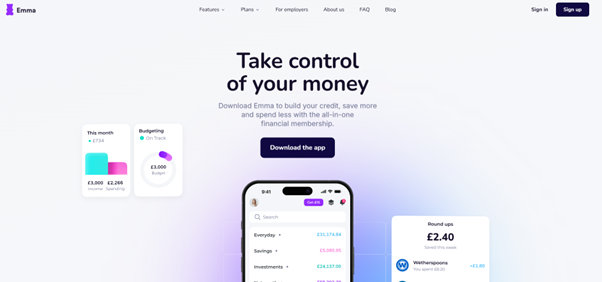
Emma has become one of the UK's most popular budgeting apps, and for good reason. It connects to your bank accounts via secure Open Banking and gives you a complete picture of your spending across all accounts. The app excels at identifying subscriptions you may have forgotten about and helps you track where your money is going each month.
Pros
- Clean and intuitive interface
- Great for identifying and managing subscriptions
- One of the strongest free plans available
Cons
- Premium pricing may deter casual users
- Some bank syncing delays reported
Is It Safe to Use?
Emma is FCA-registered and uses secure Open Banking APIs to connect to your accounts. All data is encrypted, and the app operates under UK data protection laws. It doesn't have access to your money — only read-only financial data for budgeting purposes.
Who Should Use Emma?
Emma is ideal for users who want a smart, visual overview of their spending. It's perfect for tracking subscriptions, categorising expenses, setting budgets, and spotting waste. Whether you're a student or working professional, it simplifies personal finance without feeling overwhelming.
What Are the Fees and Costs?
Emma has a free version with core features. Premium plans start at £4.99/month, unlocking tools like cashback, advanced analytics, custom categories, and unlimited accounts. It also offers Emma Pro and Ultimate tiers for deeper insights and long-term financial planning.

Bilance – Best for Tracking Accounts in More Than One Country
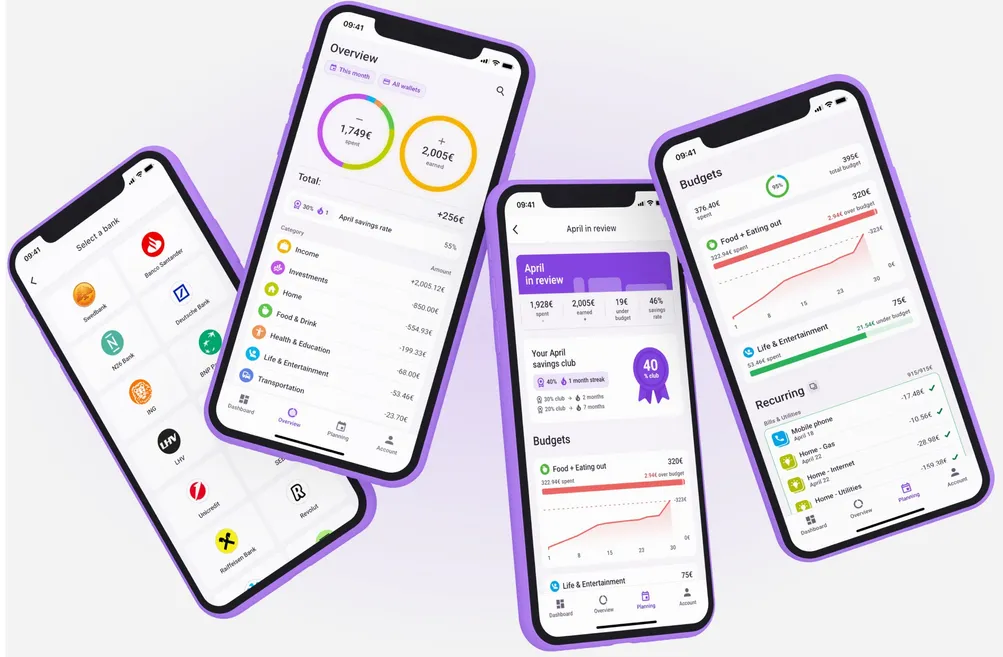
Bilance is an Estonian-built budgeting app that fills a gap none of the UK-focused apps cover: money that doesn't sit in one country. It connects to over 2,300 banks across 31 European countries, including around 100 UK institutions, so if you hold a UK current account alongside one in Spain, Germany or anywhere else in the EU or EEA, you can see everything in a single app. Expenses are categorised automatically with AI that learns from your corrections, and the app adds budgets, recurring-bill tracking, net worth and shared finances on top. It's available in 24 languages and has been used by more than 150,000 Europeans, winning the Mastercard Lighthouse People's Choice Award in 2024.
Pros
- Only app in our ranking that covers banks across 31 European countries
- AI categorisation that learns from your corrections
- Net worth tracking and shared finances included
Cons
- No free plan once the 7-day trial ends
- Smaller UK footprint than Emma or Snoop
Is It Safe to Use?
Bilance itself is not FCA-registered. Instead, bank connections run through two licensed European open banking providers: GoCardless SAS, supervised by the French Prudential Supervision and Resolution Authority, and Enable Banking Oy, regulated by the Finnish Financial Supervisory Authority. Access is read-only, you approve each connection inside your own bank's app, Bilance never sees your login credentials, and data is stored encrypted on Google Cloud servers in the EU. The app cannot move or spend your money.
Who Should Use Bilance?
Bilance is built for people whose finances cross borders: expats, remote workers, and anyone holding accounts in the UK and another European country. UK-only apps in this list stop at the border, so if you juggle a Monzo account alongside a European bank, Bilance is the one app here that shows both together. It also suits users who want automatic AI categorisation and a shared view of household finances with a partner.
What Are the Fees and Costs?
Bilance has no permanent free tier. You get a 7-day free trial with every feature unlocked, after which it's a paid subscription: £11.99 per month or £59.99 per year on the UK App Store, with the annual plan working out at £5 a month. There are no ads, and the company states that subscriptions are its only revenue source, so your data isn't the product.

Snoop – Best for Spending Insights and Alerts
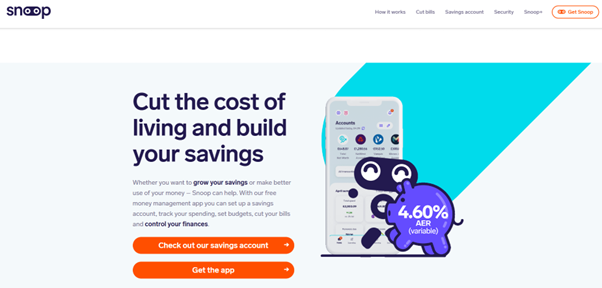
Snoop is designed for users who want more than just tracking — they want actionable insights. The app analyses your spending patterns and sends personalised suggestions to help you save money on bills, subscriptions, and everyday purchases. Its alert system keeps you informed about potential savings opportunities.
Pros
- Great insights and suggestions
- Helpful cost-cutting tips
- Free plan includes key features
Cons
- Lacks advanced long-term budgeting capabilities
- Does not offer built-in saving or investing options
Is It Safe to Use?
Snoop is regulated by the FCA and connects through secure Open Banking protocols. It never holds your money and uses encryption to keep your personal data safe. The app is read-only, meaning it can view transactions but can't make changes or transfers.
Who Should Use Snoop?
Snoop is great for people who want to cut everyday costs. It sends personalised suggestions, spending insights, and alerts to help you avoid sneaky subscriptions or overspending. If you're looking for a money-saving sidekick, this one's built for you.
What Are the Fees and Costs?
Snoop's core features are free. Premium plans, offering deeper analysis and custom alerts, start at £3.99/month. The free version is generous enough for most users, but power users may prefer the added control in the paid tier.

Plum – Best for Automated Saving and Smart Rules
Plum takes a unique approach to budgeting by focusing on automated saving. The app analyses your spending patterns and automatically sets aside money you won't miss. It's perfect for users who struggle to save manually or want a "set it and forget it" approach to building their savings.

Pros
- Smart automatic saving based on spending patterns
- Investing options available within the app
- Strong free plan with basic autosaving
Cons
- Full features require a subscription
- Some users find settings complex at first
Is It Safe to Use?
Plum is authorised and regulated by the FCA, using Open Banking technology and bank-grade encryption. Your funds are held in secure e-wallets or investment accounts depending on usage. Security features like biometric login and fraud detection are also built in.
Who Should Use Plum?
Plum is great for users who want help saving money automatically while managing a budget. It's especially useful for people who struggle to save manually. Plum combines budgeting, smart saving rules, and even investing in one simple app.
What Are the Fees and Costs?
Plum offers a free version with basic budgeting and autosaving. Premium tiers start at £2.99/month and unlock features like cashback, investment tools, and custom saving rules. Plum Ultra and Premium offer additional advanced tools and perks.

HyperJar – Best for Simple Budgeting with Prepaid Spending Control
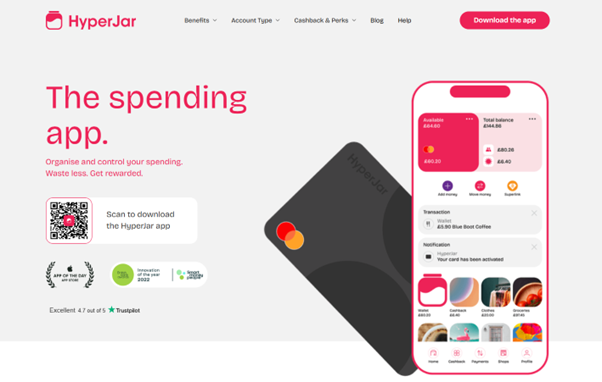
HyperJar takes a different approach to budgeting with its visual "jar" system. Instead of connecting to your bank accounts, you load money onto the HyperJar prepaid card and allocate it to different spending categories. It's ideal for users who prefer a hands-on approach to controlling their spending.
Pros
- No monthly fees
- Visual jar system makes budgeting easy
- Great parental controls and shared jars
Cons
- Requires manual loading of funds
- Doesn't connect to existing bank accounts
Is It Safe to Use?
HyperJar is FCA-authorised and operates under e-money regulations. It uses secure encryption and card-level protections. Funds are held in segregated accounts, and the prepaid model helps users avoid overspending by limiting access to only pre-loaded balances.
Who Should Use HyperJar?
Great for those who want an ultra-simple budgeting system using spending jars. HyperJar is ideal for families, students, or anyone who prefers to budget with prepaid cards and visual money pots — without linking full bank access.
What Are the Fees and Costs?
HyperJar is free to use, with no monthly fees or charges for setting up jars or using the prepaid card in the UK. There may be minor fees for overseas use or replacement cards, but daily budgeting tools are fully free.
What Should You Look for in a UK Budgeting App?
Choosing the right budgeting app depends on your financial goals and how you prefer to manage your money. Here are the key factors to consider when selecting an app:
Does It Use Secure Open Banking Access?
The best budgeting apps connect through FCA-regulated Open Banking. This ensures your data is read-only and encrypted. Never link your bank account to an app that isn't authorised — it's the foundation for security and protects against fraud or misuse.
Are Premium Features Worth Paying For?
Many apps offer free plans, but features like personalised alerts, advanced analytics, or subscription tracking are often behind a paywall. If you're serious about improving your finances, paying a few pounds a month can unlock tools that genuinely help you stay in control.
Is It Easy to Understand and Use?
A budgeting app should make managing money feel simple — not stressful. Choose one with a clean layout, clear categories, and simple graphs. If it's too complex to use daily, you'll quickly stop using it — defeating the point of having it.
Does It Help With Real Savings?
A good app shouldn't just track spending — it should help you act on it. Look for features like autosaving, spending insights, or cost-cutting suggestions. If it helps you save without even trying, it's doing its job well.
Final Thoughts – Which Budgeting App Should You Choose?
The best budgeting app is ultimately the one that aligns with how you manage your money day to day. Whether you prefer Emma for comprehensive spending tracking, Bilance for accounts spread across more than one country, or Plum for automated saving, it's important to choose a secure, FCA-compliant app that's easy to use and genuinely helps you stay in control of your finances. If you're also looking to grow your wealth, check out our guides to the best investment apps in the UK and best trading apps.
Discuss UK Budgeting Apps
Tried any of these budgeting apps? Share which one stuck, what features matter most, and the categories you actually track. Our community earns Equity for quality contributions.
Discussion 0 comments
Be the first to start discussing this topic! Log in or create an account to share your thoughts.
Log In Create Account
No comments yet. Be the first to start discussing this topic!