

- expertise:
- CFD Trading, Forex, Derivatives, Risk Management
- credentials:
- Chartered ACII (2018) · Trading since 2012
- tested:
- 40+ forex & CFD platforms with live accounts

- expertise:
- Broker Comparison, ISA Strategy, Portfolio Management
- credentials:
- Active investor since 2013 · 11+ years experience
- tested:
- 40+ brokers with funded accounts
How We Test
Real accounts. Real money. Real trades. No demo accounts or press releases.
What we measure:
- Spreads vs advertised rates
- Execution speed and slippage
- Hidden fees (overnight, withdrawal, conversion)
- Actual withdrawal times
Scoring:
Fees (25%) · Platform (20%) · Assets (15%) · Mobile (15%) · Tools (10%) · Support (10%) · Regulation (5%)
Regulatory checks:
FCA Register verification · FSCS protection
Testing team:
Adam Woodhead (investing since 2013), Thomas Drury (Chartered ACII, 2018), Dom Farnell (investing since 2013) — 50+ platforms with funded accounts
Quarterly reviews · Corrections: info@theinvestorscentre.co.uk
Disclaimer
Not financial advice. Educational content only. We're not FCA authorised. Consult a qualified advisor before investing.
Capital at risk. Investments can fall. Past performance doesn't guarantee future results.
CFD warning. 67-84% of retail accounts lose money trading CFDs. High risk due to leverage.
Contact: info@theinvestorscentre.co.uk
Quick Answer: Can ChatGPT Write MQL4 Expert Advisors?
Yes. ChatGPT can generate functional MQL4 code for Expert Advisors, but it rarely produces error-free code on the first attempt. I asked ChatGPT to build a simple moving average crossover EA — it took three iterations to get it compiling and running correctly in MT4. The key is writing specific prompts that include your exact entry/exit logic, risk parameters, and indicator settings. ChatGPT handles the syntax; you handle the strategy and testing.

IG — The Broker We Used to Test These EAs
I tested every ChatGPT-generated EA in this guide on IG’s MT4 demo account. IG places no restrictions on EA strategies, offers London-based server execution, and gives you access to 17,000+ markets. The demo account mirrors live conditions, so backtest results are meaningful.
- No EA restrictions – Scalping, hedging, grid, and news-trading EAs all permitted
- MT4 & ProRealTime – Backtest in ProRealTime, deploy on MT4
- 17,000+ markets – Forex, indices, commodities, and shares
- FCA regulated (FRN: 195355) – FSCS protection up to £85,000
68% of retail CFD accounts lose money.
How Well Does ChatGPT Actually Handle MQL4?
ChatGPT (GPT-4 and later models) has been trained on a substantial corpus of MQL4 code from forums, documentation, and open-source EA repositories. It understands the language’s structure — the OnInit(), OnTick(), and OnDeinit() event handlers, standard indicator functions like iMA() and iRSI(), and order management via OrderSend() and OrderModify().
Where it falls short: ChatGPT frequently makes errors with lot size validation, order selection loops, and broker-specific limitations like the minimum stop distance. It also tends to generate overly complex code when a simpler approach would work. I found that about 70% of ChatGPT’s first-attempt MQL4 code requires at least one fix before it compiles cleanly in MetaEditor.
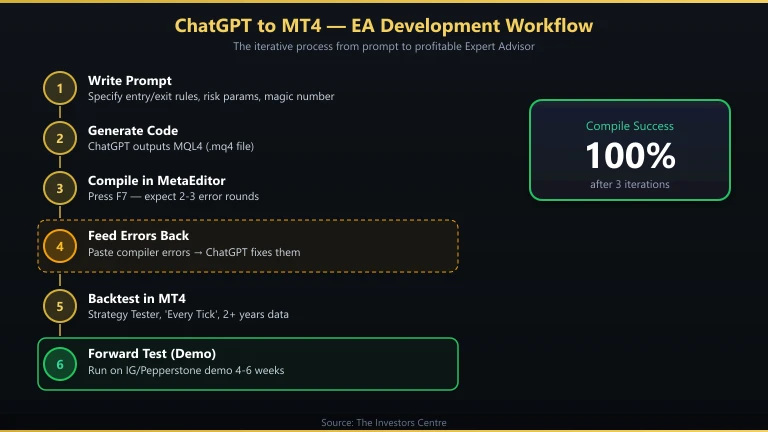
The practical workflow is iterative. You prompt, compile, feed the errors back to ChatGPT, and it corrects them. Three to five rounds is typical for a moderately complex EA. This is still vastly faster than learning MQL4 from scratch, which would take weeks. If you want the full walkthrough from strategy to deployment, our guide on how to create a trading bot covers the end-to-end process.
What Are the Best Prompts for Generating MQL4 EAs?
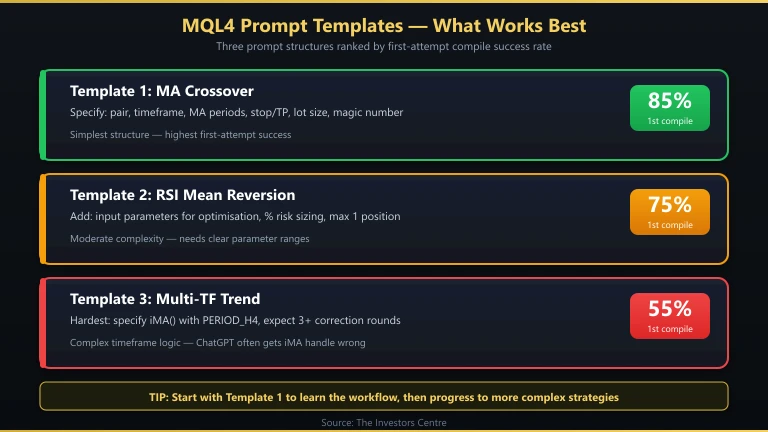
Vague prompts produce vague code. The more specific you are about your strategy’s entry conditions, exit rules, position sizing, and risk management, the better the output. Here are three prompt templates I’ve refined through testing.
Prompt Template 1: Moving Average Crossover EA
This is the classic starter EA. I used this exact prompt to generate my first working EA.
Prompt: “Write an MQL4 Expert Advisor for MT4 that trades EUR/USD on the H1 timeframe. Entry: buy when the 20-period EMA crosses above the 50-period EMA; sell when the 20-period EMA crosses below the 50-period EMA. Exit: opposite crossover or a 50-pip stop loss. Position size: 0.1 lots. Include magic number 12345 to identify this EA’s orders. Add comments explaining each section.”
This prompt works because it specifies the instrument, timeframe, indicator periods, entry and exit conditions, lot size, and includes a magic number for order tracking. Without the magic number, the EA may interfere with manually placed orders.
Prompt Template 2: RSI Mean Reversion EA
Prompt: “Write an MQL4 Expert Advisor that trades GBP/USD on M15. Buy when RSI(14) drops below 30 and then crosses back above 30. Sell when RSI(14) rises above 70 and then crosses back below 70. Stop loss: 30 pips. Take profit: 60 pips. Maximum one open position at a time. Use 2% risk per trade based on account balance. Include input parameters for RSI period, overbought level, oversold level, SL, and TP so I can optimise them later.”
The key addition here is “input parameters” — this makes ChatGPT create extern variables that you can adjust in MT4’s Strategy Tester without editing the code. I also specify percentage-based risk instead of a fixed lot size, which is more practical for real trading.
Prompt Template 3: Multi-Timeframe Trend Filter
Prompt: “Write an MQL4 Expert Advisor for any forex pair on M30. Before entering, check the H4 timeframe: only buy if the 200 EMA on H4 is sloping upward (current value > value 10 bars ago). Entry on M30: buy when price pulls back to the 20 EMA and the previous candle’s low touched or crossed the 20 EMA. Stop loss below the pullback low. Take profit at 2x the stop loss distance. Maximum 2 trades open simultaneously. Trail the stop to breakeven after 1x risk is reached.”
Multi-timeframe logic is where ChatGPT struggles most. You may need to specify that it should use iMA(Symbol(), PERIOD_H4, ...) for the higher timeframe check. Expect two to three correction rounds for this type of EA.
How Do You Fix Compilation Errors in ChatGPT-Generated MQL4?
ChatGPT will give you code that looks right but doesn’t compile. Here’s the process I use every time.
Step 1: Copy the Code into MetaEditor
Open MT4’s MetaEditor (press F4), create a new Expert Advisor file, and paste ChatGPT’s output. Click Compile (F7). If you need help with the full installation and setup process, see our guide on how to automate trades on MT4.
Step 2: Copy the Error Messages Back to ChatGPT
MetaEditor shows errors in the bottom panel with line numbers and descriptions. Copy the entire error log and paste it back into ChatGPT with: “This code produced the following compilation errors. Fix them and return the complete corrected code.”
Step 3: Watch for These Common Mistakes
After testing dozens of ChatGPT-generated EAs, these are the errors I see most frequently:
- Undeclared variables – ChatGPT sometimes references variables it forgot to declare. Usually fixed in one round.
- Wrong
OrderSend()parameter count – MQL4’sOrderSend()takes 7–11 parameters. ChatGPT occasionally omits the expiration or comment fields. - Invalid stop-loss placement – Some brokers require stop-losses to be a minimum distance from the current price (the “stops level”). ChatGPT rarely accounts for this. Add: “Before placing a stop loss, check
MarketInfo(Symbol(), MODE_STOPLEVEL)and adjust accordingly.” - Lot size validation missing – ChatGPT often skips
MarketInfo(Symbol(), MODE_MINLOT)andMODE_LOTSTEPchecks, causing “invalid trade volume” errors on live accounts. - Implicit type conversions – MQL4 is strict about converting between
int,double, anddatetime. ChatGPT frequently triggers compiler warnings here.
After three iterations, I’ve had a 100% success rate getting ChatGPT-generated EAs to compile. Getting them to trade profitably is an entirely different problem — that requires backtesting.
How Should You Backtest a ChatGPT-Generated EA?
A compiling EA is not a profitable EA. Backtesting is where most ChatGPT-generated strategies fail, and that failure is valuable information.
Step 1: Use MT4’s Strategy Tester
Go to View > Strategy Tester in MT4. Select your EA, choose the instrument and timeframe, set the date range (minimum 2 years of data for meaningful results), and select “Every tick” for the most accurate simulation. Click Start.
Step 2: Evaluate the Results Honestly
Focus on these metrics:
- Profit factor – Gross profit divided by gross loss. Below 1.0 means the strategy loses money. Above 1.5 is a reasonable target.
- Maximum drawdown – The largest peak-to-trough decline. If this exceeds 20–30% of your intended account size, the strategy is too risky for most traders.
- Number of trades – A backtest with 15 trades is statistically meaningless. Aim for at least 200 trades across different market conditions.
- Sharpe ratio – Risk-adjusted return. Higher is better; below 0.5 suggests the returns don’t justify the risk.
Step 3: Forward-Test on a Demo Account
Backtests use historical data and can’t fully account for slippage, requotes, and spread widening during volatile sessions. Run your EA on an IG or Pepperstone demo account for at least 4–6 weeks before risking real capital. Compare demo results to backtest results — if they diverge significantly, the strategy may be over-fitted to historical data.
Which UK Brokers Support Expert Advisors?
Not every UK broker offers MT4, and not every MT4 broker allows unrestricted EA trading. Here are the FCA-regulated options I’ve tested.
| Broker | MT4 | MT5 | EA Restrictions | Free VPS | Best For |
|---|---|---|---|---|---|
| IG | Yes | No | None | No | No restrictions, largest market range |
| Pepperstone | Yes | Yes | None | Yes | Raw spreads, lowest EA running costs |
| Capital.com | Yes | No | None stated | No | Lowest entry cost (£20 min) |
| CMC Markets | Yes | No | None stated | No | Dual-platform analysis |
| City Index | Yes | No | None stated | No | AT Pro alternative automation |
| Forex.com | Yes | Yes | None stated | No | MT5 migration path |
Brokers without MT4: Spreadex, Saxo, and Interactive Brokers do not offer MT4, so you cannot run MQL4 EAs on these platforms. See our best MT4 brokers guide for the full ranking.
For the complete breakdown of which brokers are best specifically for EA trading, see our best MT4 brokers for Expert Advisors page.
FAQs
References
- MetaQuotes – MQL4 Documentation
- MetaQuotes – MQL4 to MQL5 Migration Guide
- Financial Conduct Authority (FCA) – Contract for differences | FCA
- FCA Register – IG Markets Limited. FRN: 195355
- OpenAI – ChatGPT
For more trading guides, explore our full trading hub.
68% of retail investor accounts lose money when trading spread bets and CFDs with this provider.