

- expertise:
- CFD Trading, Forex, Derivatives, Risk Management
- credentials:
- Chartered ACII (2018) · Trading since 2012
- tested:
- 40+ forex & CFD platforms with live accounts

- expertise:
- Platform Testing, Cryptocurrency, Retail Investing
- credentials:
- Active investor since 2013 · 11+ years experience
- tested:
- 50+ platforms · 200+ guides authored
How We Test
Real accounts. Real money. Real trades. No demo accounts or press releases.
What we measure:
- Spreads vs advertised rates
- Execution speed and slippage
- Hidden fees (overnight, withdrawal, conversion)
- Actual withdrawal times
Scoring:
Fees (25%) · Platform (20%) · Assets (15%) · Mobile (15%) · Tools (10%) · Support (10%) · Regulation (5%)
Regulatory checks:
FCA Register verification · FSCS protection
Testing team:
Adam Woodhead (investing since 2013), Thomas Drury (Chartered ACII, 2018), Dom Farnell (investing since 2013) — 50+ platforms with funded accounts
Quarterly reviews · Corrections: info@theinvestorscentre.co.uk
Disclaimer
Not financial advice. Educational content only. We're not FCA authorised. Consult a qualified advisor before investing.
Capital at risk. Investments can fall. Past performance doesn't guarantee future results.
CFD warning. 67-84% of retail accounts lose money trading CFDs. High risk due to leverage.
Contact: info@theinvestorscentre.co.uk
Rankings at a Glance
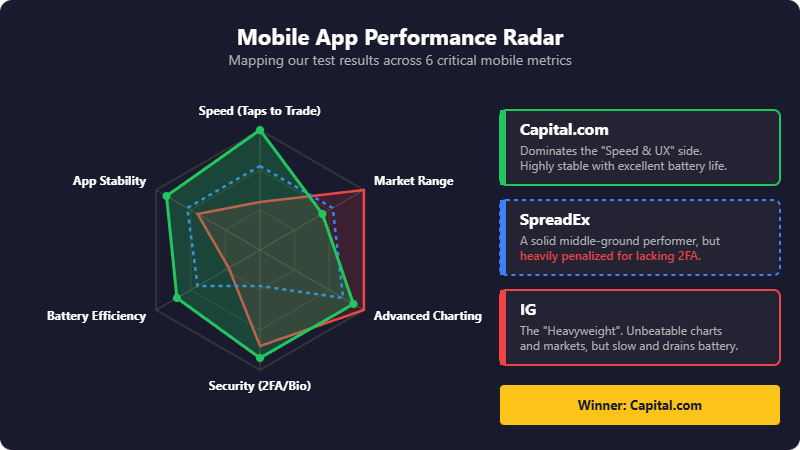
Capital.com takes it. Not by a whisker — by a clear margin. The app is what happens when a broker builds for mobile-first traders rather than porting a desktop platform to a smaller screen.
SpreadEx earns second place with a solid, no-nonsense trading interface and strong TradingView integration. IG rounds out the top three on heritage and sheer market depth — though the app shows its age in places.
For more details on spreads, overnight financing, and platform features, visit our main spread betting guide. All three platforms are FCA-regulated and provide FSCS protection up to £85,000.
| Rank | App | iOS Rating | Android Rating | Stands Out For |
|---|---|---|---|---|
| #1 | Capital.com | 4.8★ | 4.7★ | Speed and simplicity |
| #2 | SpreadEx | 4.7★ | 4.4★ | Established reputation, TradingView charts |
| #3 | IG | 4.6★ | 4.3★ | Market depth and research tools |

62% of Retail CFD Accounts Lose Money

65% of retail CFD accounts lose money.

68% of retail CFD accounts lose money.
Feature Comparison
This table focuses purely on app performance. For spread comparisons, overnight financing, and platform features, see our main spread betting guide.
| Feature | Capital.com | SpreadEx | IG |
|---|---|---|---|
| iOS App Store Rating | 4.8★ | 4.7★ | 4.6★ |
| Android Play Store Rating | 4.7★ | 4.4★ | 4.3★ |
| Taps to Trade | 3 | 4 | 5 |
| Chart Load Time | Under 1 sec | 1-2 sec | 2-3 sec |
| Indicators Available | 100+ | TradingView integrated | 100+ (ProRealTime) |
| TradingView Integration | Yes | Yes | No (ProRealTime instead) |
| Face ID / Biometric | Yes | Yes | Yes |
| 2FA Available | Yes | No | Yes |
| Apple Watch App | No | No | Yes |
| Widget Support | Yes (iOS) | No | Yes (iOS) |
| Dark Mode | Yes | Yes | Yes |
| Weekend Trading | Limited | Limited | Yes |
How We Tested
We weren't testing brokers. We were testing apps — the software you'll actually use at 6am when the Asian session's moving and you're half-awake.
This review assumes you've already narrowed down your broker shortlist. We're reviewing the software, not the financial product. For broker-level analysis including forex spreads and commodity trading costs, see our dedicated guides.
Last tested: February 2026 | Devices: iPhone 15 Pro, Samsung Galaxy S24
| Metric | What We Tested |
|---|---|
| Taps to trade | From app launch to position filled |
| Chart responsiveness | Pinch-to-zoom lag, indicator rendering, drawing tools on a small screen |
| Notification speed | Price alert delivery time |
| Volatility stress test | App behaviour during high-impact news events |
| Battery drain | Power consumption during extended sessions |
| Security UX | Biometric login, 2FA implementation, session timeout logic |
Our Top 3 Spread Betting Apps
1. Capital.com – Speed and simplicity
2. SpreadEx – Established reputation, TradingView charts
3. IG – Market depth and research tools
Capital.com – Speed and simplicity
App Store: 4.8★ (iOS) | 4.7★ (Android)
Capital.com feels like it was designed by people who actually trade on their phones. That sounds obvious, but open most broker apps and you'll see what I mean — cramped menus, buried settings, charts that judder when you pinch to zoom. None of that here.
Pros
- Three taps from launch to live position
- 100+ indicators, smooth charting with TradingView integration
- SmartFeed AI-curated news – genuinely useful
- Fastest notification delivery (2-3 seconds)
Cons
- No Apple Watch app
- No MT5 support – MT4 only
- No social/copy trading features
Speed and Navigation
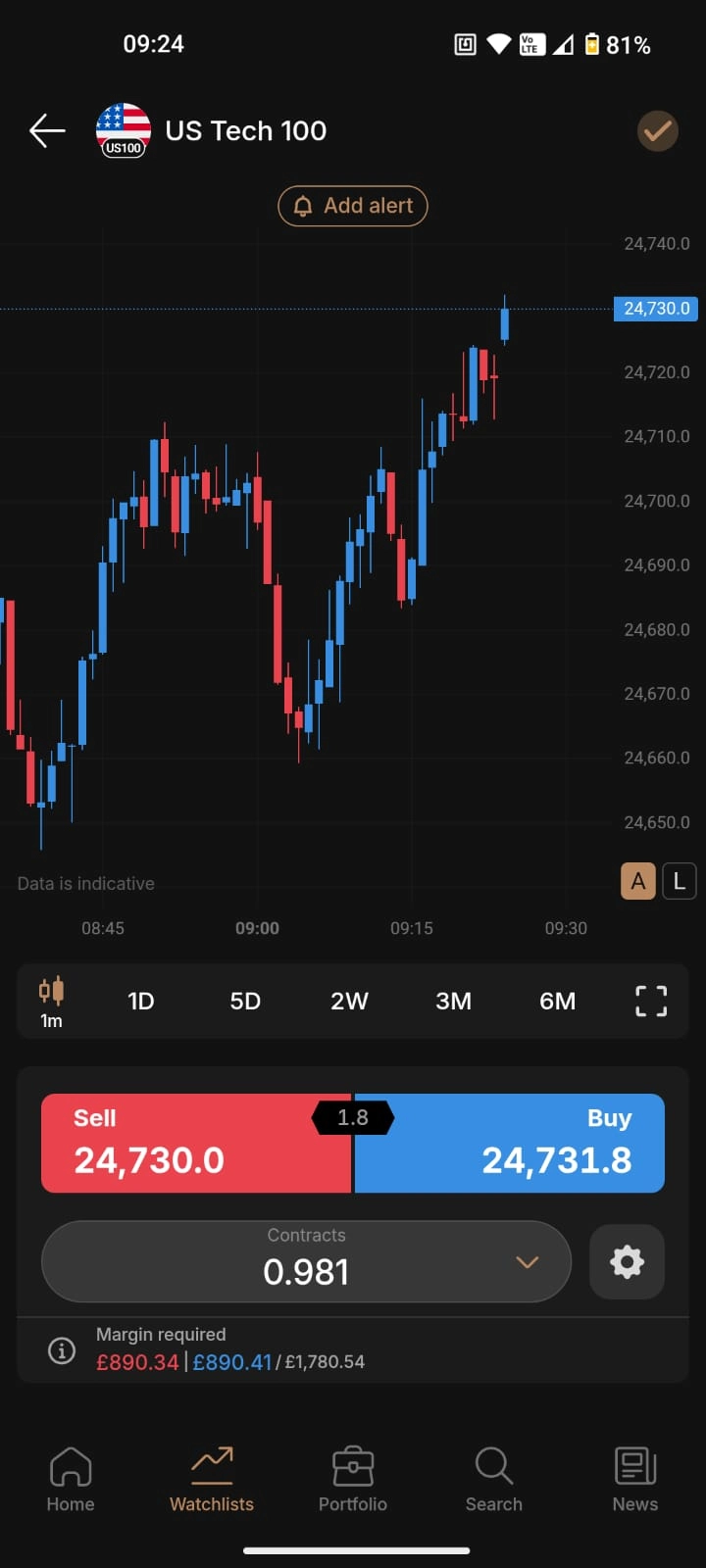
The home screen drops you straight into your watchlist. One tap opens the chart. One tap opens the ticket. One tap executes. Three taps from app launch to live position. We timed it repeatedly — it's consistent.
Charting
Charting is genuinely usable on mobile. 100+ indicators, drawing tools that don't require surgeon's fingers, and smooth rendering even on older devices. We ran the same session on an iPhone 12 and saw no meaningful lag. TradingView integration is baked in, so if you're already fluent in that ecosystem, you'll feel at home.
SmartFeed
SmartFeed is Capital.com's AI-curated news feature. It learns what you trade and surfaces relevant headlines. Gimmick? We thought so too. But after two weeks, it was flagging earnings releases and macro events we'd have otherwise missed. Not essential, but genuinely useful.
Notifications
Notifications arrive fast. We set identical price alerts across all three apps. Capital.com delivered within 2-3 seconds of the price hitting. SpreadEx was comparable. IG lagged noticeably on several occasions — not ideal when you're trying to catch a move.
Battery and Security
Battery drain measured 18% over a 4-hour active session. Acceptable.
Face ID works instantly. 2FA available but not mandatory. Session timeout is configurable.
SpreadEx – Established reputation, TradingView charts
App Store: 4.7★ (iOS) | 4.4★ (Android)
SpreadEx has been around since 1999, making it one of the longest-established names in UK spread betting. The financial trading app reflects that experience — it's functional, stable, and gets the job done without unnecessary bells and whistles.
The interface won't win design awards, but it's intuitive enough. Four taps to trade instead of Capital.com's three, but the difference is marginal in practice. For a deeper look at the platform beyond the app, see our full SpreadEx review.
Pros
- Established since 1999 – decades of experience
- TradingView integration with solid charting
- Functional, stable, no-frills interface
- Fast notification delivery, comparable to Capital.com
Cons
- No two-factor authentication – significant security oversight
- Largest iOS/Android rating gap (0.3 stars)
- Limited educational content in-app
Charting and Tools
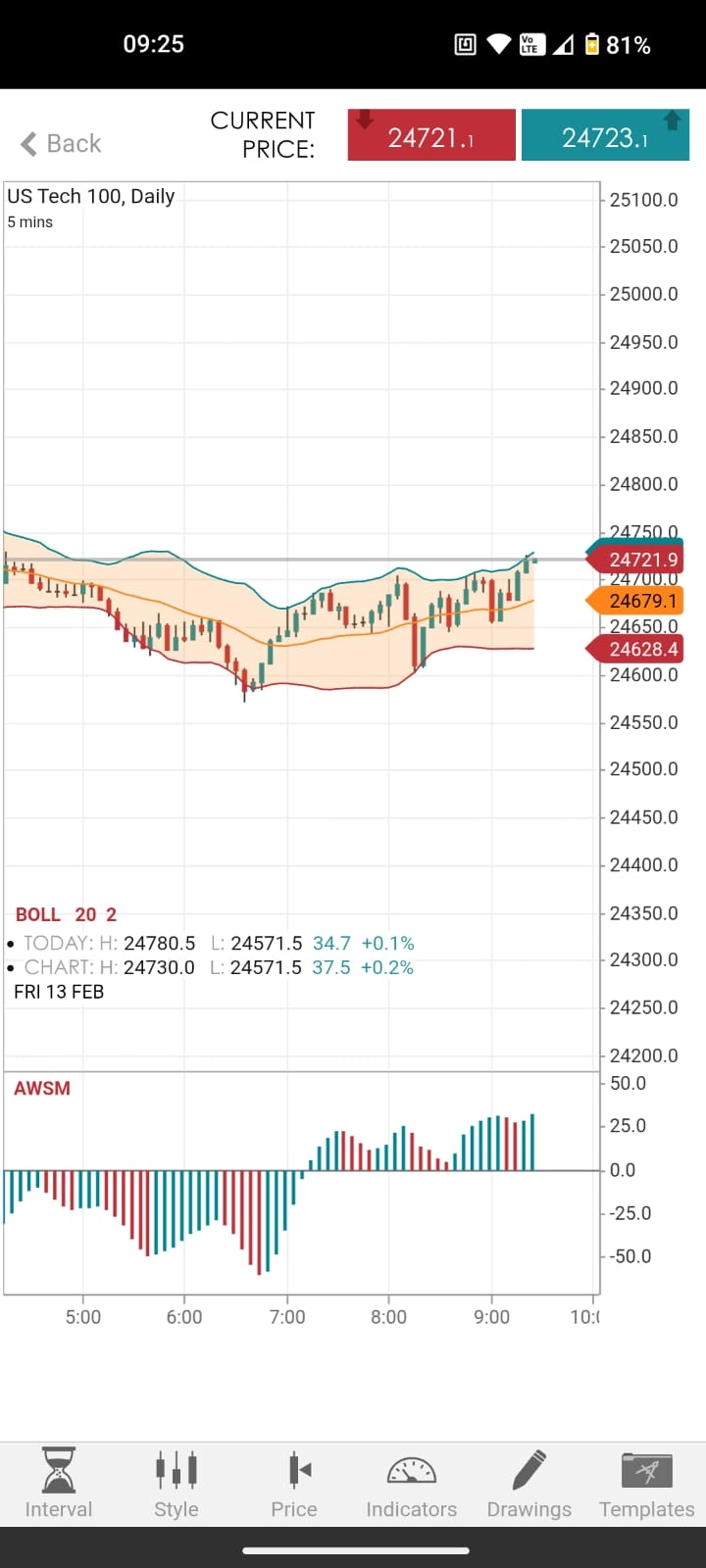
TradingView integration gives you access to decent charting capabilities. Charts render smoothly, orders fill without drama. The indicator selection is solid, though the mobile implementation doesn't feel quite as polished as Capital.com's native charts.
iOS vs Android Gap
The 0.3-star difference (4.7 vs 4.4) between iOS and Android is the largest of the three apps we tested. In our testing on Samsung Galaxy S24, the iOS version felt marginally snappier, though we didn't experience the crashes some Android reviewers mention.
Battery and Security
Battery drain measured 22% over a 4-hour session. Higher than Capital.com, but not excessive.
The lack of 2FA is hard to overlook. SpreadEx relies on email verification for sensitive actions, which is better than nothing, but not best practice. If security is a priority, this is a mark against.
IG – Market depth and research tools
App Store: 4.6★ (iOS) | 4.3★ (Android)
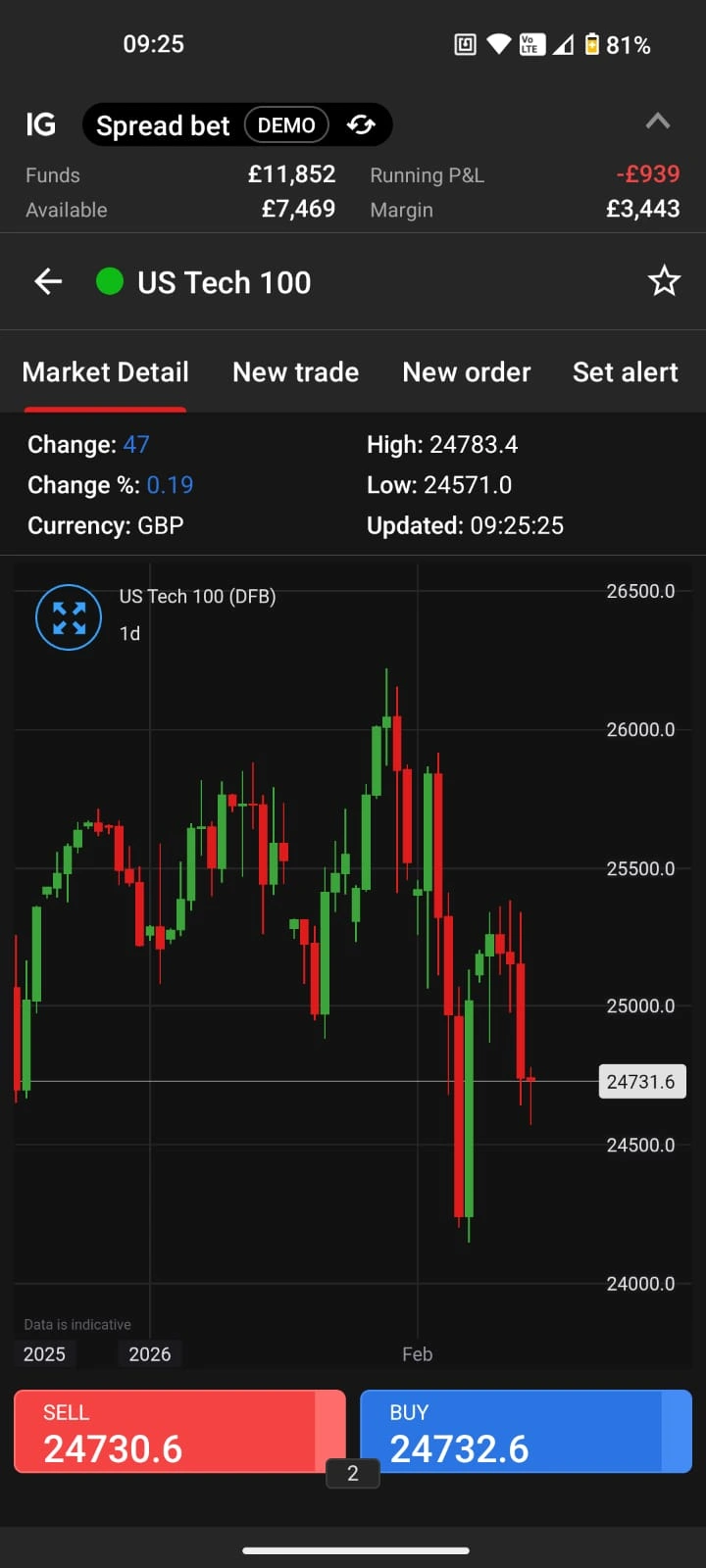
IG is the UK's oldest spread betting provider — founded in 1974 by Stuart Wheeler, who essentially invented the concept. It offers access to over 17,000 markets, more than any competitor. The app reflects that scale: comprehensive, feature-rich, and occasionally overwhelming.
This is not a beginner-friendly app.
The first time we opened it, we spent 10 minutes finding where to set a price alert. The menu structure is deep. Settings are spread across multiple screens. There's a learning curve that Capital.com simply doesn't have. For more on IG's spread betting capabilities, see our IG spread betting review.
Pros
- 17,000+ markets – unmatched range
- ProRealTime advanced charting on mobile
- Weekend trading on select markets
- Apple Watch app for prices and alerts
Cons
- Steep learning curve – not beginner-friendly
- Slower notification delivery in testing
- Highest battery drain (25% over 4 hours)
Charting and Analysis
Once you're past the learning curve, there's a lot here. ProRealTime integration brings advanced charting to mobile — more indicators, more drawing tools, more customisation than either competitor. If you're a technical trader who lives in charts, IG delivers. The trade-off is speed: charts load in 2-3 seconds versus Capital.com's sub-second.
Market Access
17,000+ markets is not marketing fluff. We searched for obscure ETFs, minor forex pairs, and niche commodities — IG had them. Capital.com's range is solid (5,000+), but IG's is genuinely unmatched.
Weekend trading is available on select markets — crypto, weekend indices, and a few others. If you want to trade on Saturday, IG is one of the few options.
Battery and Additional Features
Battery drain measured 25% over a 4-hour session. The highest of the three, likely due to ProRealTime's resource demands.
Apple Watch app exists — lets you check prices and set basic alerts from your wrist. Neither Capital.com nor SpreadEx offer this.
iOS vs Android: Why the Rating Gap
Every app scores higher on iOS than Android. Capital.com's gap is smallest (0.1 stars), SpreadEx's is largest (0.3 stars). This isn't coincidence — it's a pattern across the entire trading app category.
Why iOS Consistently Wins
Device standardisation. Apple controls the hardware. Developers optimise for a handful of iPhone models. Android developers face thousands of device combinations, screen sizes, and manufacturer skins.
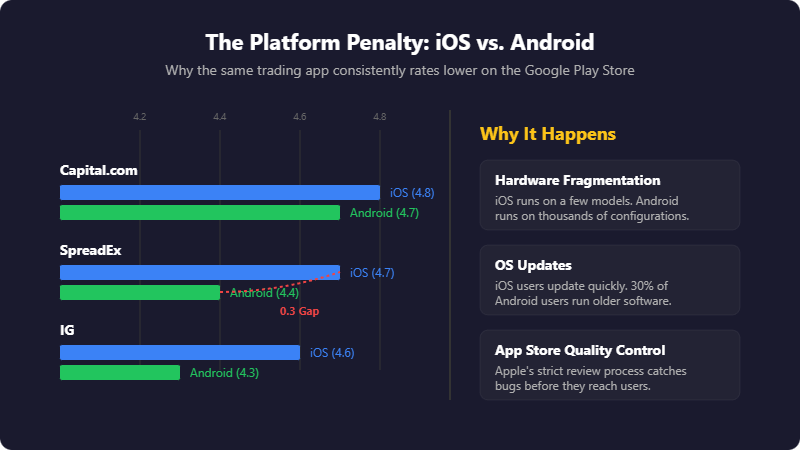
OS fragmentation. As of early 2026, Android 14 holds the largest market share at roughly 35%, but Android 12 and 13 still account for another 30% combined. iOS users update faster, so developers can use newer features confidently.
App Store review process. Apple's stricter review catches bugs before release. Google Play's lighter touch means more issues reach users.
What This Means For You
If you're on iPhone, all three apps will perform well. If you're on Android, Capital.com offers the most consistent experience — the 0.1-star gap suggests near-parity between platforms. SpreadEx's 0.3-star gap is worth noting if you're an Android user weighing options.
Tablet Performance
We tested briefly on iPad Pro and Samsung Galaxy Tab S9. Capital.com scales well — the extra screen real estate makes charting genuinely better. IG's app also benefits from larger screens. SpreadEx feels unchanged — the interface doesn't adapt to tablet dimensions as intelligently.
Download and First Trade
Each app is free to download. Here's the quick-start for each:
Capital.com
Download from App Store or Google Play. Register with email or Apple/Google sign-in. Verify identity (photo ID + selfie — takes 5-10 minutes). Deposit minimum £20 via card, Apple Pay, or bank transfer. Search for a market, tap Buy or Sell, confirm.
SpreadEx
Download from App Store or Google Play. Register with email. Verify identity (may take up to 24 hours). Deposit minimum £1 via card or bank transfer. Select market, place trade.
IG
Download from App Store or Google Play. Register — requires more detail than competitors (employment, trading experience). Verify identity. Deposit minimum £250 via card or bank transfer. Search for market, select position size, confirm.
Note on verification: All three brokers are FCA-regulated and require identity verification before you can trade. Capital.com's process was fastest in our experience — verified within 10 minutes. IG's was slowest, sometimes taking 24-48 hours.
If you're new to spread betting, consider starting with a demo account. Our beginner's guide to trading platforms covers the basics of getting started safely.
Which App Should You Choose
Three apps. Three different approaches.
Capital.com is for traders who value speed and simplicity. Three taps to trade. Sub-second chart loads. Clean interface. If you trade frequently and want friction removed, this is it. The 4.8-star iOS rating isn't accidental.
SpreadEx is for traders who want a reliable, established platform without unnecessary complexity. The trading interface is straightforward, TradingView integration is solid, and the company has been doing this since 1999. The lack of 2FA is a genuine weakness, but the core functionality is sound.
IG is for traders who prioritise market access and research depth. 17,000+ markets. ProRealTime charting. Weekend trading. Apple Watch support. The trade-off is complexity — this app assumes you know what you're doing.
Our pick: Capital.com wins for most UK spread bettors. It's fast, clean, and does the core job exceptionally well. But the right app is the one that fits your trading style — not the one with the highest rating.
For full broker comparisons including spreads, funding costs, and regulation details, see our main spread betting guide.
Common Questions
References
- Apple App Store — Capital.com, SpreadEx, IG app listings and ratings. Retrieved February 2026.
- Google Play Store — Capital.com, SpreadEx, IG app listings and ratings. Retrieved February 2026.
- Financial Conduct Authority — FCA Register. Regulation status verified for all three brokers.
- Financial Services Compensation Scheme — FSCS protection up to £85,000 confirmed.
- Capital.com — Official website. Platform specifications and market data.
- SpreadEx — Official website. Founded 1999. FCA reference number 190941.
- IG Group — Official website. Founded 1974, 17,000+ markets confirmed.