

- expertise:
- CFD Trading, Forex, Derivatives, Risk Management
- credentials:
- Chartered ACII (2018) · Trading since 2012
- tested:
- 40+ forex & CFD platforms with live accounts

- expertise:
- Broker Comparison, ISA Strategy, Portfolio Management
- credentials:
- Active investor since 2013 · 11+ years experience
- tested:
- 40+ brokers with funded accounts
How We Test
Real accounts. Real money. Real trades. No demo accounts or press releases.
What we measure:
- Spreads vs advertised rates
- Execution speed and slippage
- Hidden fees (overnight, withdrawal, conversion)
- Actual withdrawal times
Scoring:
Fees (25%) · Platform (20%) · Assets (15%) · Mobile (15%) · Tools (10%) · Support (10%) · Regulation (5%)
Regulatory checks:
FCA Register verification · FSCS protection
Testing team:
Adam Woodhead (investing since 2013), Thomas Drury (Chartered ACII, 2018), Dom Farnell (investing since 2013) — 50+ platforms with funded accounts
Quarterly reviews · Corrections: info@theinvestorscentre.co.uk
Disclaimer
Not financial advice. Educational content only. We're not FCA authorised. Consult a qualified advisor before investing.
Capital at risk. Investments can fall. Past performance doesn't guarantee future results.
CFD warning. 67-84% of retail accounts lose money trading CFDs. High risk due to leverage.
Contact: info@theinvestorscentre.co.uk
Quick Answer: The 5 Best TradingView Brokers in 2026 are…
- SpreadEX – Best for beginners & tax-free spread betting.
- Capital.com – Best for intuitive trading & commission-free CFDs.
- IG – Best for established spread betting with TradingView.
- Pepperstone – Best for advanced traders & tight spreads.
- CMC Markets – Best for multi-asset CFD trading.
SpreadEX is the best TradingView broker for most UK traders, offering native chart integration, full FCA regulation, and the ability to place tax-free spread bets directly from TradingView charts. New users who deposit £500 receive three months of TradingView Premium free, which adds significant value for active chart users.
How Do the Best TradingView Brokers Compare?
| Rank | Broker | Best For | TIC TradingView Broker Rating | Min Deposit | Spreads From |
|---|---|---|---|---|---|
| #1 | SpreadEX | Beginners & spread betting | 4.9 / 5 | £0 | 0.6 pips |
| #2 | Capital.com | Intuitive trading & commission-free CFDs | 4.8 / 5 | £20 | 0.6 pips |
| #3 | IG | Established spread betting | 4.7 / 5 | £0 | 0.6 pips |
| #4 | Pepperstone | Advanced traders | 4.7 / 5 | £0 | 0.0 pips |
| #5 | CMC Markets | Multi-asset CFDs | 4.4 / 5 | £0 | 0.7 pips |
Note: All brokers listed below are FCA regulated and support trading directly through TradingView charts.
Here Are the Top Brokers for TradingView Reviewed:
Best TradingView Brokers UK - Ranked and Tested

SpreadEX
- Best For
- Beginners & spread betting
- TIC TradingView Broker Rating
- 4.9 / 5
- Trustpilot
- 4.4 (189)
- Spread
- From 0.6 pips
- Cost
- £0 commission
65% of retail CFD accounts lose money.

Capital.com
- Best For
- Intuitive trading & commission-free CFDs
- TIC TradingView Broker Rating
- 4.8 / 5
- Trustpilot
- 4.6 (14372)
- Spread
- From 0.6 pips
- Cost
- £0 commission
61% of Retail CFD Accounts Lose Money

IG
- Best For
- Established spread betting
- TIC TradingView Broker Rating
- 4.7 / 5
- Trustpilot
- 3.8 (9206)
- Spread
- From 0.6 pips
- Cost
- £0 (spread bet)
69% of retail CFD accounts lose money.

Pepperstone
- Best For
- Advanced traders
- TIC TradingView Broker Rating
- 4.7 / 5
- Trustpilot
- 4.3 (3368)
- Spread
- From 0.0 pips (Razor)
- Cost
- $3.50/side/lot (Razor); £0 (Standard)
73% of retail CFD accounts lose money.

CMC Markets
- Best For
- Multi-asset CFDs
- TIC TradingView Broker Rating
- 4.4 / 5
- Trustpilot
- 4.2 (3040)
- Spread
- From 0.7 pips
- Cost
- £0 (FX/indices)
68% of retail CFD accounts lose money.
SpreadEX – Best for Beginners and Tax-Free Spread Betting
Pros
- Free TradingView Premium for three months with a £500 deposit
- FCA regulated with UK-based customer support
- No trading commissions on spread betting
- Clean, intuitive TradingView integration
Cons
- No demo account available
- TradingView Premium auto-renews at a paid rate after three months
- No MT4 or MT5 platform options
- Smaller range of exotic markets than larger brokers
How Good Is SpreadEX’s TradingView Integration?
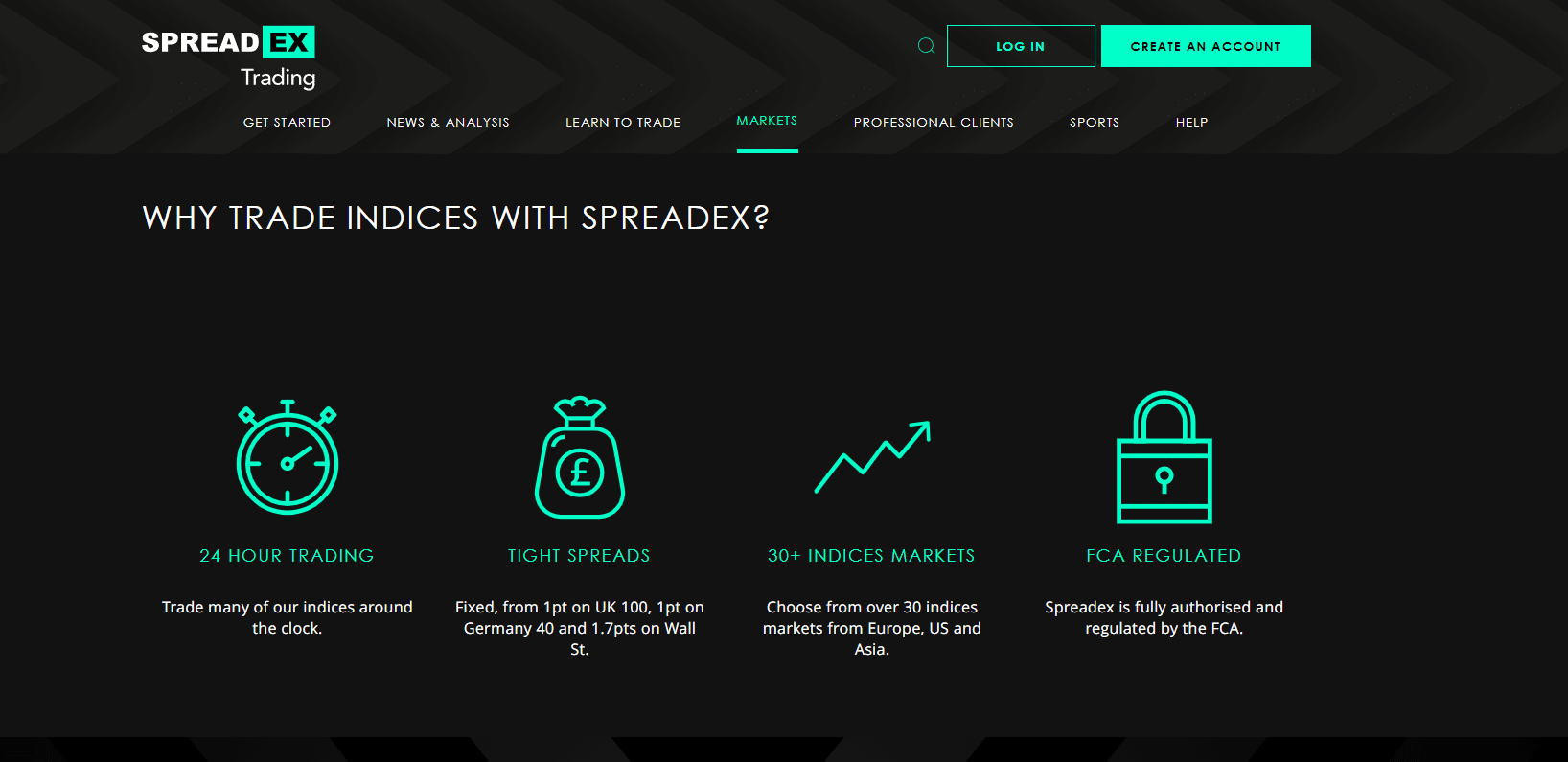
SpreadEX’s TradingView integration is strong because it offers a native connection that lets you trade directly from TradingView charts. In our testing, we were able to place and manage trades without leaving the TradingView interface, with positions updating in real time. The three-month TradingView Premium offer activates when you deposit £500 and automatically renews at the standard paid rate unless cancelled. Traders can access forex, indices, commodities, and shares via TradingView, with spread betting instruments clearly labelled using the “SPREADEXSB:” prefix.
Is SpreadEX Safe for UK Traders?
Yes, SpreadEX is safe for UK traders because it is authorised and regulated by the Financial Conduct Authority under FRN 190941. Client funds are held in segregated accounts at tier-1 banks including Barclays and Lloyds. Negative balance protection is in place, and eligible clients are covered by FSCS protection up to £120,000, updated in December 2025. UK-based customer support adds another layer of reassurance.
What Are the Costs When Using TradingView with SpreadEX?
SpreadEX uses a spread-only pricing model for spread betting, meaning there is no separate commission on most trades. Typical forex spreads start from around 0.6 pips, while share CFDs are charged at 0.1% commission with a £10 minimum. There are no additional platform fees for TradingView during the promotional Premium period, although overnight financing applies to positions held past market close.
Who Should Choose SpreadEX for TradingView?
SpreadEX is best for beginners who want a simple, fully integrated TradingView setup and for spread bettors looking for tax-efficient trading. It also suits traders who value UK-based support. It is not ideal for high-frequency traders, those who need MT4 or MT5, or traders who want to practise first using a demo account.
Capital.com – Best for Intuitive Trading and Commission-Free CFDs
Pros
- Commission-free CFDs (*other fees apply)
- Direct TradingView integration for chart-based trading
- Intuitive proprietary app and web platform
- FCA regulated (FRN: 793714)
Cons
- No support for MT5
- Smaller market range than IG or CMC Markets
- No demo account available through TradingView
What Are Capital.com’s Costs When Using TradingView?
Capital.com offers commission-free CFD trading (*other fees apply), with costs built into the spread. EUR/USD spreads start from 0.6 pips, and we recorded consistent pricing during London trading hours. There are no deposit fees, no withdrawal fees, and no inactivity fees, making it cost-effective for traders at all activity levels. Overnight financing applies to leveraged positions held past market close.
How Good Is Capital.com’s TradingView Integration?
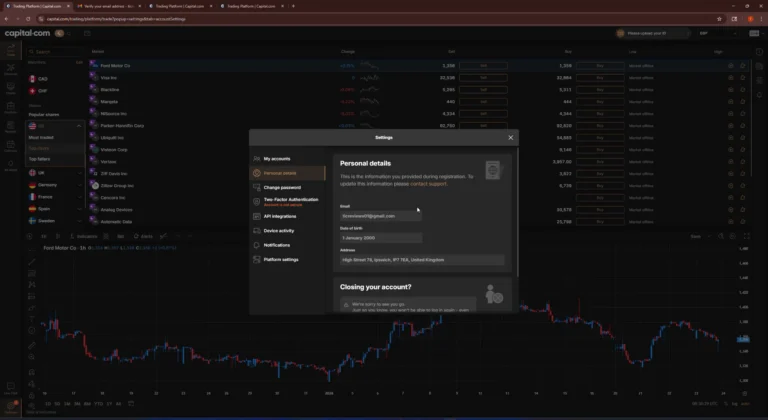
Capital.com integrates directly with TradingView, allowing you to place and manage trades from TradingView charts without switching platforms. In our testing, the connection was straightforward and positions synced reliably between TradingView and Capital.com’s own platform. The integration supports forex, indices, commodities, and shares, with access to over 5,000 markets across CFD and spread betting. The main limitation is that demo accounts are not available through the TradingView connection.
What Platforms Does Capital.com Offer Alongside TradingView?
Capital.com provides its proprietary web and mobile platforms, MT4 integration, and direct TradingView compatibility. The proprietary platform is clean, responsive, and well-suited to beginners and intermediate traders. The mobile app is particularly strong, offering a full-featured trading experience. MT4 is available for traders who prefer that environment, although MT5 is not supported.
Is Capital.com Safe for UK TradingView Users?
Yes, Capital.com is safe for UK traders because it is authorised and regulated by the Financial Conduct Authority under FRN 793714. Client funds are held in segregated accounts, and negative balance protection applies to all retail clients. Eligible clients are covered by FSCS protection up to £120,000.
Who Should Choose Capital.com for TradingView?
Capital.com is best for beginners and intermediate traders who want an intuitive platform combined with commission-free CFD trading (*other fees apply) through TradingView. It suits those who value transparent pricing and a well-designed mobile app. It is less suitable for traders who need the widest possible market range or those requiring MT5 support.
IG – Best for Established Spread Betting with TradingView
Pros
- Native TradingView integration for spread betting
- Access to over 17,000 markets
- FTSE 250–listed, offering high transparency
- Guaranteed stop-loss orders available
- Unlimited demo account
Cons
- Spreads are not the tightest available
- £12 monthly inactivity fee after 24 months
- Occasional TradingView syncing issues reported
- Crypto trading not available via TradingView
How Does IG’s TradingView Integration Work?
IG’s TradingView integration works through native account linking, allowing you to execute spread bets directly from TradingView charts. In our testing, we were able to place and manage trades across forex, indices, and commodities without leaving TradingView, with positions syncing back to the IG platform. IG also offers ProRealTime for advanced charting. Some users report occasional syncing delays, so it’s sensible to double-check positions on IG’s platform. Crypto markets are not available via TradingView.
Is IG Safe for UK Spread Bettors Using TradingView?
Yes, IG is safe for UK spread bettors because it is authorised and regulated by the Financial Conduct Authority (FRN: 195355) and is a FTSE 250–listed company. It has over 50 years of operating history, segregates client funds, and provides FSCS protection up to £120,000.
What Does TradingView Cost with IG?
TradingView trading with IG involves no commission on spread betting, with costs built into the spread. Typical pricing starts from around 0.6 pips on EUR/USD and 1 point on the FTSE 100. There is no minimum deposit requirement, although a £12 monthly inactivity fee applies after 24 months of no trading. TradingView Basic is free to use, while premium features require a separate TradingView subscription.
Who Should Choose IG for TradingView?
IG is best for spread bettors who want tax-free trading with a long-established, well-capitalised broker. It suits traders who value access to a very wide market range and features like guaranteed stop-loss orders. It is less suitable for traders seeking the tightest possible spreads or those wanting to trade crypto via TradingView.
Pepperstone – Best for Advanced Traders and Tight Spreads

Pros
- Raw spreads from 0.0 pips on Razor accounts
- Fast execution suitable for active trading
- Multiple platform options alongside TradingView, including MT4, MT5, and cTrader
- No deposit, withdrawal, or inactivity fees
Cons
- TradingView integration limited to Razor (commission) accounts
- TradingView subscription offers for UK traders are eligibility-based
- Spread betting requires a separate account type
- Demo accounts expire after 60 days
How Does Pepperstone’s TradingView Integration Perform?
Pepperstone’s TradingView integration performs extremely well, offering full order placement and position management directly from TradingView charts. In our testing, execution speeds were consistently fast, with minimal delay between order placement and fill. Traders can access over 1,200 instruments through TradingView, although integration is limited to Pepperstone’s Razor account. UK traders may also qualify for TradingView subscription benefits, depending on trading volume or deposit size.
Is Pepperstone Safe for UK TradingView Users?
Yes, Pepperstone is safe for UK TradingView users because it is authorised and regulated by the Financial Conduct Authority under FRN 684312. Client funds are held in segregated accounts with tier-1 banks, and negative balance protection applies to retail clients. Pepperstone is also regulated by ASIC, CySEC, BaFin, and DFSA, with FSCS protection available up to £120,000.
What Does It Cost to Trade via TradingView on Pepperstone?
TradingView access with Pepperstone is only available on the Razor account, which uses commission-based pricing. On Razor, raw spreads start from 0.0 pips, with a commission of $3.50 per lot per side when trading via TradingView. The Standard account does not support TradingView integration. Pepperstone does not charge platform fees, and there are no deposit, withdrawal, or inactivity fees to factor in.
Who Is Pepperstone’s TradingView Integration Best For?
Pepperstone’s TradingView setup is best for active day traders and scalpers who prioritise tight spreads and fast execution. It suits traders comfortable with commission-based pricing and those using custom indicators or scripts. It is not ideal for complete beginners, traders seeking spread betting via TradingView, or those who prefer spread-only pricing.
CMC Markets – Best for Multi-Asset CFD Trading
Pros
- Access to over 12,000 CFDs across multiple asset classes
- London Stock Exchange–listed, adding financial transparency
- Guaranteed stop-loss orders available
- No minimum deposit
- Direct TradingView integration
Cons
- Spread betting accounts cannot connect to TradingView yet
- £10 inactivity fee after 12 months of no trading
- Spreads are slightly wider than Pepperstone
How Well Does CMC Markets Integrate with TradingView?
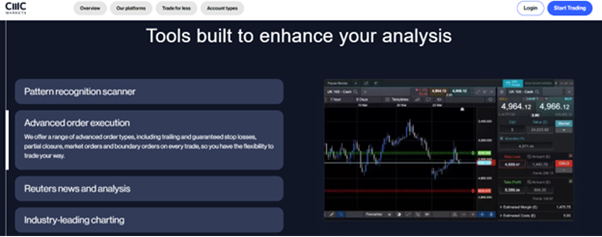
CMC Markets integrates directly with TradingView, allowing you to trade straight from TradingView charts with full order management. Since the integration update in April 2025, we were able to open, manage, and close positions reliably, with trades syncing across TradingView and CMC’s web and mobile platforms. The main limitation is that only CFD Trading and FX Active accounts currently connect to TradingView, while spread betting integration is still pending.
Is CMC Markets a Safe Choice for UK Traders?
Yes, CMC Markets is a safe choice for UK traders because it is authorised and regulated by the Financial Conduct Authority and is listed on the London Stock Exchange, which adds an extra layer of financial transparency. Client funds are segregated, FSCS protection applies up to £120,000, and guaranteed stop-loss orders are available. The broker has over 35 years of operating history.
What Are CMC Markets’ TradingView-Related Costs?
Most CMC Markets products are priced on a spread-only basis, with no commission on standard CFD trades. Typical forex spreads start from around 0.7 pips, with tighter pricing available on the FX Active account. Stock CFDs attract commission, but there is no minimum deposit requirement. A £10 inactivity fee applies after 12 months without trading.
Who Should Use CMC Markets with TradingView?
CMC Markets is best for traders who want access to a wide range of markets through TradingView, including stocks, indices, forex, and commodities. It suits those who value the transparency of an LSE-listed broker and access to over 12,000 instruments. It is not ideal for spread bettors wanting TradingView access or traders chasing the very lowest spreads.
Our Methodology
Every platform review at The Investors Centre is independently scored by three financial experts: Adam Woodhead, Thomas Drury, and Dom Farnell. Each expert evaluates the platform across six categories, Fees, Security, Ease of Use, Features, Customer Support, and Asset Range, with scores averaged to produce our final TIC Rating. Our process includes hands-on testing with funded accounts, verification of regulatory status through the FCA register, and fee data sourced directly from each broker’s official documentation. We also monitor Trustpilot and TIC community review sentiment continuously and refresh ratings quarterly.
What Is TradingView and Why Do UK Traders Use It?
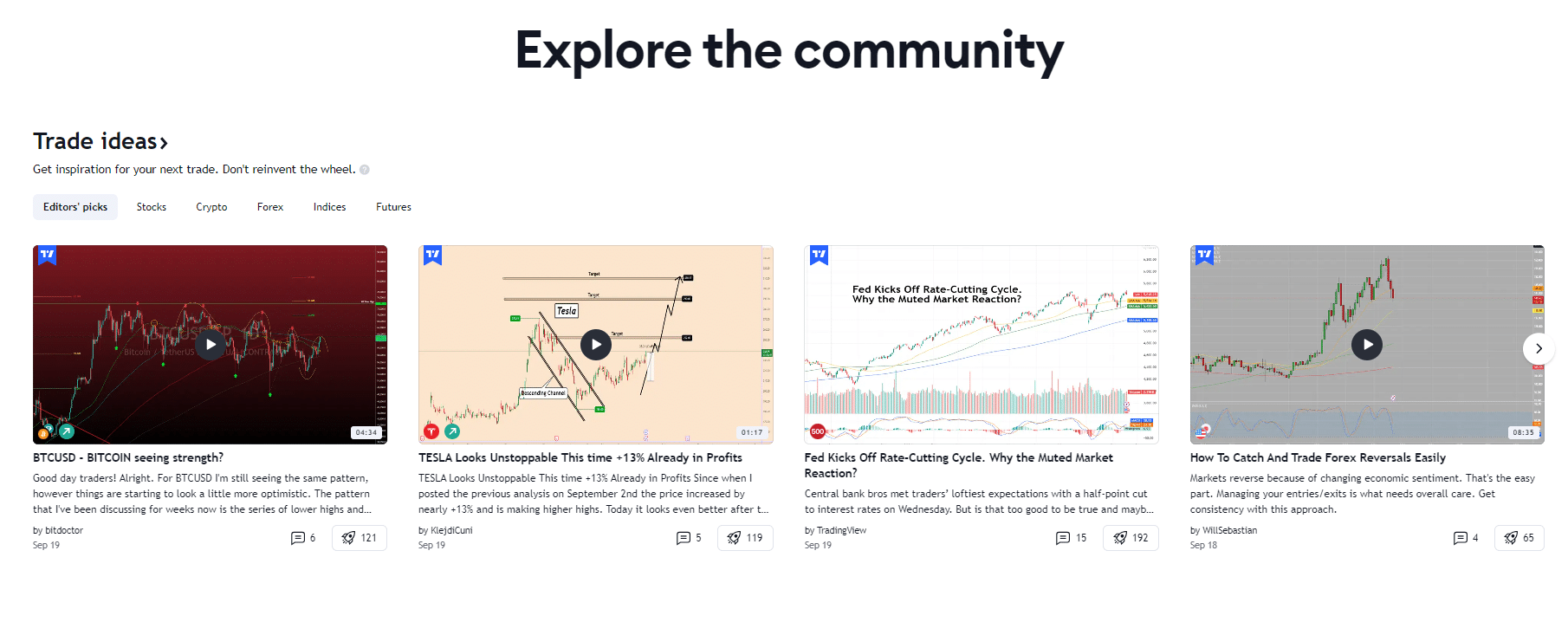
TradingView is a cloud-based charting and trading platform used by retail traders to analyse markets and execute trades. UK traders use TradingView for its advanced charting, fast performance, and the ability to trade directly from charts by connecting a supported broker.
TradingView is popular because it combines professional-grade technical analysis tools with social features that let traders share ideas and follow strategies in real time. TradingView is not a broker itself, so to place live trades you must connect TradingView to a compatible, regulated broker account.
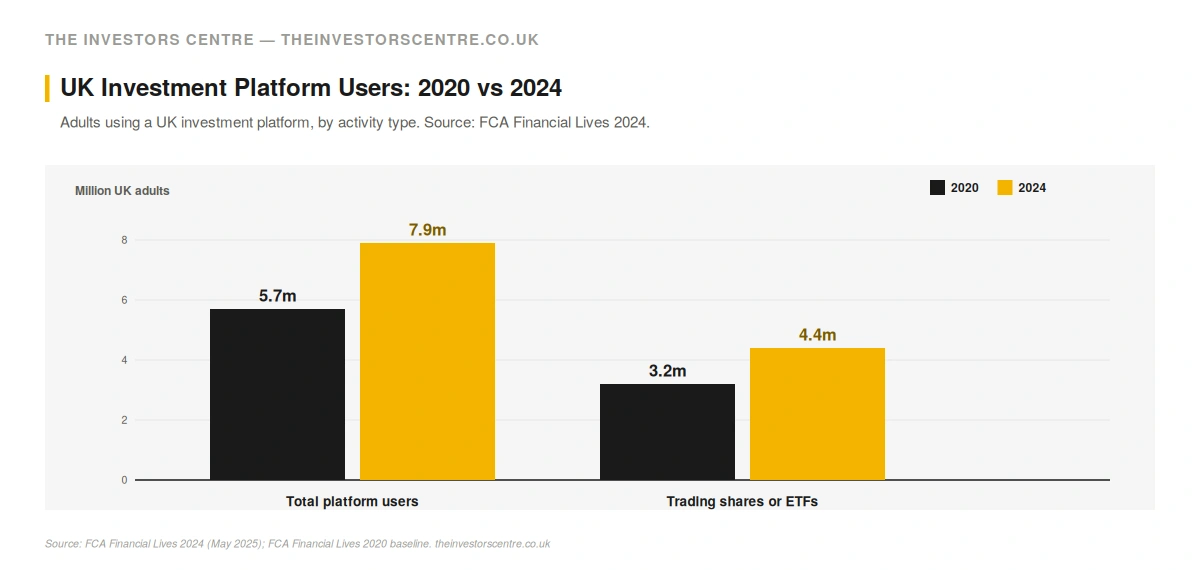
UK demand for self-directed trading platforms has surged. According to FCA Financial Lives 2024 (published May 2025), 7.9 million UK adults used an investment platform in 2024, up from 4.4 million in 2020, an 80% increase in four years. The non-advised cohort, where most TradingView-connected trading sits, climbed from 5.9% to 11% of UK adults over the same period, covering roughly 5.8 million people.

What Are the Key TradingView Features for UK Traders?
TradingView offers a wide range of tools that support analysis, strategy development, and execution for UK traders.
| Feature | What It Does | Benefit for UK Traders |
|---|---|---|
| Real-time charts | Live price data across markets | Accurate technical analysis |
| 100+ indicators | Built-in technical indicators | Strategy development without extra software |
| Pine Script | Custom indicator coding language | Personalised trading setups |
| Price alerts | Notifications on price movements | Never miss entry or exit opportunities |
| Social network | Share and follow trade ideas | Learn from a global trading community |
| Broker integration | Execute trades from charts | No platform switching |
| Paper trading | Trade with virtual funds | Test strategies risk-free |
Note: If you prefer MetaTrader’s interface, compare our MT4 brokers for UK traders instead.
How Do You Connect a UK Broker to TradingView?
Connecting a UK broker to TradingView allows you to analyse markets and execute trades from the same interface. Once linked, orders placed on TradingView are routed directly to your broker for execution, with positions updating in real time. The setup process is straightforward, but requirements can vary slightly by broker.
What Is the Step-by-Step Connection Process?
You start by creating a TradingView account, which can be done using the free Basic plan. Next, open a live account with a supported broker such as SpreadEX or Pepperstone and fund it if required. In TradingView, click the “Trading Panel” at the bottom of the chart, select your broker, and authorise the connection using your broker login details. Once linked, you can place, manage, and close trades directly from TradingView charts.
What If Your TradingView Connection Fails?
Most connection issues are easy to resolve. Check that you are using a live account, as some brokers do not support demo connections. Make sure browser pop-ups are enabled and that your TradingView plan allows broker linking. If credentials have changed, re-authorise the connection. Some brokers also require specific account types, such as CFDs rather than spread betting. If problems persist, contact broker support.
What About Paper Trading on TradingView?
TradingView offers built-in paper trading that lets you practise without connecting a broker account. You start with $100,000 in adjustable virtual funds to test strategies and learn order types. Paper trading doesn’t reflect real spreads or execution, so use it to learn TradingView before moving to a broker demo, especially useful since SpreadEX has no demo.
Before connecting a live account, practise with a demo trading account first.
How Do You Choose the Right TradingView Broker?
These four factors matter most when selecting a TradingView broker for UK trading.
TIC view, Adam Woodhead, Co-founder: When I tested all five of these integrations with funded accounts, the difference that mattered most wasn’t the spread headline. It was order syncing under load. SpreadEX and Pepperstone fired and confirmed within a second every time. IG had two visible sync delays during a busy London open in my testing, which is the sort of thing that costs you in fast markets. If you trade actively, test small first and watch the round trip before committing real size.
How Important Is Integration Quality?
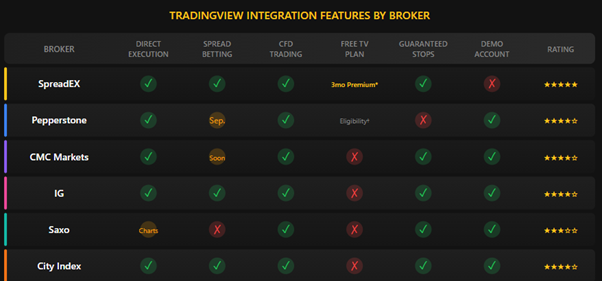
Integration quality determines whether you can trade smoothly from charts. Brokers with native integration allow full order execution directly from TradingView, including market, limit, and stop orders. You should also check that positions sync correctly between TradingView and the broker platform. Some integrations have reported minor latency or syncing issues, so it’s sensible to test with small trades first.
What TradingView Subscription Do You Need?
The free TradingView Basic plan works for most broker connections. Some brokers offer subscription incentives, such as SpreadEX providing three months of TradingView Premium with a £500 deposit. Paid plans add more charts, indicators, and alerts, but Premium is only worth it if you need advanced layouts or high indicator limits.
Why Does Regulation and Fund Safety Matter?
All brokers covered are FCA regulated, which provides important protections for UK traders. Eligible accounts are covered by FSCS protection up to £120,000, increased from £85,000 in December 2025. Always verify a broker on the FCA Register and look for segregated client funds and negative balance protection. Public listings, such as on the LSE or NYSE, add further transparency.
How Do Trading Costs Compare?
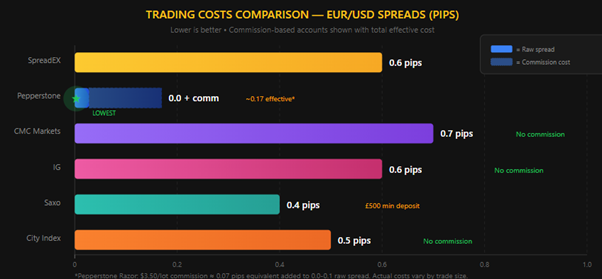
Trading costs vary by broker and market. Compare spreads for the instruments you trade most, and note whether pricing is spread-only or commission-based. Overnight financing matters if you hold positions beyond a day, and inactivity fees can add up if you trade infrequently.
For cost-conscious traders, our cheapest broker guide compares fees in detail.
Final Thoughts: Which TradingView Broker Should UK Traders Choose?
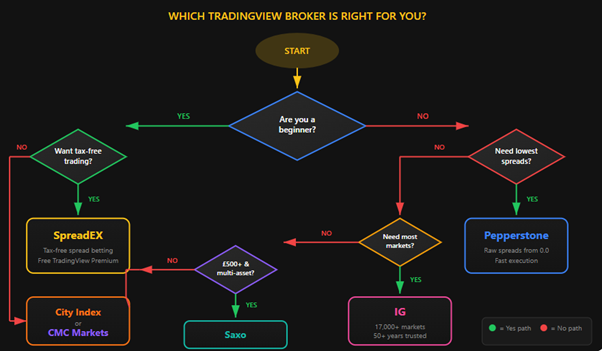
The right TradingView broker depends on whether you prioritise tax-free spread betting, commission-free CFDs, or raw-spread execution. Test a small position before committing, and check the FCA Register for any broker before funding an account. For broader options beyond TradingView, explore our UK trading platforms guide.
FAQs
The questions below are real questions our readers and the wider UK finance community ask, sourced from the TIC Community, relevant Reddit threads, and the People Also Ask data we monitor for each topic. We answer them in the order they’re most commonly raised.
References
- FCA Register — Spreadex Limited (FRN: 190941)
- FCA Register — Capital.com (UK) Limited (FRN: 793714)
- FCA Register — IG Index Ltd (FRN: 195355)
- FCA Register — Pepperstone Limited (FRN: 684312)
- TradingView Official Brokers Page
- SpreadEX TradingView Premium Promotion
- Pepperstone TradingView Integration
- CMC Markets TradingView Partnership (April 2025)
- FCA Financial Lives 2024 Survey (published May 2025)