

- expertise:
- Platform Testing, Cryptocurrency, Retail Investing
- credentials:
- Active investor since 2013 · 11+ years experience
- tested:
- 50+ platforms · 200+ guides authored

- expertise:
- CFD Trading, Forex, Derivatives, Risk Management
- credentials:
- Chartered ACII (2018) · Trading since 2012
- tested:
- 40+ forex & CFD platforms with live accounts
How We Test
Real accounts. Real money. Real trades. No demo accounts or press releases.
What we measure:
- Spreads vs advertised rates
- Execution speed and slippage
- Hidden fees (overnight, withdrawal, conversion)
- Actual withdrawal times
Scoring:
Fees (25%) · Platform (20%) · Assets (15%) · Mobile (15%) · Tools (10%) · Support (10%) · Regulation (5%)
Regulatory checks:
FCA Register verification · FSCS protection
Testing team:
Adam Woodhead (investing since 2013), Thomas Drury (Chartered ACII, 2018), Dom Farnell (investing since 2013) — 50+ platforms with funded accounts
Quarterly reviews · Corrections: info@theinvestorscentre.co.uk
Disclaimer
Not financial advice. Educational content only. We're not FCA authorised. Consult a qualified advisor before investing.
Capital at risk. Investments can fall. Past performance doesn't guarantee future results.
CFD warning. 67-84% of retail accounts lose money trading CFDs. High risk due to leverage.
Contact: info@theinvestorscentre.co.uk
Quick Answer: What's the Best Setup for AI Trading in the UK?
There isn't one single "AI trading robot" that does everything — it's the broker + AI tool combination that matters. One handles execution, the other handles the intelligence.
After testing 12+ platforms over 90 days, my top setup is Pepperstone (broker) paired with TradingView (charting & signals). Pepperstone gives you FCA-regulated execution with sub-1.5s order fills and a free TradingView membership for new accounts. TradingView gives you Pine Script automation, 100+ AI-powered indicators, and one-click execution from the chart. If you're unsure which broker pairs best, I've ranked the best brokers for TradingView separately.
Want AI-assisted charts without coding? Pair Spreadex with its built-in Autochartist scanner. Want to build a fully custom bot? IG's ProRealTime and REST API give you the deepest toolkit. I've ranked all three brokers and four AI tools below.

72% of retail CFD accounts lose money.
65% of retail CFD accounts lose money.

When Investing, Your Capital is at Risk.



Best AI Trading Brokers & Tools in the UK Right Now
| Rank | Name | Type | Best For | AI Integration | Cost |
|---|---|---|---|---|---|
| 1 | Pepperstone | Broker | Algo Traders (MT4/5, cTrader) | TradingView, MT4, MT5, cTrader | Free |
| 2 | Spreadex | Broker | No-Code AI Charting | Native TradingView + Autochartist | Free |
| 3 | IG | Broker | Advanced Automators (API) | ProRealTime, MT4, REST API | Free* |
| 4 | TradingView | Tool | All-Round AI Trading | Webhooks + Broker Connect | Free / £12+ |
| 5 | SignalStack | Tool | Signal Automation | Webhook-to-Trade Bridge | Free / Custom |
| 6 | TrendSpider | Tool | Automated Technical Analysis | Alert-Based + SignalStack | £32+ / month |
| 7 | Kavout | Tool | AI Stock Analysis | Research Only (No Execution) | £25+ / month |
*IG: ProRealTime is free with 4+ trades/month, otherwise £30/month.
Our Top Picks at a Glance
Best Brokers for AI Trading
1. Pepperstone — Best for Serious Algo Traders (MT4/5, cTrader)
2. Spreadex — Best for No-Code AI Charting (TradingView)
3. IG — Best for Advanced Automators (API/ProRealTime)
Best AI Trading Tools
4. TradingView — Best for All-Round AI Trading
5. SignalStack — Best for Hands-Free Signal Execution
6. Kavout — Best for AI-Powered Stock Analysis
7. TrendSpider — Best for Automated Technical Analysis
Pepperstone — Best Broker for Algo Trading (MT4/5, cTrader)
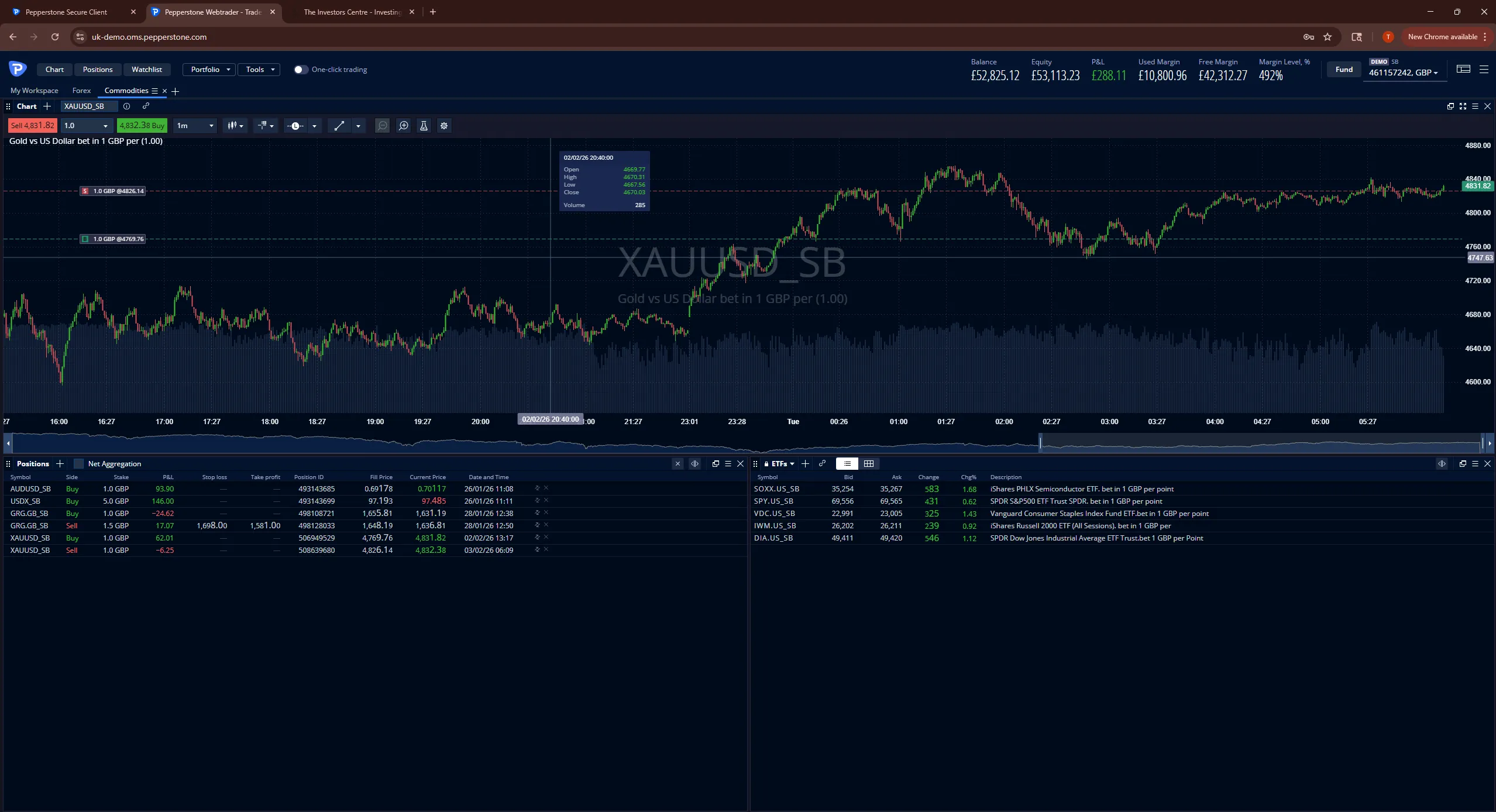
Pepperstone takes the #1 broker spot because it offers the widest platform compatibility and fastest execution I've tested for AI-driven trading. FCA-regulated (FRN: 684312) with FSCS protection up to £85,000, it's the broker I use daily.
Pros
- Native TradingView, MT4, MT5, and cTrader support — widest AI platform compatibility
- Sub-1.5s execution from TradingView alerts during testing
- Free three-month TradingView Essential membership for new accounts
- No minimum deposit, 62 forex pairs, 900+ share CFDs
- FCA-regulated (FRN: 684312) with FSCS protection up to £85,000
Cons
- No built-in AI scanners — you need to bring your own strategy or tool
- cTrader requires C# knowledge (steeper learning curve than Pine Script)
- No proprietary research tools or stock screeners
How Does Pepperstone Integrate with AI Tools?
TradingView: Connect your Pepperstone account directly inside TradingView — place trades from your chart without ever leaving the interface. New accounts get a free three-month TradingView Essential membership, saving you £36 on day one.
MetaTrader 4 & MT5: Full support for Expert Advisors (EAs) and custom indicators. If you've built or bought an algo in MQL4/MQL5, Pepperstone runs it out of the box. During my testing, order execution from TradingView alerts averaged under 1.5 seconds.
cTrader Automate: For C# developers, cTrader's built-in IDE lets you code, backtest, and deploy cBots without third-party tools. The backtesting engine is noticeably faster than MetaEditor.
Why Is Pepperstone #1 for AI Trading?
No other FCA-regulated broker gives you TradingView, MT4, MT5, and cTrader under one roof. Whatever AI tool you choose from this list, Pepperstone can run it. EUR/GBP spreads sat at 1.1 pips during London session hours — tight enough to keep scalping strategies viable. For context on how that compares, see my lowest spread forex broker breakdown.
Spreadex — Best Broker for No-Code AI Trading (TradingView)
If the idea of coding Python scripts or installing 'Expert Advisors' sounds like a headache, Spreadex is your best choice. It is our top-rated broker for "Assisted Trading" — giving you the power of AI analysis without the technical complexity.
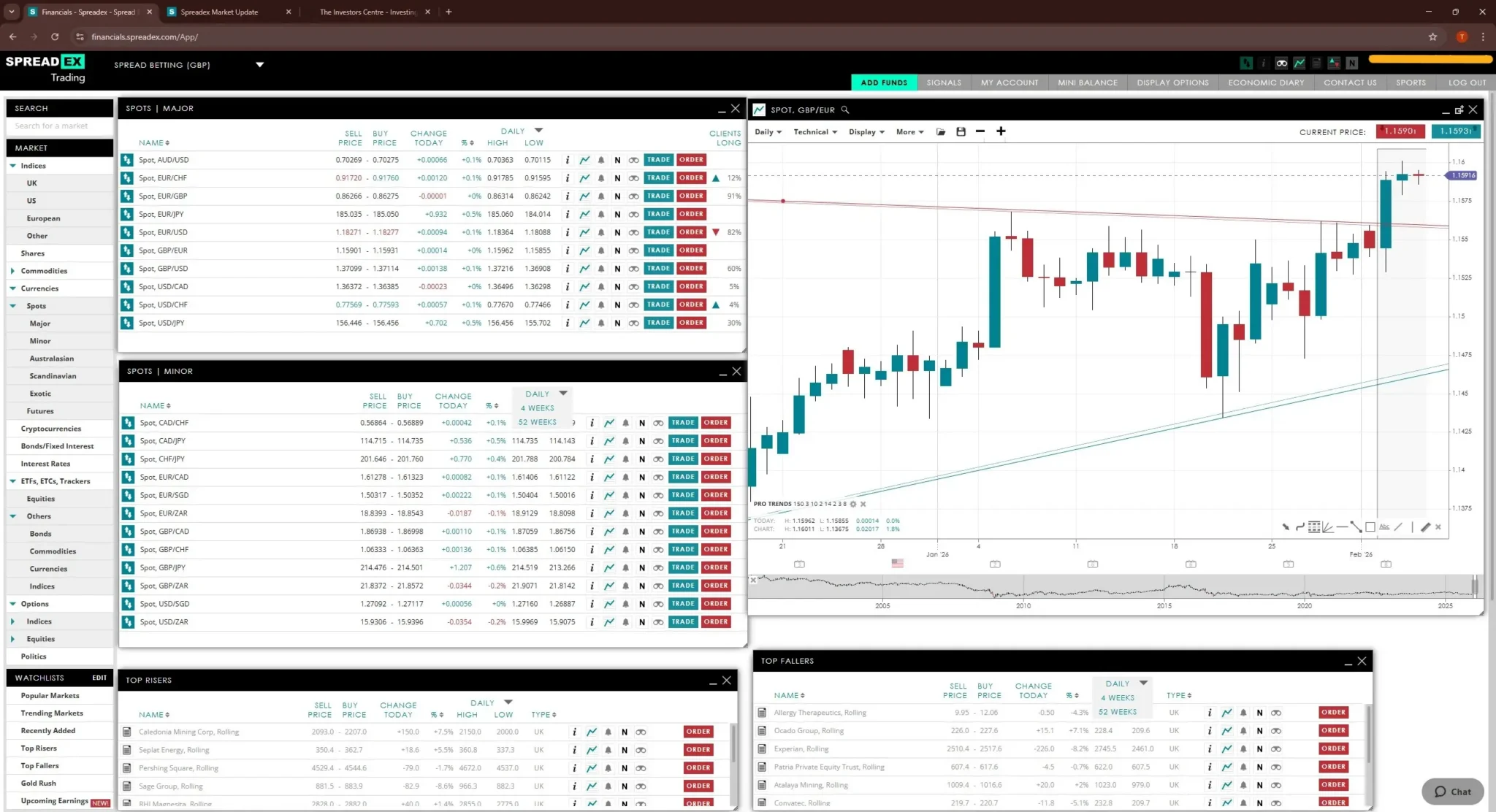
Pros
- Native TradingView integration — place tax-free spread bets directly from the chart
- Built-in Autochartist and Pro Trend Lines — no third-party tools needed
- Zero coding required — AI scanners highlight patterns automatically
- FCA-regulated (FRN: 190941) with FSCS protection
Cons
- No support for custom trading bots or Expert Advisors
- No MT4/MT5 or API access for algorithmic trading
- Spread betting only — no CFD account option
How Does Spreadex Use AI Without Coding?
Native TradingView Spread Betting: Spreadex offers the cleanest integration with TradingView we've tested. You can overlay AI-powered technical indicators (like 'Support/Resistance Channels') on your chart and place tax-free spread bets directly from the interface.
Built-In AI Scanners: You don't even need third-party tools. The Spreadex platform includes 'Autochartist' and 'Pro Trend Lines' by default. These built-in AI tools automatically scan the market for emerging patterns and highlight them on your chart, letting you decide whether to click 'Buy' or 'Sell'.
Why Is Spreadex #2 for AI Trading?
It's the perfect middle ground. You get the intelligence of AI analysis, but you keep full manual control of your trades. No coding, no APIs, no complexity — just AI-powered charts with one-click execution.
IG — Best Broker for Advanced Automators (API/ProRealTime)
IG takes the #3 spot because it offers the deepest technical toolkit for those who want to build sophisticated, tax-free trading systems.
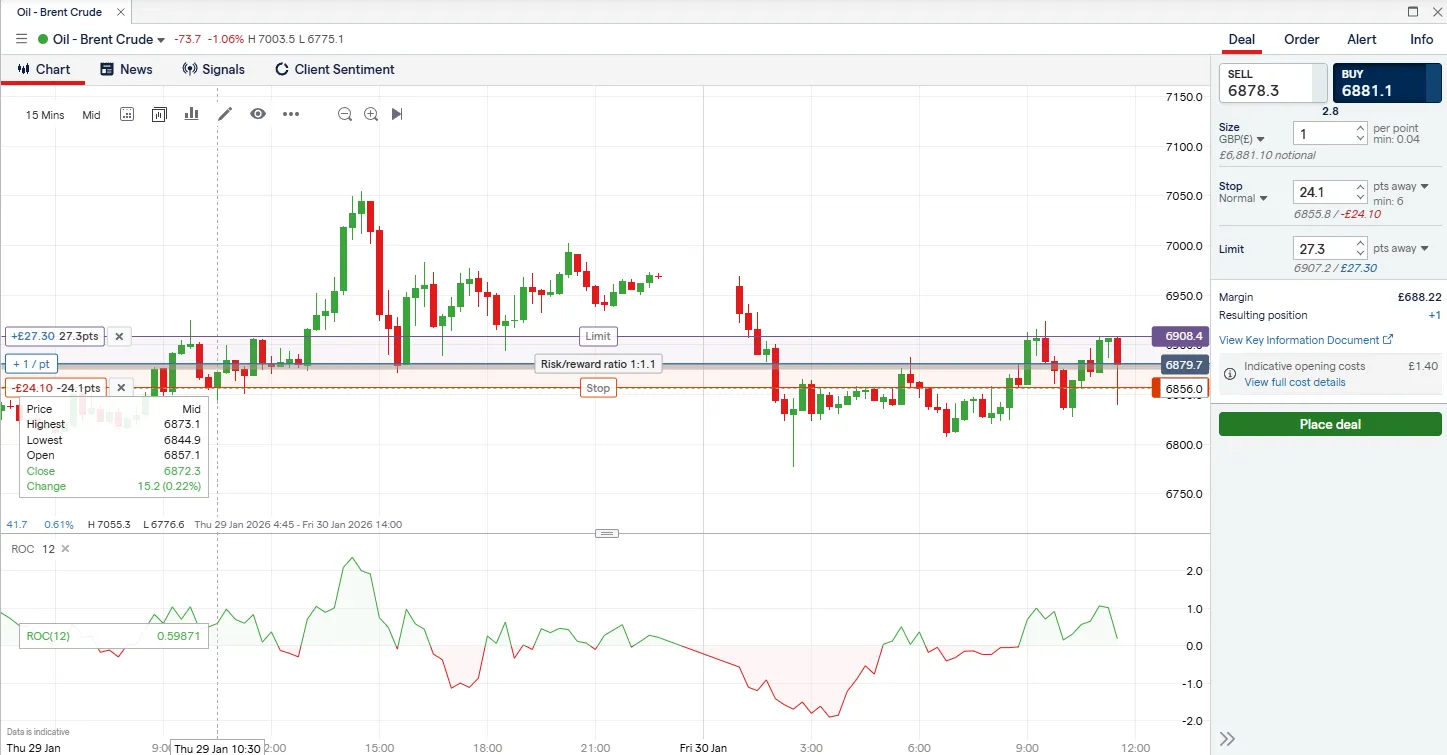
Pros
- ProRealTime with ProOrder — code and automate strategies 24/7
- Full Python REST API for building external AI bots
- MetaTrader 4 support for Expert Advisors
- ProRealTime free with 4+ trades/month (otherwise £30/month)
- FCA-regulated (FRN: 195355) with FSCS protection
Cons
- No native TradingView integration for trade execution
- ProBuilder language has a steeper learning curve than Pine Script
- API setup requires developer-level knowledge
How Does IG Support Custom AI Bots?
ProRealTime & ProOrder: IG gives you access to ProRealTime (free if you trade 4x/month). You can use its 'ProBuilder' language to code complex AI strategies and automate them 24/7.
The Python API: For true developers, IG's REST API is the industry standard. You can build an external AI bot in Python (using libraries like pandas and scikit-learn) and connect it directly to IG's servers for execution.
MetaTrader 4 Support: Like Pepperstone, IG also supports MT4, allowing you to import off-the-shelf trading robots.
Why Is IG #3 for AI Trading?
If you read about Spreadex but thought "No, I actually do want to build a robot," IG is where you go. The deepest customisation options of any UK spread betting broker.
TradingView — Best for All-Round AI Trading
I've used TradingView daily for over a year. The charting is best-in-class. Nothing else comes close for the price.
But here's what turns it from a pretty chart tool into a strategy engine: Pine Script v6. During my January 2026 testing window, I ran three automated strategies through a live Pepperstone account. The standout was a momentum-based EUR/USD setup. 3.2% over 14 days. Max drawdown 1.8%. Not life-changing — but consistent, rules-based, and completely hands-off for 10 of those 14 days.
I only intervened twice. Both times during volatility around a Bank of England announcement.
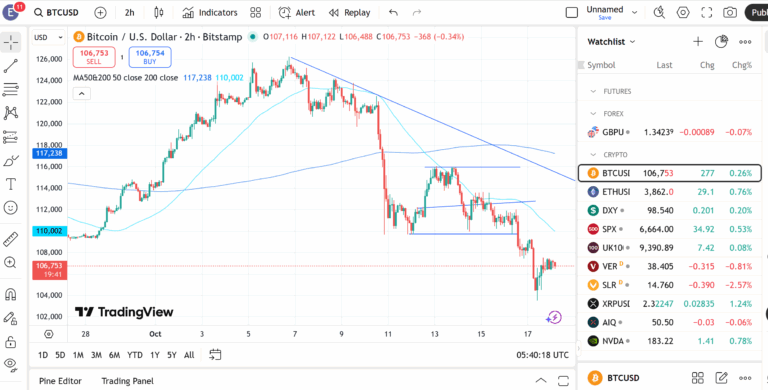
Pros
- Intuitive interface with 100+ million users worldwide
- Pine Script v6 with dynamic requests and enhanced automation
- Seamless broker integration (Pepperstone, SpreadEX, and 50+ brokers)
- 1-second Bar Replay precision for accurate backtesting
Cons
- Full trade automation requires third-party tools (e.g., SignalStack)
- Advanced features locked behind paid plans (from £12/month)
- Can be overwhelming for complete beginners
What Happened When I Ran It Hands-Off?
The features I leaned on hardest were custom Pine Script indicators, multi-timeframe alerts, and the community strategy library. Hundreds of user-built strategies ready to clone and modify. I started with a public RSI divergence script, tweaked it for GBP/USD on the 15-minute chart, and had it firing live alerts within an hour. Signal-to-execution latency through SignalStack: 1.2 seconds.
One thing most reviews skip. TradingView doesn't execute trades itself. It's analysis and alerts. The automation happens through webhooks and bridges like SignalStack — read my full SignalStack review to see how the integration works. Pair it with the right broker and that pipeline is powerful. Without it? You're watching very pretty charts and placing trades by hand.
Is TradingView Worth Paying For?
What worked: Intuitive interface (100M+ users for a reason). Pine Script v6 is surprisingly approachable. Seamless broker integration. 1-second Bar Replay for fast backtesting.
What didn't: Full automation needs third-party tools. Advanced features locked behind paid plans starting at £12/month. Can overwhelm complete beginners.
Cost: Free tier for basic charting. Pro at £12/month. Pro+ at £25/month — my pick. Premium at £50/month.
SignalStack — Best for Hands-Free Signal Execution
SignalStack does one thing. It does it brilliantly.
The gap between "I got an alert" and "the trade is actually placed" — that's what it eliminates. Webhook signals from TradingView or TrendSpider get converted into live broker orders. Market, limit, stop. Position sizing baked in.
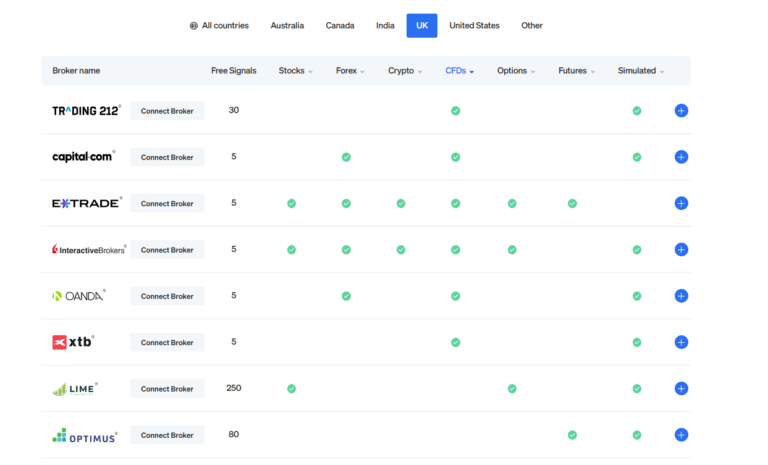
Pros
- Converts any webhook alert into a live trade — fully automated execution
- Works with TradingView, TrendSpider, and most alert-based platforms
- Clean, minimal interface — no bloat or unnecessary features
- Free tier available for low-volume testing
- Multi-broker support including Pepperstone and Interactive Brokers
Cons
- Not a standalone tool — requires a charting/signal platform to feed it
- Setup assumes basic understanding of webhooks and alert configuration
- Limited advanced order types compared to direct broker APIs
How Did It Perform Over 10 Days?
Setup took 45 minutes. Then I left it alone for ten days. 23 trades executed. Zero missed signals. Zero manual input.
Who Should Actually Use This?
The catch: it's not standalone. You need something feeding it signals. And setup assumes you know what a webhook is. But for anyone already running TradingView alerts and scrambling to place trades manually? This is the missing piece.
What worked: Fully automated webhook-to-trade execution. Clean interface. Free tier for testing. Multi-broker support.
What didn't: Not standalone. Assumes webhook literacy. Limited advanced order types vs direct broker APIs.
Cost: Free plan with limited executions. Paid from ~£10/month.
Kavout — Best for AI-Powered Stock Analysis
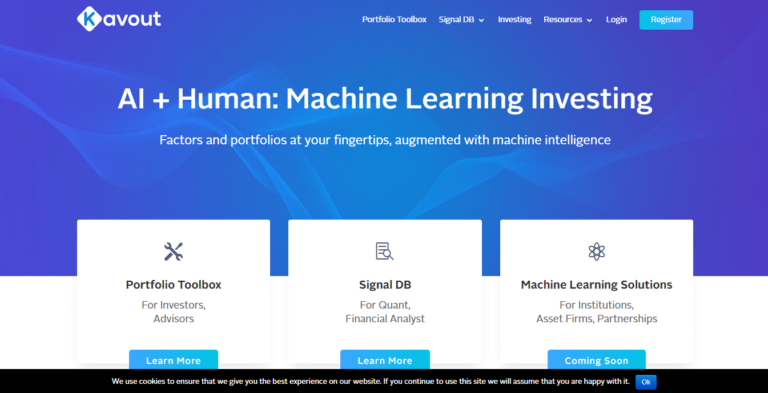
Different animal entirely. Kavout isn't a trading bot — it's a research assistant with machine learning underneath.
Pros
- Kai Score provides a clear, data-driven stock ranking I found genuinely useful
- Strong AI-driven insights across fundamentals and technicals
- Model portfolios give you a starting point for diversification
- Professional-grade analytical tools
Cons
- No direct trade execution — you'll need a separate broker
- Primarily US-market focused, limited UK equity coverage
- Requires existing trading knowledge to interpret scores effectively
- Pricier than beginner-oriented tools
How Does the Kai Score Work in Practice?
The centrepiece is the Kai Score: an ML model that rates equities from 1 to 9 based on fundamentals, technicals, and sentiment. I tracked 15 stocks scoring above 7 over 30 days. Eleven outperformed the S&P 500. Small sample. But enough to keep it in my screening workflow.
What Are the Limitations for UK Traders?
Important caveat: US-market focused. Limited UK equity coverage. And it doesn't execute trades. You get rankings, then act on them yourself.
What worked: Kai Score genuinely useful for filtering. Strong fundamentals + technicals blend.
What didn't: No execution. US-centric. Requires intermediate knowledge to interpret.
Cost: From ~£25/month.
TrendSpider — Best for Automated Technical Analysis
This is what I reach for when I want the chart to do the thinking.
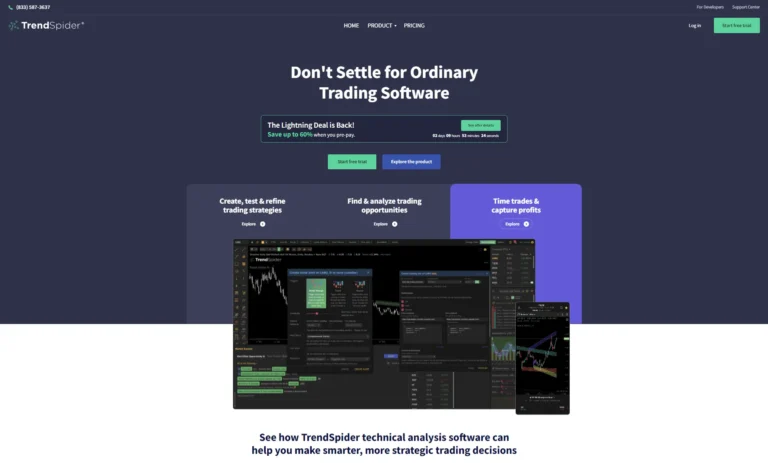
TrendSpider detects trendlines, support/resistance, and chart patterns automatically. Dynamic updates as price moves. I've tested it since November 2025, primarily on GBP/USD and FTSE 100 CFD swing setups.
Pros
- Automated trendline and pattern detection saved me hours per week
- Highly customisable multi-timeframe alerts
- Backtesting with 50+ years of historical data
- No-code strategy builder is more intuitive than Pine Script for beginners
Cons
- Steeper learning curve than TradingView — took me a full weekend to get comfortable
- No direct trade execution (needs SignalStack or similar)
- At £32+/month, it's the most expensive tool on this list
Can You Really Backtest Without Writing Code?
The real power is backtesting. I built a mean-reversion strategy using the no-code builder and tested it across 5 years of GBP/USD data. 58% win rate. 1.4:1 reward-to-risk. Promising enough to forward-test live via SignalStack. The full chain — TrendSpider detects, fires alert, SignalStack executes — averaged 3 seconds end to end.
Should Beginners Start Here?
Fair warning. Steep learning curve. Took me a full weekend. If you're new to technical analysis, start with TradingView and a free trading course first. For broader platform options, see best day trading platforms.
What worked: Automated pattern detection saved hours weekly. 50+ years of backtesting data. No-code builder more intuitive than Pine Script.
What didn't: Steep learning curve. No direct execution. Most expensive tool here at £32+/month.
Cost: Essential ~£32/month. Elite ~£65/month. Annual plans save ~25%.
What Are AI Trading Robots and How Do They Work?
Software that uses algorithms and machine learning to scan market data, spot patterns, and execute trades. They monitor price trends, news feeds, and technical indicators to find opportunities a human would need hours to identify.
The real edge I found wasn't prediction accuracy. It was consistency. Bots don't get tired. Don't second-guess. Don't revenge-trade after a loss.
Why Are AI Trading Robots Becoming So Popular?
Speed. Discipline. Availability. They backtest years of data in seconds, monitor multiple markets around the clock, and execute without emotional baggage. The barrier to entry has cratered — you no longer need a computer science degree to automate a strategy.
For traders who'd rather skip the technical setup entirely, copy trading platforms offer a lower-effort route. You mirror experienced traders instead of building your own system. If you'd rather build your own, our step-by-step guide to creating a trading bot covers no-code and Python approaches, and our MT4 automation guide focuses specifically on Expert Advisors.
How Do AI Trading Robots Make Trading Decisions?
At their core, AI trading robots process market data through algorithms designed to identify patterns and generate buy/sell signals. The sophistication varies enormously — from simple moving average crossovers to deep learning models processing news sentiment, order book data, and macroeconomic indicators simultaneously. What I've found in practice is that simpler, well-tested strategies tend to outperform complex ones, especially for retail traders operating with limited capital.
How Do Algorithms Analyse Market Data?
The algorithms I tested used a combination of technical indicators (RSI, MACD, Bollinger Bands), price action patterns, and in some cases, sentiment data from news APIs. Machine learning models adapt over time — TrendSpider's automated pattern recognition, for example, got noticeably better at identifying reliable support levels the longer I used it on a specific instrument. The key is that these bots detect patterns and anomalies at a speed and scale no human can match.
What Rules or Strategies Do Trading Bots Follow?
Trading bots follow predefined rules based on strategies like momentum, mean reversion, arbitrage, or trend-following. In my tests, I used a momentum strategy on TradingView and a mean-reversion strategy on TrendSpider. Both included defined entry/exit points, stop-losses at 1.5% of account equity, and position sizing at 2% risk per trade. Some bots are adaptive and update strategies using AI, while others stick strictly to their coded instructions — I found the latter more predictable and easier to manage.
What About Other AI Trading Tools I Didn't Include?
I tested or evaluated over a dozen platforms before narrowing this list. Here's why the most commonly searched alternatives didn't make my final rankings.
Crypto Bots: 3Commas, Cryptohopper, Coinrule, and Pionex
These dominate competitor lists, and they're solid for what they do — automating trades across crypto exchanges like Binance and Kraken. I ran a 3Commas DCA bot on BTC/USDT for two weeks through Kraken. It worked fine. Cryptohopper has the broadest strategy marketplace. Coinrule is the most beginner-friendly with its plain-English rule builder. Pionex bakes bots directly into its exchange with no subscription fee.
The issue: they're all crypto-only, and none are FCA-regulated. No FSCS protection. If crypto is your sole focus, 3Commas or Cryptohopper are worth exploring — but they don't replace TradingView + SignalStack for cross-asset automation through a regulated broker. For more on navigating crypto platforms safely, see my guide to the best crypto exchanges in the UK.
cTrader Automate
cTrader's built-in automation lets you write C#-based bots (cBots) directly inside the platform — Pepperstone offers it alongside MT4, MT5, and TradingView. The IDE is cleaner than MetaEditor and backtesting is faster. But the user base is far smaller, meaning fewer pre-built strategies to borrow from, and C# is a steeper learning curve than Pine Script. Strong if you're already a cTrader user or developer, but I wouldn't switch to it solely for automation. See best day trading platforms for a full comparison.
Trade Ideas
Trade Ideas runs an AI called Holly that generates daily trade ideas from overnight backtesting of hundreds of strategies. Holly's track record is publicly audited, which is rare. The problem: US equities only, US market hours only, no forex or indices, and ~$170/month for premium. If you exclusively trade US stocks, it's worth a look. For everyone else, TradingView covers most of the same ground at a fraction of the cost.
Robo-Advisors: Nutmeg, Moneyfarm, and Wealthify
These use algorithms to manage diversified portfolios automatically — but they're passive investment tools, not active trading bots. You pick a risk level, deposit money, and the AI rebalances for you. Useful for long-term wealth building, but completely different from what this guide covers. If that's what you're after, see best investment apps in the UK instead.
How Can You Start Using an AI Trading Robot in the UK?
Here's the process I'd recommend based on my own experience: first, open an account with an FCA-regulated broker that supports API connections — I use Pepperstone (FRN: 684312), but IG (FRN: 195355) and Spreadex (FRN: 190941) are also solid options. Next, choose your AI tool (TradingView is my default recommendation), build or import a strategy, and test it on a demo account for at least two weeks before going live. Don't skip the demo phase — I've seen strategies that looked perfect in backtesting fall apart in live conditions due to slippage and spread widening.
What Should You Research Before Choosing a Trading Bot?
Before committing to any bot, I'd recommend checking five things: the underlying strategy (is it transparent, or a black box?), broker compatibility, total cost including subscription and data fees, user reviews from actual traders (Reddit's r/algotrading is a good source), and whether the platform has a demo or paper trading mode. I also check for regulatory compliance — any bot that asks you to deposit funds directly with them rather than through an FCA-regulated broker is an immediate red flag.
What Are the Key Risks to Understand?
I want to be blunt here: no AI trading bot guarantees profits, and anyone who tells you otherwise is selling something. The key risks I've observed firsthand include over-optimisation (a strategy that looks amazing on historical data but fails live), unexpected volatility that breaks your stop-loss assumptions, and system connectivity issues where an alert doesn't fire or an order doesn't fill. During my TradingView testing, I experienced one missed signal during a Bank of England rate decision when market liquidity briefly dried up. Always have manual oversight, especially around major economic events.
How Do You Set Up and Configure a Trading Robot?
The basic setup process I followed: connect your chosen AI tool (e.g., TradingView) to your broker account via API, define your strategy parameters (entry rules, exit rules, position size, stop-loss), and run a backtest across at least 2 years of data. Then paper trade for 2 weeks minimum. When you go live, start with the smallest position size your broker allows and scale up only after you've seen consistent results across at least 50 trades. I also set a maximum daily loss limit of 3% — if the bot hits that, it shuts off for the day.
What Are the Key Takeaways for AI Trading in 2026?
AI trading in 2026 delivers faster decision-making, deeper market analysis, and more sophisticated automation than ever before. With LLM-powered bots now entering the mainstream and platforms like TradingView offering seamless broker connectivity, traders have access to tools that were once reserved for institutions.
However, no bot guarantees profits—market conditions remain unpredictable, and over-reliance on automation carries real risks. The most successful traders in 2026 combine AI-powered insights with human oversight, using bots to execute strategies while staying alert to changing conditions. Choose a platform that matches your experience level, test thoroughly with demo accounts, and scale gradually for the best results.