

- expertise:
- Platform Testing, Cryptocurrency, Retail Investing
- credentials:
- Active investor since 2013 · 11+ years experience
- tested:
- 50+ platforms · 200+ guides authored

- expertise:
- Broker Comparison, ISA Strategy, Portfolio Management
- credentials:
- Active investor since 2013 · 11+ years experience
- tested:
- 40+ brokers with funded accounts
How We Test
Real accounts. Real money. Real trades. No demo accounts or press releases.
What we measure:
- Spreads vs advertised rates
- Execution speed and slippage
- Hidden fees (overnight, withdrawal, conversion)
- Actual withdrawal times
Scoring:
Fees (25%) · Platform (20%) · Assets (15%) · Mobile (15%) · Tools (10%) · Support (10%) · Regulation (5%)
Regulatory checks:
FCA Register verification · FSCS protection
Testing team:
Adam Woodhead (investing since 2013), Thomas Drury (Chartered ACII, 2018), Dom Farnell (investing since 2013) — 50+ platforms with funded accounts
Quarterly reviews · Corrections: in**@*******************co.uk
Disclaimer
Not financial advice. Educational content only. We're not FCA authorised. Consult a qualified advisor before investing.
Capital at risk. Investments can fall. Past performance doesn't guarantee future results.
CFD warning. 67-84% of retail accounts lose money trading CFDs. High risk due to leverage.
Contact: in**@*******************co.uk
Quick Answer: What Is the Difference Between Coinbase and Coinbase Advanced?
Coinbase is designed for beginners, offering a simple buying experience with higher fees. Coinbase Advanced targets more active buyers, with lower trading fees, advanced charts, and order types — all using the same account and security infrastructure. Switching is free and takes seconds.
Which is Better?
For occasional buyers, Coinbase is fine. If you buy regularly or want lower fees, Coinbase Advanced is the better choice — it costs nothing extra to access and immediately reduces what you pay per trade.

Don’t invest unless you’re prepared to lose all the money you invest. This is a high-risk investment and you should not expect to be protected if something goes wrong. Take 2 mins to learn more
Coinbase and Coinbase Advanced Overview
Coinbase is a beginner-friendly crypto platform for buying, selling, and storing digital assets. It's straightforward to use but comes with higher fees than most alternatives.
Coinbase Advanced (formerly Coinbase Pro) is the professional trading interface built directly into your existing Coinbase account. It offers lower fees, limit and stop orders, and full charting tools — with no separate registration required.
For a full account of both platforms tested with real money, see our in-depth Coinbase Review for UK users.
Key Differences at a Glance
| Feature | Coinbase | Coinbase Advanced |
|---|---|---|
| Fees | High (up to 3.99%) | Lower (0.40%–1.20% typical) |
| Trading options | Simple buy/sell | Market, limit, and stop orders |
| Charting | Basic price view | Full candlestick charts + order book |
| Monthly cost | Free | Free |
| Best for | Beginners, occasional buyers | Regular buyers, active traders |
| FCA Registration | Both — CB Payments Ltd, FRN 900635 | |
| FSCS Protection | Neither — crypto is not FSCS-covered | |
Both platforms share the same account, funds, and security. The choice comes down to how often you trade and how much you want to pay in fees.
What's the Real Fee Difference? My March 2026 Test
To put real numbers on this, I ran a live test on 6th March 2026 using Coinbase Advanced. I bought £99.97 of Bitcoin on the BTC-GBP pair at a limit price of £52,717.19. The order filled instantly. The fee was £1.19 — an effective rate of 1.19%.
The same purchase on the standard Coinbase interface would have cost significantly more. Standard Coinbase charges a spread of approximately 0.5% plus a variable convenience fee — typically 1.49%–1.99% via bank transfer, and up to 3.99% on a debit card purchase. On a £100 buy, that's £2.00–£4.00 in fees versus £1.19 on Advanced. The difference is immediate, and it compounds over any period of regular buying.
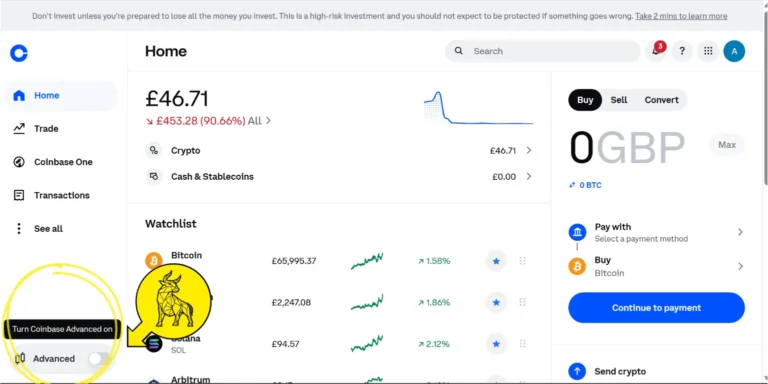
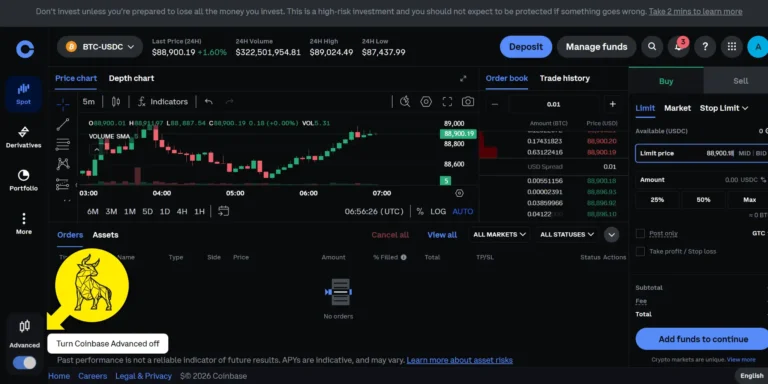
Advanced isn't harder to use for this kind of purchase — it's a toggle in the bottom-left of the app. The fee saving requires no extra effort.
Fee Comparison: Same £100 Purchase
| Platform | Method | Fee on £100 buy | Source |
|---|---|---|---|
| Coinbase Standard | Debit card | ~£3.99 | Published fee schedule |
| Coinbase Standard | Bank transfer | ~£1.49–£1.99 | Published fee schedule |
| Coinbase Advanced | Bank transfer (tested) | £1.19 (1.19%) | Live test, 6th March 2026 |
| Coinbase Advanced | High-volume maker | From £0.40 (0.40%) | Published fee schedule |
Fees correct as of March 2026. Coinbase may update its fee schedule without notice. Always confirm at checkout.
How to Switch from Coinbase to Coinbase Advanced
Switching is free and uses the same account, balances, and security settings. There's no need to move funds or create a new profile.
Desktop
- Log in to your Coinbase account
- Click "Advanced" in the main navigation (or visit advanced.coinbase.com)
- Your existing balances appear automatically
- Select a trading pair and access lower fees, charts, and order types
Mobile
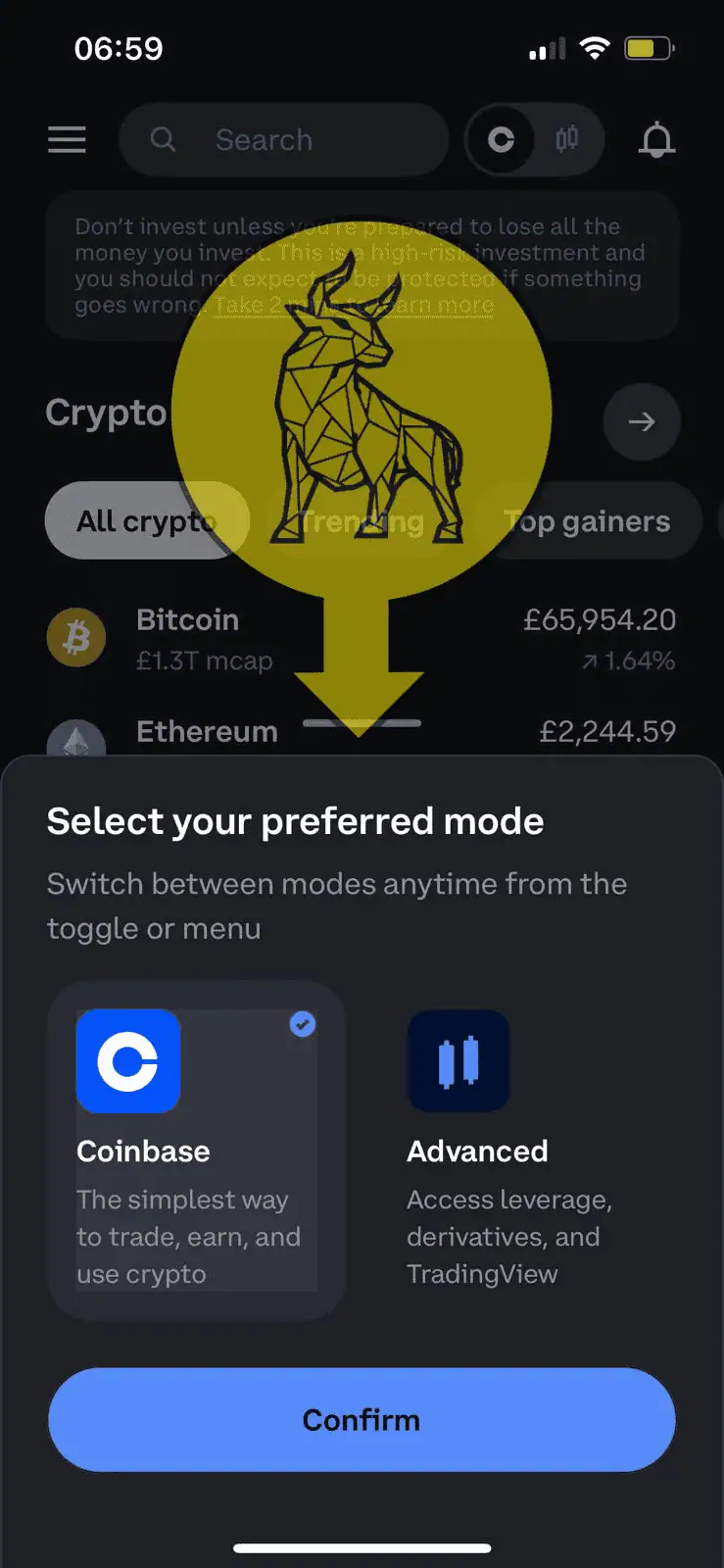
- Open the Coinbase app and log in
- Scroll to the bottom of the left-hand navigation menu
- Tap the Advanced toggle to switch modes
- Trade using your existing funds at lower fees

Key Things to Know
- Your login, funds, and security settings remain identical across both interfaces.
- You can switch back at any time — there's no lock-in.
- No transfer fees — your balance is shared across both platforms.
Verdict: Coinbase Advanced is completely free to access — switching is instant and risk-free. For most UK users buying regularly, it's worth making the move for the fee saving alone.
Coinbase vs Coinbase Advanced: Detailed Comparison
User Interface — Which Is More Beginner-Friendly?
The standard Coinbase interface is clean and minimal — buy and sell buttons are prominent, and the process takes a few clicks. It's designed for people who want to buy crypto quickly without thinking about order types or charts.
Coinbase Advanced looks like a professional trading terminal. There are candlestick charts, a live order book, and multiple order types. If you've never used a trading interface, it can feel overwhelming initially. Once you're familiar with it, though, it gives substantially more control — and the fee saving is available from the first trade.
User Interface Comparison
| Feature | Coinbase | Coinbase Advanced |
|---|---|---|
| Best for beginners | Yes | No |
| Ease of use | Very simple | Requires brief learning curve |
| Buying process | One-click | Order types available |
| Trading charts | Basic price view | Full candlestick charts |
| Order book | No | Yes |
Verdict: For a first purchase, standard Coinbase is easier. For anyone buying more than once a month, Coinbase Advanced is worth the brief learning curve for the fee saving.
Coinbase vs Coinbase Advanced: Trading Fees in Detail
Fees are where the two platforms diverge most significantly. Standard Coinbase charges a spread plus a convenience fee that varies by payment method — the total can reach 3.99% on a debit card purchase. I've paid close to that on early purchases before switching to Advanced.
| Fee Type | Coinbase | Coinbase Advanced |
|---|---|---|
| Debit card purchase | Up to 3.99% | Not applicable |
| Bank transfer purchase | ~1.49%–1.99% | Maker/taker fees apply |
| Maker fee (low volume) | Not applicable | 0.40% |
| Taker fee (low volume) | Not applicable | 0.60%–1.20% |
| Maker fee ($400M+ volume) | Not applicable | 0.00% |
| Taker fee ($400M+ volume) | Not applicable | 0.05% |
| Spread fee | 0.50%–2.00% | None |
| GBP deposit — Faster Payments | Free | Free |
| GBP withdrawal — Faster Payments | Free | Free |
How These Fees Work in Practice
- Debit card fee (Coinbase only): Up to 3.99% for instant purchases.
- Spread (Coinbase only): A hidden markup of 0.50%–2.00% built into the quoted price.
- Maker fee (Advanced): Applies when your order adds liquidity — i.e. a limit order that isn't filled immediately. Starts at 0.40%, drops to 0.00% at high volumes.
- Taker fee (Advanced): Applies when your order fills immediately. Starts at 0.60%–1.20% at low volumes, dropping with higher monthly activity.
Verdict: For regular buying, Coinbase Advanced is materially cheaper. My March 2026 test confirmed 1.19% effective fee via Advanced on a bank transfer — versus up to 3.99% on standard Coinbase via debit card.
Supported Cryptocurrencies and Security
Which Has More Coins?
Both platforms access the same 250+ cryptocurrencies available on Coinbase. The most popular assets — Bitcoin (BTC), Ethereum (ETH), Solana (SOL), and others — are all available on both. Coinbase Advanced may offer additional trading pairs not visible in the standard interface, but the underlying asset list is shared.
Notable gaps: BNB (Binance Coin) is not supported, and privacy coins such as Monero (XMR) are absent, likely for regulatory reasons.
Is Coinbase Advanced Safer Than Standard Coinbase?
No — security is identical across both interfaces. They share the same account, 2FA settings, and cold storage infrastructure. Approximately 98% of customer crypto is held offline. Both are covered by the same FCA registration (CB Payments Ltd, FRN 900635). For a full safety breakdown, see our Is Coinbase Safe? guide.
One important note for UK users: crypto held on Coinbase — on either interface — is not covered by the Financial Services Compensation Scheme (FSCS). This applies regardless of which platform you use.
Security Features on Both Platforms
- Two-Factor Authentication (2FA): Required for login and transactions.
- Cold Storage: ~98% of customer funds held offline.
- FCA Registration: CB Payments Ltd, FRN 900635.
- NASDAQ-listed: Subject to mandatory audited financial disclosures.
Trading Tools & Features — Which Offers More Control?
Standard Coinbase only supports market orders — you buy at whatever the current price is. Coinbase Advanced adds limit orders, stop orders, and full charting tools. For anyone who wants to set a target buy price rather than accepting the live market price, Advanced is the only option.
Trading Features Comparison
| Feature | Coinbase | Coinbase Advanced |
|---|---|---|
| Market orders | Yes | Yes |
| Limit orders | No | Yes |
| Stop-loss orders | No | Yes |
| Candlestick charts | No | Yes |
| Order book depth | No | Yes |
| API access | No | Yes |
| Recurring buys | Yes | Yes |
Verdict: If you want to set a specific buy price, use stop-losses, or run automated strategies via API, Coinbase Advanced is the only option. For simple one-off purchases, standard Coinbase is adequate.
Customer Support — Any Difference?
Customer support is identical across both interfaces — it's the same Coinbase team and the same ticketing system. Support starts with automated responses; reaching a human requires persistence. Coinbase One subscribers receive priority support on both interfaces. Going by Coinbase's Trustpilot reviews, support response times remain a common complaint from standard users.
Final Verdict — Which Should You Choose?
For most UK users, Coinbase Advanced is the better default choice. It's free to access, uses the same account, and immediately reduces your fee per trade. The only reason to stay on standard Coinbase is if you find the Advanced interface confusing — and even then, you can switch back at any time.
Who Should Use Standard Coinbase?
- Complete beginners making their first ever crypto purchase.
- People who only buy once or twice a year and value simplicity above fee savings.
- Users who want one-click debit card purchases without thinking about order types.
Who Should Use Coinbase Advanced?
- Anyone buying crypto more than occasionally — the fee saving is immediate.
- Users who want to set limit orders rather than accepting market prices.
- Active traders who need stop-losses, charting tools, or API access.
- Anyone spending £500+/month (fee savings compound quickly at higher volumes).
If you're comparing Coinbase against other exchanges entirely, see our Is Coinbase Good for Beginners? guide, our Coinbase vs Kraken comparison, and our roundup of the best UK crypto exchanges.
Don't invest unless you're prepared to lose all the money you invest. This is a high-risk investment and you should not expect to be protected if something goes wrong.
Discuss Coinbase vs Coinbase Advanced
Used Coinbase, Coinbase Advanced, or both? Share which interface worked for you, ask about fees, or help others decide. Our community earns Equity for quality contributions.
Discussion 0 comments
Be the first to start discussing this topic! Log in or create an account to share your thoughts.
Log In Create Account
No comments yet. Be the first to start discussing this topic!