

- expertise:
- CFD Trading, Forex, Derivatives, Risk Management
- credentials:
- Chartered ACII (2018) · Trading since 2012
- tested:
- 40+ forex & CFD platforms with live accounts

- expertise:
- Broker Comparison, ISA Strategy, Portfolio Management
- credentials:
- Active investor since 2013 · 11+ years experience
- tested:
- 40+ brokers with funded accounts
How We Test
Real accounts. Real money. Real trades. No demo accounts or press releases.
What we measure:
- Spreads vs advertised rates
- Execution speed and slippage
- Hidden fees (overnight, withdrawal, conversion)
- Actual withdrawal times
Scoring:
Fees (25%) · Platform (20%) · Assets (15%) · Mobile (15%) · Tools (10%) · Support (10%) · Regulation (5%)
Regulatory checks:
FCA Register verification · FSCS protection
Testing team:
Adam Woodhead (investing since 2013), Thomas Drury (Chartered ACII, 2018), Dom Farnell (investing since 2013) — 50+ platforms with funded accounts
Quarterly reviews · Corrections: in**@*******************co.uk
Disclaimer
Not financial advice. Educational content only. We're not FCA authorised. Consult a qualified advisor before investing.
Capital at risk. Investments can fall. Past performance doesn't guarantee future results.
CFD warning. 67-84% of retail accounts lose money trading CFDs. High risk due to leverage.
Contact: in**@*******************co.uk
Quick Answer: How Good Is xStation 5?
Good enough that XTB bet the whole company on it, and after using it with real money I understand the confidence. One platform runs everything (desktop, web and mobile on the same account), the charts are quick and detach into their own windows, every cost prints on the ticket before you trade, and the research stack (news, calendar, scanner, education) lives one tab from the chart. The mobile apps hold 4.7 on the App Store and 4.5 on Google Play, which matches my experience. The flip side of a one-platform strategy is that there is no MetaTrader alternative and no automation route, so xStation is the take-it-or-leave-it answer. Most people who take it will not look back, and plenty will wonder why other brokers still make this hard.

74% of retail investor accounts lose money when trading CFDs with this provider. You should consider whether you can afford to take the high risk of losing your money.
What Exactly Is xStation 5?
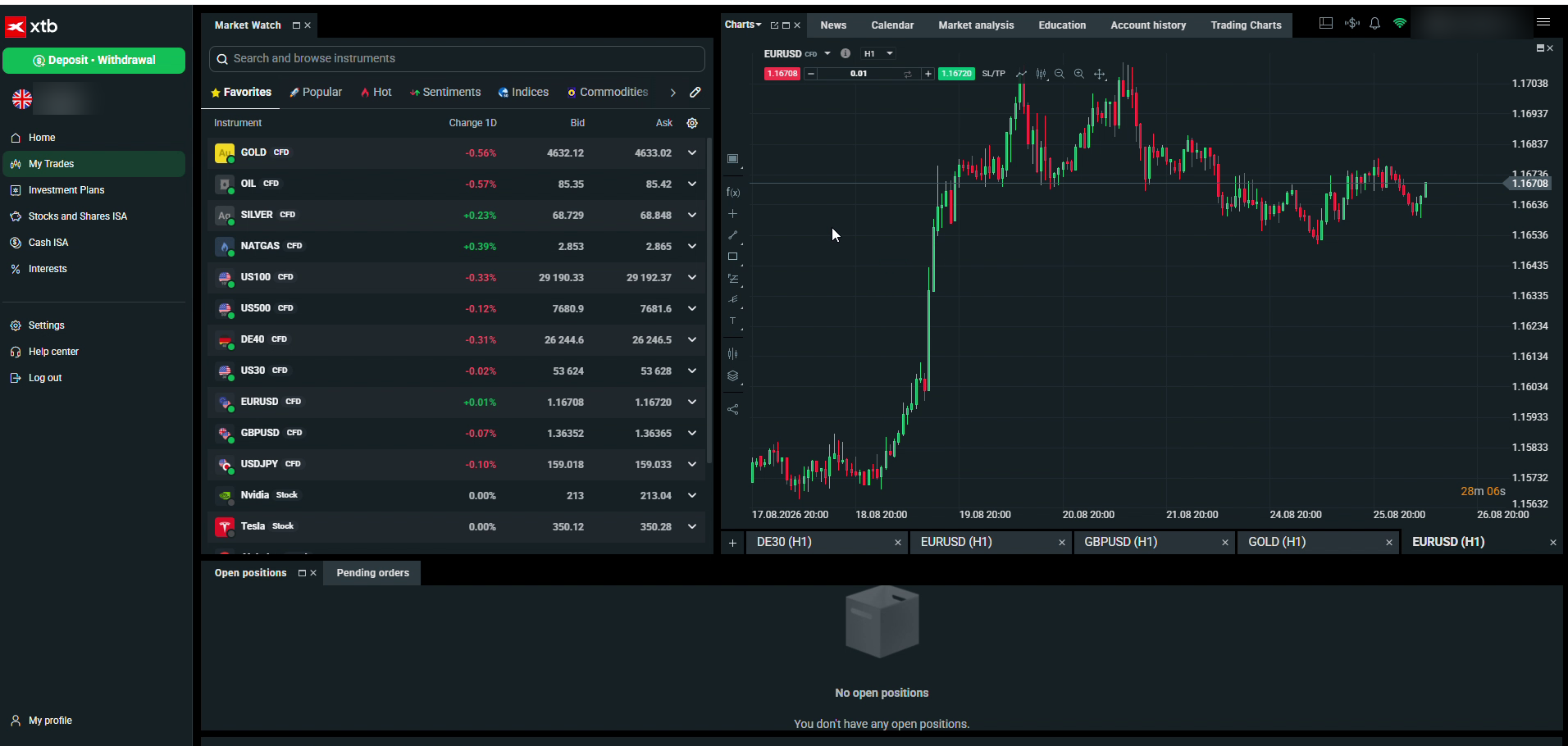
I tested the platform with real money in August 2026, and every workflow this review describes was used first-hand. It is XTB's own platform and the only one the broker runs: no MetaTrader alongside it, no third-party fallback. That is an unusual bet in an industry where most brokers hedge by offering three platforms in various states of neglect, and it changes the incentives in the user's favour. When the platform is the product, it gets the engineering attention, and it shows: xStation feels maintained in a way white-label MetaTrader setups rarely do.
One login covers the whole account across desktop, web and mobile, and the whole product range with it: CFDs on around 70 currency pairs, indices, an unusually deep commodities list, plus the real stocks, ETFs and ISA on the investing side. Positions opened on one device follow you to the next, marked-up charts included.
What Is It Like to Use Every Day?
A platform review lives or dies on the boring details, so here are the ones that decide a trading day. The workflow runs left to right: search or scroll the market watch, expand a quote to see sell, buy and the live spread, open the ticket, trade. The ticket is the platform's best idea, printing the spread in pounds, the margin requirement and the overnight swap for both directions before you commit, so the full cost of a decision sits in front of you at the moment you make it.
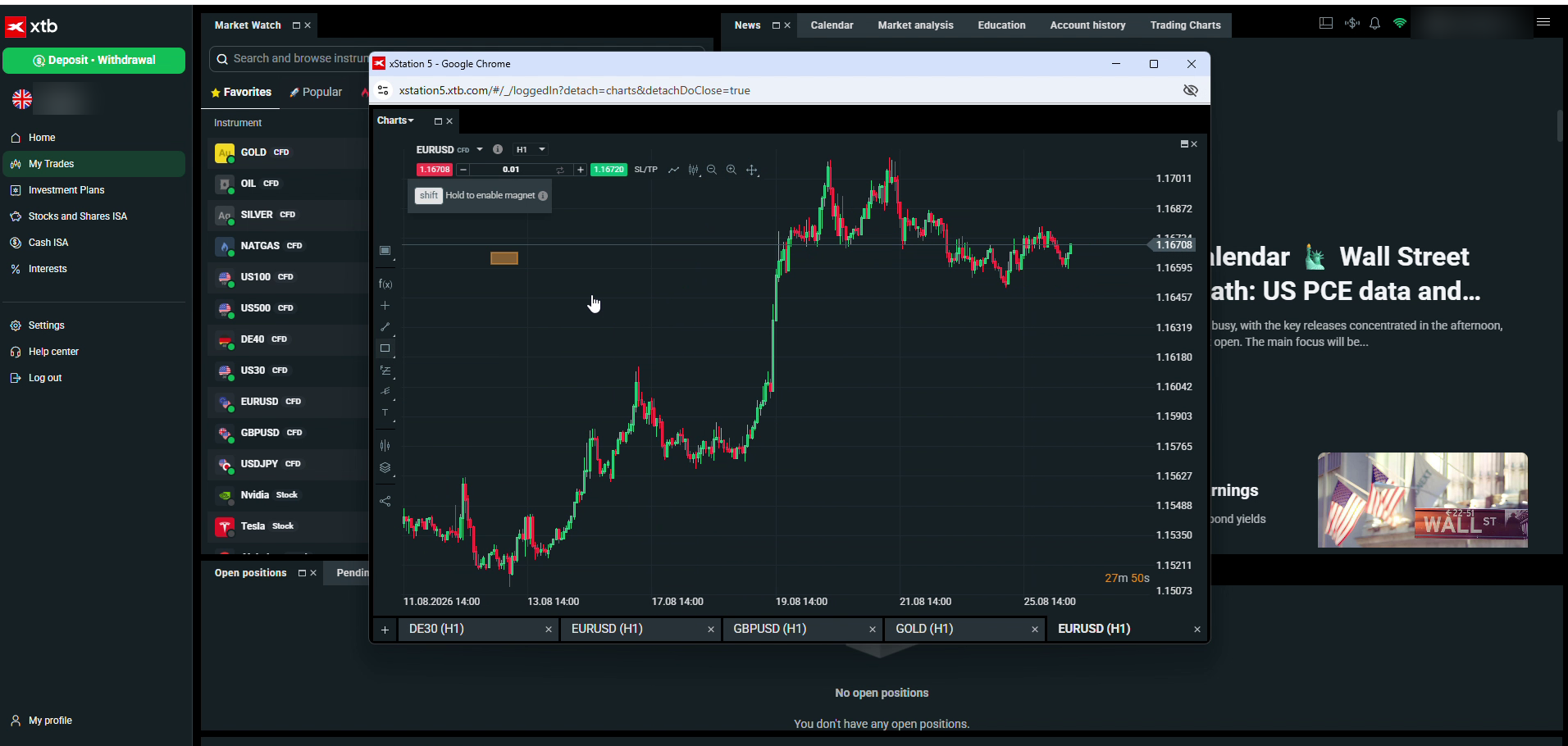
Charts earn their keep too. They respond instantly, carry a proper drawing toolbox, and detach into separate windows, which turns a laptop and a monitor into a genuine multi-screen setup. Anything you draw is saved: the zone I marked on EUR/USD during one session was waiting for me the next login, on mobile as well as desktop. Small thing, until you have used platforms that forget your work every time you close a tab.
How Strong Are the Research and Learning Tools?
Stronger than a broker platform needs to be, which is the pleasant surprise of the whole product. Where most brokers treat research as a marketing page bolted to the outside of the platform, here it is furniture inside it, sharing the same screen as your positions and updating live. The top bar runs News, Calendar, Market analysis, Education and Account history, and each is a real feature rather than a checkbox:
| Tool | What it does |
|---|---|
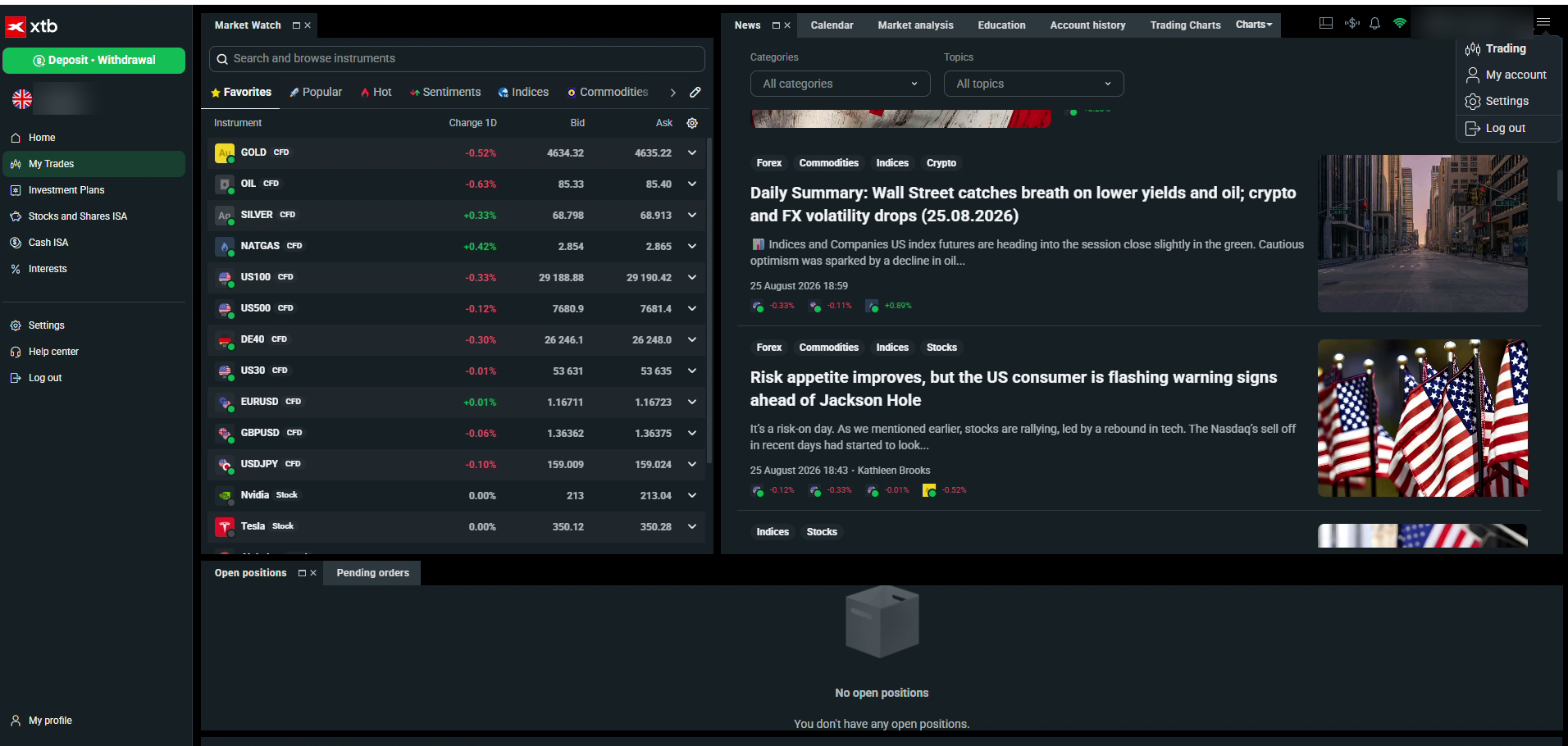
| News feed | Live market stories, filterable by forex, commodities, indices and stocks |
| Economic calendar | Scheduled releases with impact ratings, one tab from the chart |
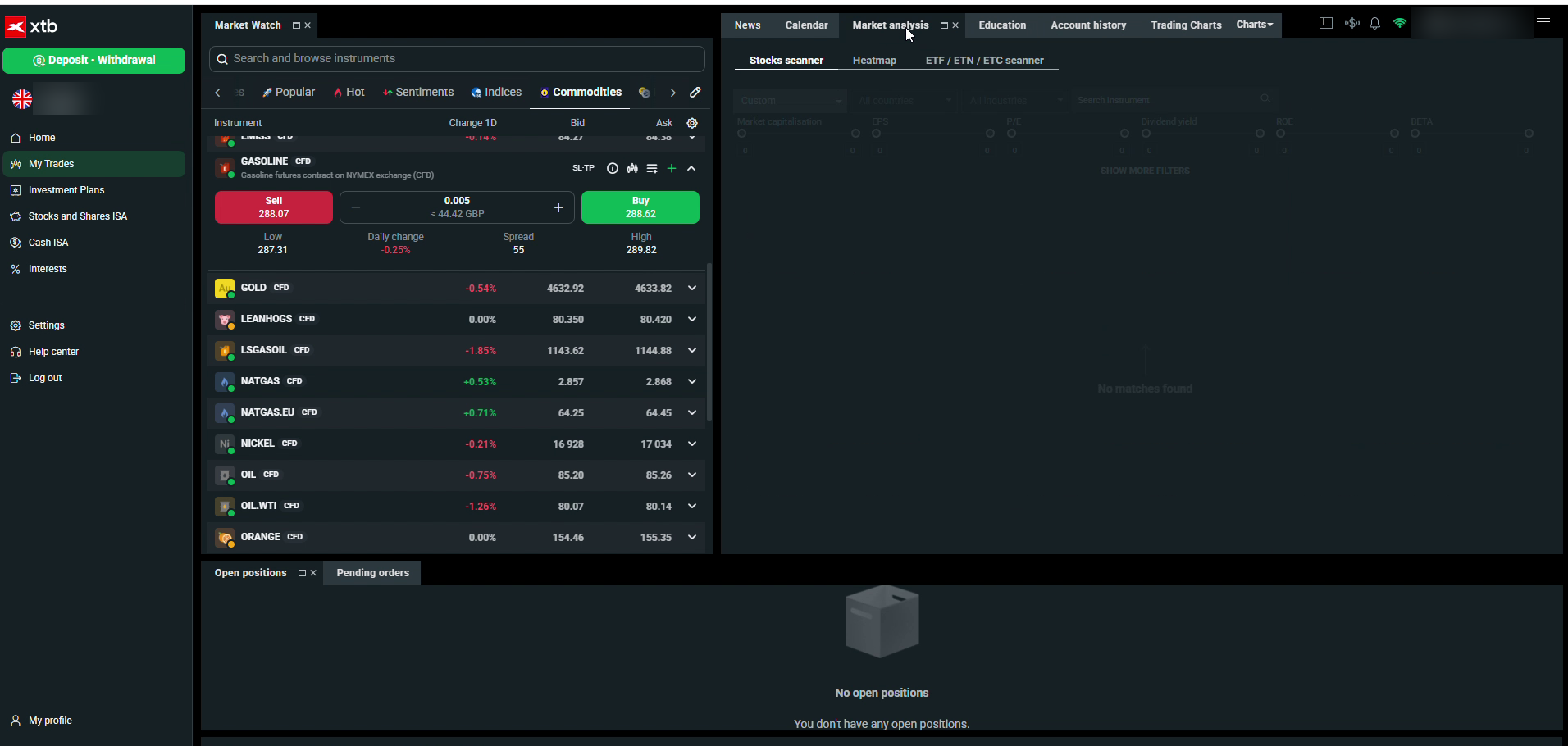
| Market analysis | Stock scanner with fundamental filters, heatmap and an ETF scanner |
| Education | Structured courses, from trading basics to portfolio building and psychology |
The scanner deserves a mention because filters for market cap, EPS, P/E, dividend yield and ROE are investing-platform territory, and here they sit inside a trading platform at no charge. For anyone who both trades and invests, that is one subscription-worth of tooling quietly included.
How Does It Compare With MetaTrader?
Most traders arriving here are coming from MT4 or MT5, so the comparison matters. On day-to-day usability there is no contest: xStation's interface is modern, legible and consistent across devices, where MetaTrader still asks new users to learn conventions from another era. On cost transparency, the ticket's pounds-and-pence breakdown beats anything MetaTrader shows natively. And on built-in research, the scanner, calendar and education library are simply things MetaTrader does not have without bolt-ons.
MetaTrader keeps two decisive advantages: the enormous ecosystem of custom indicators and Expert Advisors, and the muscle memory of traders who have used it for a decade. Neither transfers here. My honest framing: MetaTrader is a toolkit you assemble, xStation is a product you use, and which suits you is a question about how you like to work rather than which is objectively better. For the majority who never install a custom indicator, the product wins.
What Should You Set Up on Day One?
Three things, in this order. Build the market watch around what you actually trade, because the default list is a general tour and the platform is at its best when the left panel is your markets only. Set a sensible default volume on the ticket before your first live session, so a rushed click can never be an oversized one. And pin the economic calendar tab if you trade anything macro-sensitive, because knowing what lands at 1:30pm is the cheapest risk management there is.
After that, spend ten minutes detaching a chart and drawing on it, purely to learn that everything you mark is saved to the account. The traders who get the most from xStation treat it as a workspace they are furnishing rather than a website they visit, and the platform rewards that within the first week. None of this setup takes more than an evening, and all of it can be done on the demo before a penny is deposited.
Is the Mobile App Any Good?
Yes, and the store ratings back the impression: 4.7 on the App Store and 4.5 on Google Play at the fact-check date, across more than 5 million downloads. It runs the same account, keeps your stops and marked levels from desktop, and handles the two jobs a trading app genuinely needs to do well: managing an open position calmly, and not making you dread placing an order on a small screen. Charting depth still belongs to the desktop, as it does everywhere, but nothing about the app feels like an afterthought. Price alerts and order notifications arrive promptly, and because the account is one account, there is never a sync step or a second login to remember. Plenty of brokers ship a good desktop platform and a passable app; shipping both at this standard is rarer than it should be.
What Can't xStation Do?
The list is short but decisive for certain traders. There is no MetaTrader compatibility, no TradingView connection and no public API, which closes the door on Expert Advisors, copy-trade bridges and custom automation of any kind. Depth-of-market tooling is thinner than a dedicated DMA platform would offer, so order-book traders will notice the gap. And because it is the only platform on offer, disliking it means choosing a different broker rather than a different download.
My reading after real use: these are boundaries, not flaws. The platform does what it sets out to do at a high standard; it simply sets out to serve hands-on traders and investors rather than machines. Traders who need the excluded tools are well served by our MT4 rankings and TradingView broker guide.
Should You Trade on xStation 5?
If you trade or invest by your own hand, yes, happily. It is fast, legible, honest about costs at the point of decision, and carries research tools that outclass most rivals' paid add-ons. Beginners get an education library and a free demo with no meaningful time pressure; experienced discretionary traders get detachable charts, saved markups and a ticket that respects their arithmetic. The automated crowd gets a polite no. As one-platform bets go, XTB has built the version of that bet that works, and the platform is a genuine reason to choose the broker rather than a compromise you accept for it. The wider account, from spreads to the ISA, is covered in our full XTB review.
What Didn't I Test?
I did not test the platform under a major news release, where any system's speed is most stressed, and I did not run the mobile app through a full trading week as a primary device. The desktop application on MacOS was outside the scope of my sessions, which ran on the web platform. Features and layouts evolve, so everything here reflects the platform as used and checked in August 2026, with a monthly re-check scheduled.
FAQs
Is xStation 5 free?
Yes. The platform, the demo, the research tools and the education library all come with the account at no charge, and there is no minimum deposit to open one.
Can I use xStation on multiple devices?
Yes, one login runs desktop, web and mobile, and positions, stops and chart markups follow you between them.
Does xStation support MT4 indicators or Expert Advisors?
No. There is no MetaTrader compatibility and no automation route. Charting and indicators are xStation's own, and trades are placed by hand.
Can I trade real shares and CFDs in the same platform?
Yes, and that is one of xStation's best features: the 9,100+ real stocks and ETFs, the ISA and the 2,600+ CFD markets all live behind the same login.
Is there a desktop version, or is it browser only?
Both. xStation runs as a desktop application and in the browser with nothing to install, plus the iOS and Android apps, all on the same account. The browser version is the quickest way to try it.
Do chart drawings and layouts sync between devices?
Yes. Levels I marked on the desktop were waiting in the mobile app, which turns the phone into a genuine continuation of the desk rather than a separate tool.
Is xStation 5 suitable for beginners?
More than most trading platforms. The layout is learnable in an afternoon, the education section is structured rather than scattered, and the free demo plus tiny minimum position sizes make the first live steps cheap. The products themselves remain high risk, which no platform design changes.
Discussion 0 comments
Be the first to start discussing this topic! Log in or create an account to share your thoughts.
Log In Create Account
No comments yet. Be the first to start discussing this topic!