

- expertise:
- CFD Trading, Forex, Derivatives, Risk Management
- credentials:
- Chartered ACII (2018) · Trading since 2012
- tested:
- 40+ forex & CFD platforms with live accounts

- expertise:
- Broker Comparison, ISA Strategy, Portfolio Management
- credentials:
- Active investor since 2013 · 11+ years experience
- tested:
- 40+ brokers with funded accounts
How We Test
Real accounts. Real money. Real trades. No demo accounts or press releases.
What we measure:
- Spreads vs advertised rates
- Execution speed and slippage
- Hidden fees (overnight, withdrawal, conversion)
- Actual withdrawal times
Scoring:
Fees (25%) · Platform (20%) · Assets (15%) · Mobile (15%) · Tools (10%) · Support (10%) · Regulation (5%)
Regulatory checks:
FCA Register verification · FSCS protection
Testing team:
Adam Woodhead (investing since 2013), Thomas Drury (Chartered ACII, 2018), Dom Farnell (investing since 2013) — 50+ platforms with funded accounts
Quarterly reviews · Corrections: in**@*******************co.uk
Disclaimer
Not financial advice. Educational content only. We're not FCA authorised. Consult a qualified advisor before investing.
Capital at risk. Investments can fall. Past performance doesn't guarantee future results.
CFD warning. 67-84% of retail accounts lose money trading CFDs. High risk due to leverage.
Contact: in**@*******************co.uk
Quick Answer – What Is the Best AI Trading Software in the UK?
IG’s ProRealTime ProBuilder is the best AI trading software available through a UK spread betting broker. It lets you code, backtest, and deploy automated strategies directly within IG’s platform — no third-party tools required. Pepperstone’s Capitalise.ai integration is the best no-code option, letting you build strategies in plain English. All five brokers below are FCA-regulated and offer spread betting with built-in or integrated AI tools.
- #1 IG – ProRealTime ProBuilder automation, Autochartist, free with 4+ monthly trades (TIC Rating: 4.8/5)
- #2 Pepperstone – Capitalise.ai no-code automation, Smart Trader Tools (TIC Rating: 4.7/5)
- #3 CMC Markets – Pattern recognition scanner, 80+ indicators, client sentiment (TIC Rating: 4.2/5)
- #4 Spreadex – TradingView Pine Script alerts, simple execution (TIC Rating: 4.7/5)
- #5 City Index – AT Pro rule-based automation, StoneX infrastructure (TIC Rating: 4.3/5)
AI Trading Software Brokers, Ranked

IG
- TIC Score
- 4.8/5
- AI Tool
- ProRealTime ProBuilder
- Code Required
- Low-code (ProBuilder)
- Best For
- Most powerful automation
68% of retail CFD accounts lose money.

Pepperstone
- TIC Score
- 4.7/5
- AI Tool
- Capitalise.ai
- Code Required
- No code
- Best For
- Best no-code automation
72.9% of retail CFD accounts lose money.

CMC Markets
- TIC Score
- 4.2/5
- AI Tool
- Pattern recognition scanner
- Code Required
- No code
- Best For
- Intelligent chart analysis
68% of retail CFD accounts lose money.

Spreadex
- TIC Score
- 4.7/5
- AI Tool
- TradingView Pine Script
- Code Required
- Low-code (Pine Script)
- Best For
- Pine Script alerts
65% of retail CFD accounts lose money.

City Index
- TIC Score
- 4.3/5
- AI Tool
- AT Pro
- Code Required
- No code (rule-based)
- Best For
- StoneX infrastructure
70% of retail CFD accounts lose money.
How Did We Test These AI Trading Tools?
I opened live accounts with all five brokers and tested each AI tool on real market data. For each platform, I built a simple trend-following strategy using the broker’s built-in AI or automation tool, ran it for at least two weeks on a demo account, and evaluated the workflow from setup to execution. I also measured how long each tool took to learn from scratch — with no prior experience of that specific platform.
The ranking prioritises three factors: the power and flexibility of the AI tool itself, ease of use for someone new to automation, and the quality of the underlying broker (spreads, regulation, and execution). For a broader look at AI-driven trading tools beyond broker platforms, see our best AI trading robots guide.
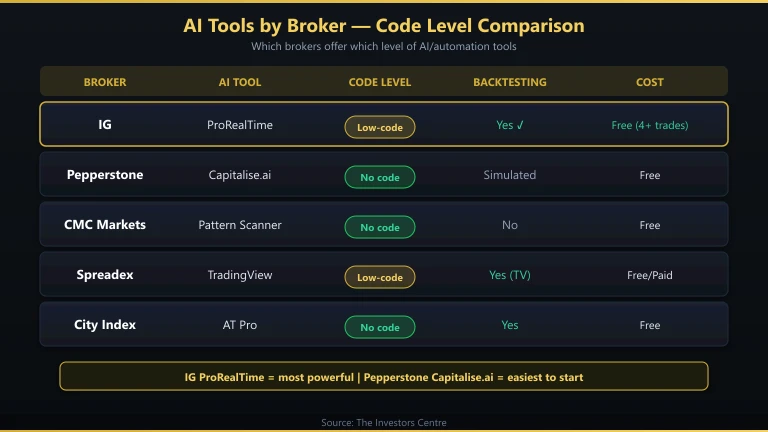
How Do These AI Trading Tools Compare?
| Broker | AI Tool | Code Required | Backtesting | Cost | Spread Betting |
|---|---|---|---|---|---|
| IG | ProRealTime ProBuilder | Low-code (ProBuilder) | Yes (built-in) | Free with 4+ trades/month | Yes |
| Pepperstone | Capitalise.ai | No code | Yes (simulated) | Free | Yes |
| CMC Markets | Pattern recognition scanner | No code | No | Free | Yes |
| Spreadex | TradingView Pine Script | Low-code (Pine Script) | Yes (TradingView) | Free (basic) / £10–50/month (paid plans) | Yes |
| City Index | AT Pro | No code (rule-based) | Yes (built-in) | Free | Yes |
IG – Most Powerful Automation
- Fees & Spreads
- 4.2
- Platform & Tools
- 4.5
- Customer Service
- 3.8
- Ease of Use
- 4.1
- Mobile App
- 4.2
Why Is IG’s ProRealTime the Best AI Trading Software?
ProRealTime’s ProBuilder language lets you code automated trading strategies that execute directly through IG’s platform. It sits a level above basic indicator alerts — you can define entry/exit logic, position sizing, stop-losses, and multi-condition filters, then backtest across years of tick data before going live.
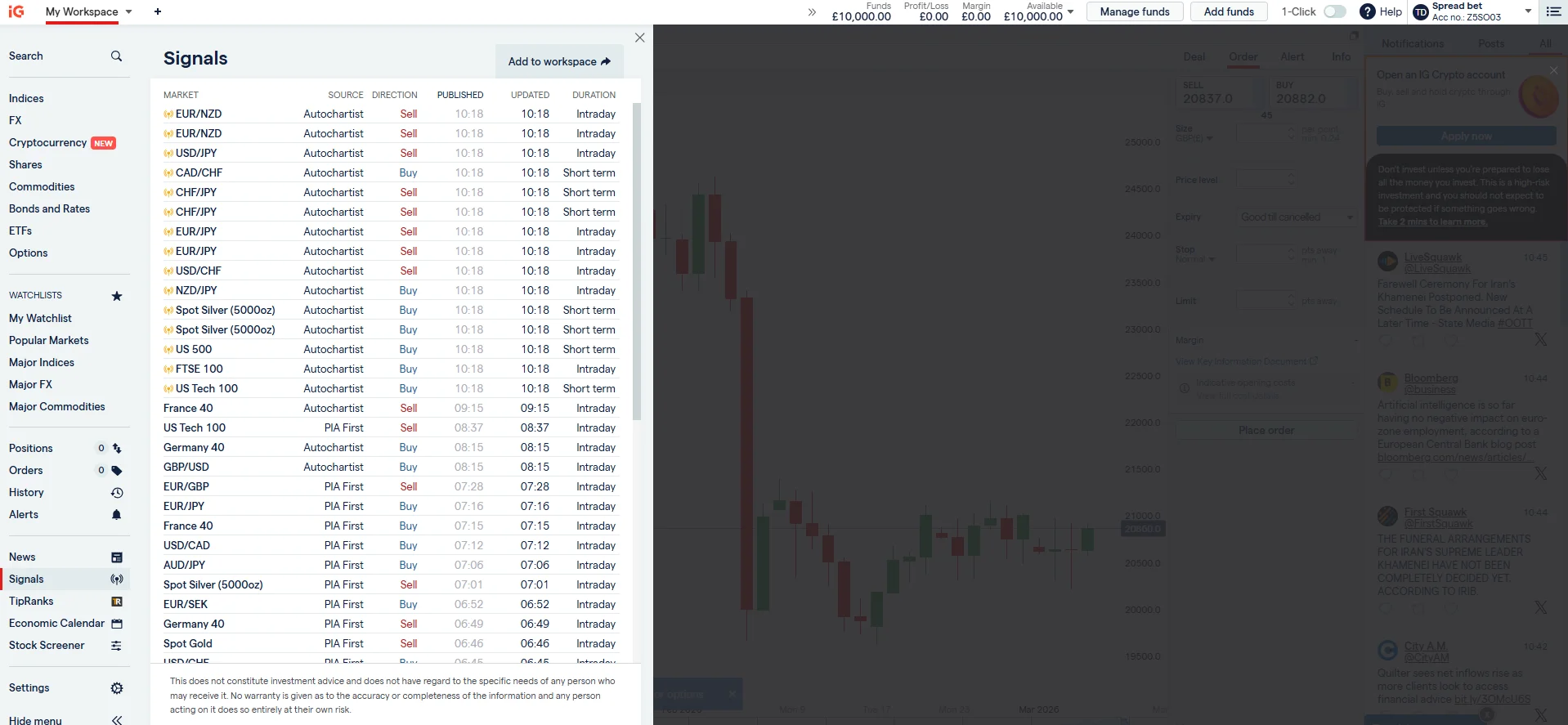
I built a Bollinger Band mean-reversion strategy in ProBuilder in about 45 minutes. The backtesting engine is fast and includes realistic spread simulation. ProRealTime is free if you place four or more trades per month through IG; otherwise there’s a £30/month charge. For active traders, it’s effectively free — and it’s the most powerful automation tool available through any UK spread betting broker.
IG also offers Autochartist for automatic chart pattern detection and PIA (Performance & Intelligence Analytics) for analysing your trading behaviour. Combined with 17,000+ markets and FCA regulation, IG is the clear number one for AI-assisted trading in the UK.
- AI Tool: ProRealTime ProBuilder + Autochartist + PIA analytics
- Code Level: Low-code (ProBuilder language)
- Backtesting: Yes — tick-level historical data
- Markets: 17,000+ including forex, indices, commodities, shares
- Regulation: FCA (FRN 195355)
Pepperstone – Best No-Code Automation
- Fees & Spreads
- 4.1
- Platform & Tools
- 4.4
- Customer Service
- 4.2
- Ease of Use
- 3.9
- Mobile App
- 4.3
Is Pepperstone’s Capitalise.ai Worth Using?
Capitalise.ai is the best no-code automation tool I’ve tested. You build strategies by typing plain English sentences: “If EUR/USD RSI(14) drops below 30, buy 0.1 lots with a 50-pip stop loss.” The platform interprets your rules and executes them automatically through your Pepperstone account.
I set up a complete momentum strategy in under 15 minutes with zero coding. The interface guides you through condition-building with dropdowns for indicators, timeframes, and actions. Capitalise.ai also includes a simulated backtest feature and real-time monitoring dashboard.
The trade-off compared to ProBuilder: less flexibility. You can’t implement complex multi-timeframe logic or custom calculations. But for traders who want automation without learning a programming language, Capitalise.ai is genuinely excellent. Combined with Pepperstone’s raw spreads from 0.0 pips and sub-30ms execution, it’s a powerful combination.
- AI Tool: Capitalise.ai + Smart Trader Tools + Autochartist
- Code Level: No code (plain English)
- Backtesting: Simulated testing available
- Spreads: From 0.0 pips (Razor) / 1.0 pips (Standard)
- Regulation: FCA (FRN 684312)
CMC Markets – Intelligent Chart Analysis
- Fees & Spreads
- 4.2
- Platform & Tools
- 4
- Customer Service
- 4
- Ease of Use
- 3.8
- Mobile App
- 3.9
How Good Is CMC Markets’ Pattern Recognition Scanner?
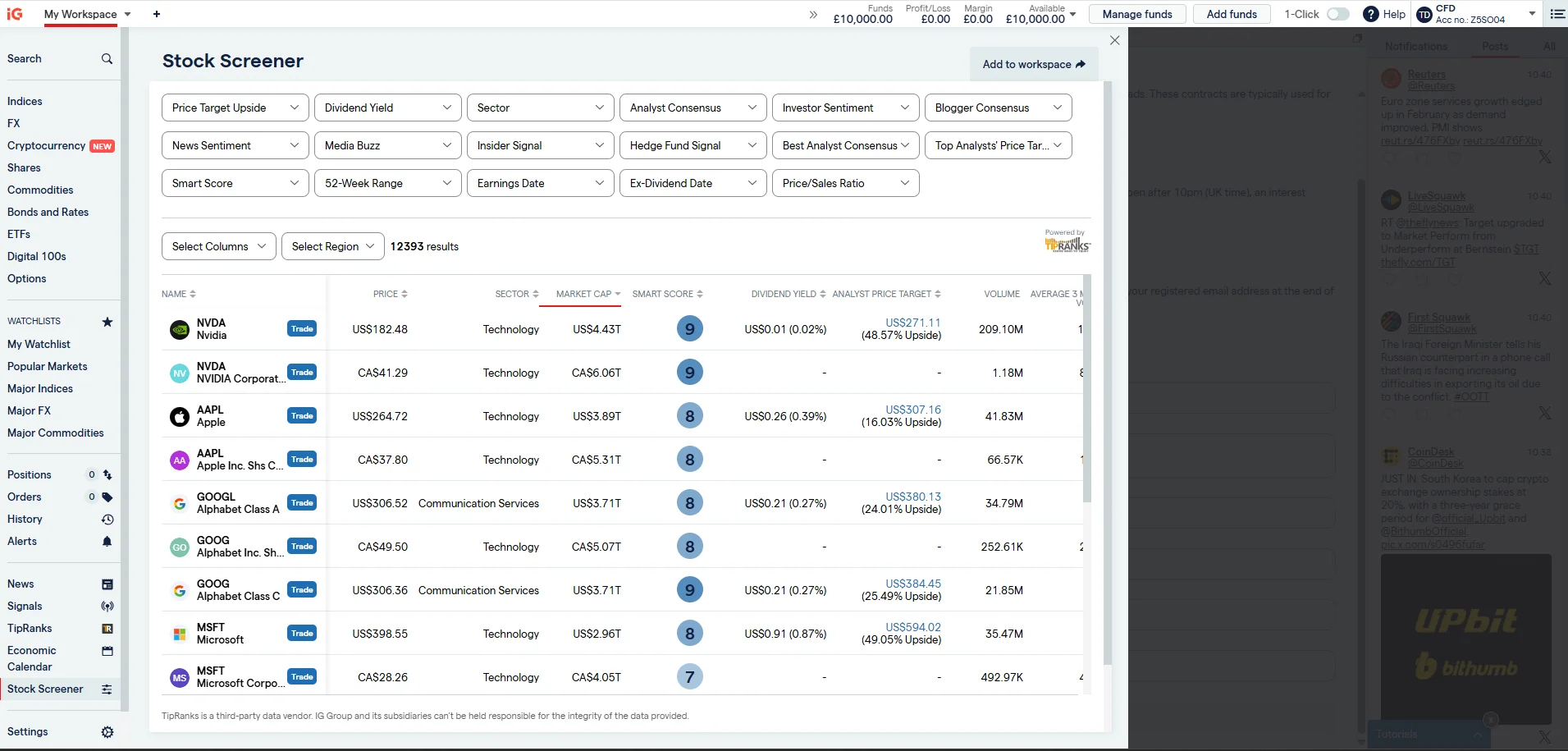
CMC Markets’ Next Generation platform includes an automated pattern recognition scanner that identifies chart patterns — head and shoulders, double tops/bottoms, channels, triangles — across all instruments in real time. It’s not full automation; the scanner flags setups and you decide whether to trade them. But it saves hours of manual chart scanning.
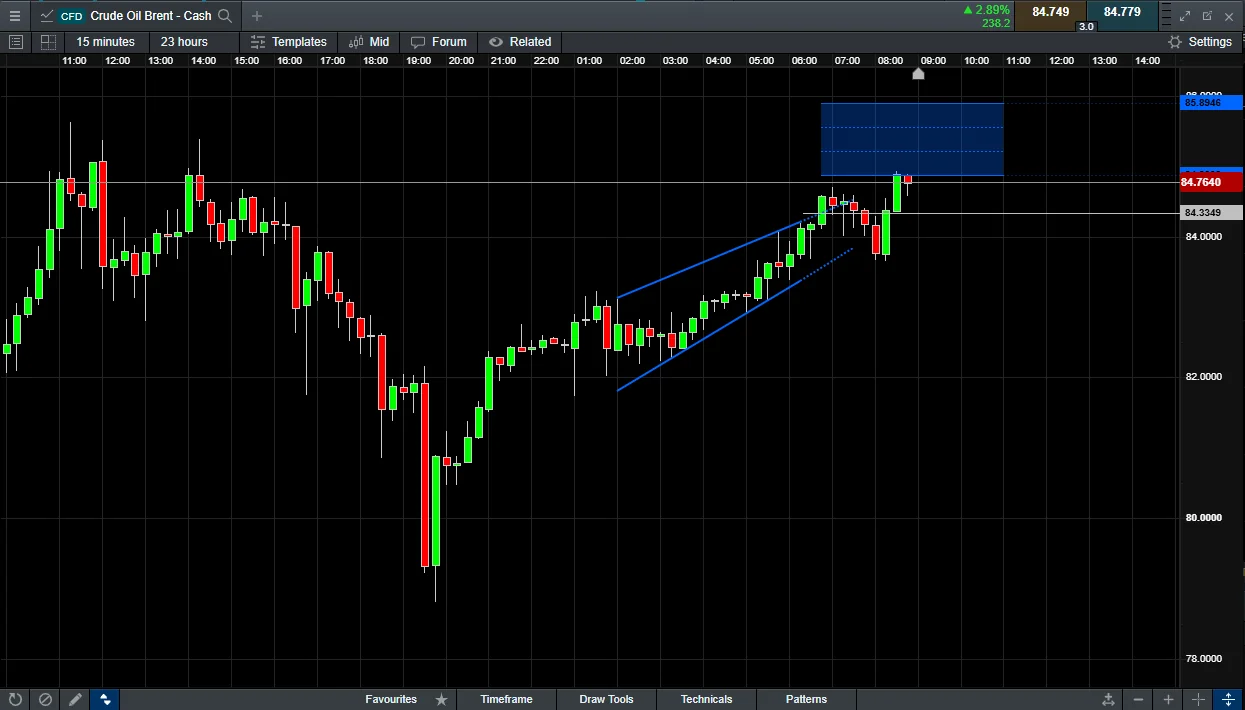
The client sentiment tool adds another layer, showing the percentage of CMC clients holding long versus short positions. When combined with pattern recognition, you get a useful two-signal approach: the scanner finds the pattern, sentiment data tells you whether the crowd is positioned in the same direction. I found the contrarian signal (fading the crowd) more reliable than following it.
CMC’s 80+ built-in indicators and customisable layouts make Next Generation one of the best manual analysis platforms in the UK. The AI features are complementary rather than central — this is for traders who want intelligent analysis tools, not full automation.
- AI Tool: Pattern recognition scanner + client sentiment
- Code Level: No code
- Backtesting: Not available on Next Generation
- Markets: 10,000+ instruments
- Regulation: FCA (FRN 173730)
Spreadex – Pine Script Alerts
- Fees & Spreads
- 4.5
- Platform & Tools
- 4.2
- Customer Service
- 4.7
- Ease of Use
- 4.2
- Mobile App
- 4.1
Can You Use TradingView’s Pine Script with Spreadex?
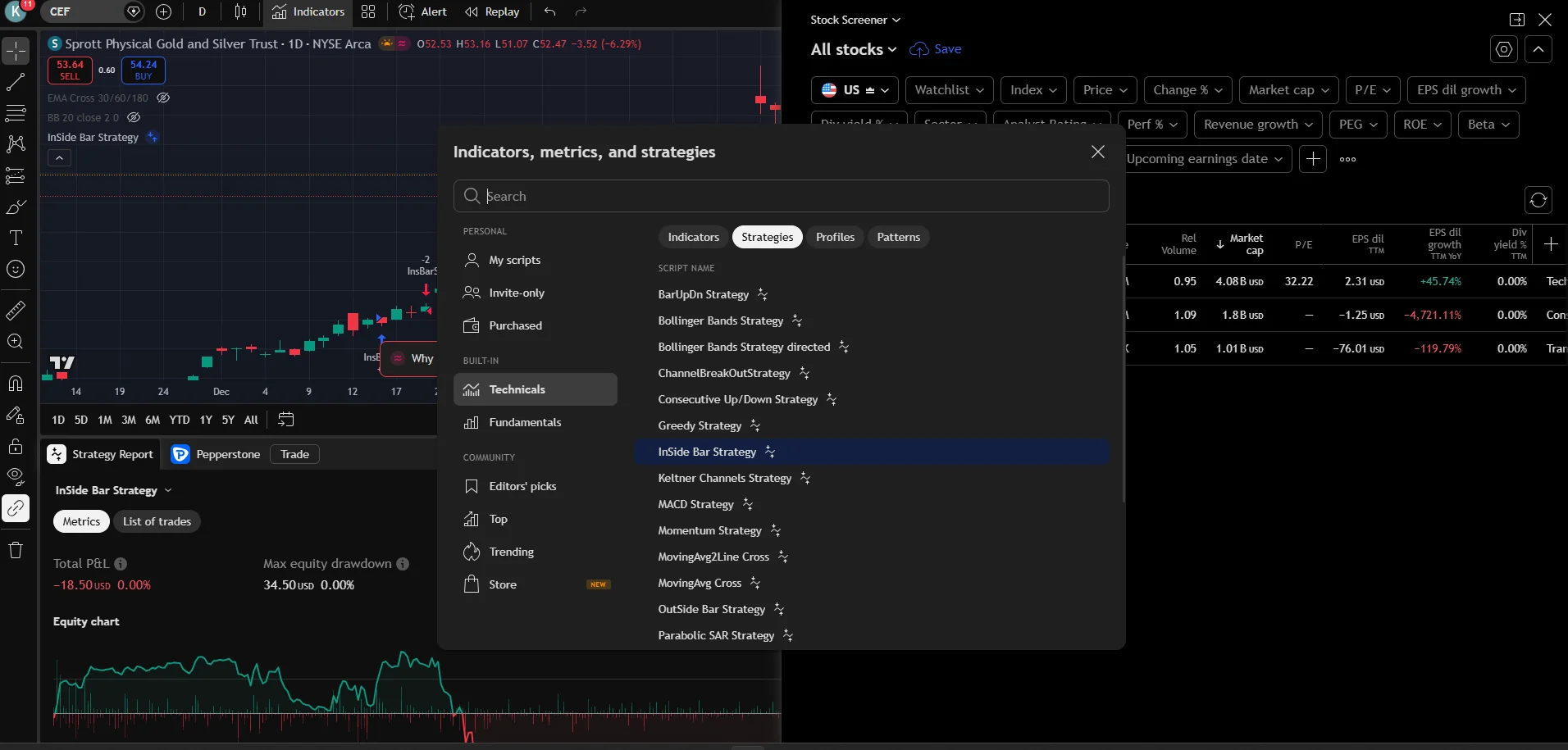
Spreadex offers TradingView integration, which means you can use Pine Script to build custom indicators and strategy alerts. Pine Script is easier to learn than MQL4 or ProBuilder — I wrote a working RSI divergence alert in about 20 minutes. TradingView’s community library also has thousands of free Pine Script strategies you can use immediately.
The limitation: TradingView alerts through Spreadex don’t auto-execute trades. You receive the alert and place the trade manually. This is semi-automated rather than fully automated. For traders who want signal generation without full hands-off execution, it’s a practical middle ground.
Spreadex does not offer MT4 or MT5, so MQL-based EAs are not an option. If you specifically need Pine Script-based analysis with spread betting, Spreadex is the cleanest setup. For full automation, IG or Pepperstone are better choices.
- AI Tool: TradingView Pine Script (alerts, not auto-execution)
- Code Level: Low-code (Pine Script)
- Backtesting: Yes (via TradingView)
- Min Deposit: £0
- Regulation: FCA (FRN 190941)
City Index – StoneX Infrastructure
- Fees & Spreads
- 4
- Platform & Tools
- 3.3
- Customer Service
- 3.3
- Ease of Use
- 3.5
- Mobile App
- 3.7
Does City Index’s AT Pro Offer Real Automation?
City Index’s AT Pro platform lets you build rule-based automated strategies without writing code. You define conditions using a visual interface — select indicators, set thresholds, and specify actions. The system executes trades automatically when conditions are met.
AT Pro is less powerful than ProRealTime’s ProBuilder and less intuitive than Capitalise.ai, placing it between the two. It handles simple single-condition strategies well but becomes cumbersome with complex multi-indicator setups. The built-in backtesting is adequate but uses limited historical data compared to ProRealTime.
City Index is part of StoneX Group, which provides institutional-grade infrastructure and reliable execution. If you already have a City Index account and want to add basic automation without switching brokers, AT Pro is a functional option. For new users specifically seeking AI trading tools, IG or Pepperstone offer more capable solutions.
- AI Tool: AT Pro rule-based automation
- Code Level: No code (visual rule builder)
- Backtesting: Yes (limited historical data)
- Regulation: FCA (FRN 446717)
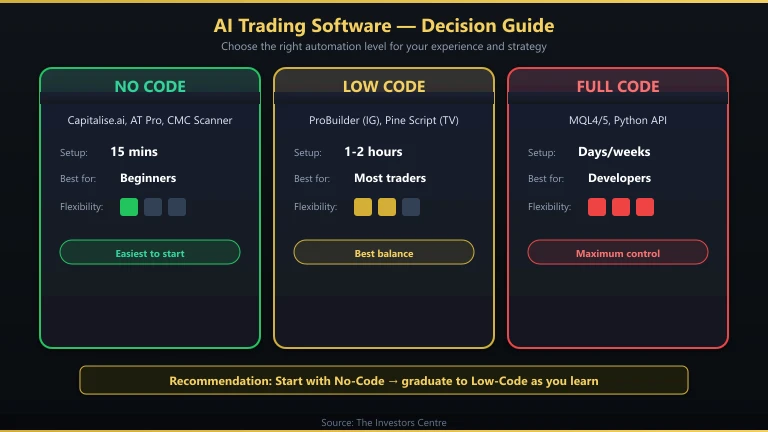
Should You Choose No-Code, Low-Code, or Full-Code AI Trading Software?
The right approach depends on your technical ability and how much control you need over your strategy. Here’s the honest breakdown.
No-Code (Capitalise.ai, AT Pro, CMC Pattern Scanner)
Best for: traders who want automation without learning a programming language. Setup takes minutes. The trade-off is limited flexibility — you’re constrained by the platform’s pre-built conditions and actions. If your strategy requires custom calculations or unusual indicator combinations, no-code tools may not support it.
Low-Code (ProBuilder, Pine Script)
Best for: traders willing to invest a few hours learning a simple scripting language. ProBuilder and Pine Script are both easier than MQL4 or Python. You gain full control over entry/exit logic, position sizing, and risk management. Most strategies can be implemented in under 50 lines of code. This is the sweet spot for the majority of retail traders.
Full Code (MQL4/MQL5, Python API)
Best for: programmers and traders with complex, multi-asset strategies. Maximum flexibility but the steepest learning curve. If you’re starting from zero coding experience, low-code is a better first step. See our trading bot guide for the full-code path, and our MT4 automation guide for MQL4-specific instructions.
Can You Use ChatGPT as AI Trading Software?
ChatGPT is not trading software. It cannot connect to a broker, execute trades, or access real-time market data. But it is a powerful tool for building trading strategies that you then deploy through broker platforms.
I use ChatGPT to generate ProBuilder code for IG’s ProRealTime, Pine Script for TradingView, and MQL4 for MT4. It saves hours of manual coding. The output usually needs two to three rounds of debugging before it compiles cleanly, but the workflow is vastly faster than learning each language from scratch.
ChatGPT is also useful for analysing trading ideas, stress-testing strategy logic (asking it to find edge cases where your rules would fail), and explaining unfamiliar technical indicators. Treat it as a research and coding assistant, not a signal generator.
For a detailed walkthrough of using ChatGPT to build MT4 Expert Advisors, see our ChatGPT MQL4 guide.
Discuss AI Trading Software
Built an automated strategy with ProBuilder, Capitalise.ai, or Pine Script? Share which AI trading tool actually held up in live markets — and which broker made deployment painless. Our community earns Equity for helpful contributions.
Discussion 0 comments
Be the first to start discussing this topic! Log in or create an account to share your thoughts.
Log In Create AccountFAQs
References
- Financial Conduct Authority (FCA) – Contract for differences | FCA
- ProRealTime – ProBuilder Trading Programming
- Capitalise.ai – Automated Trading in Plain English
- FCA Register – IG Markets Limited. FRN: 195355
- HM Revenue & Customs – Spread betting tax treatment (BIM22015). Available at: gov.uk/hmrc-internal-manuals
For more trading guides, explore our full trading hub.
68% of retail investor accounts lose money when trading spread bets and CFDs with this provider.
No comments yet. Be the first to start discussing this topic!