

- expertise:
- CFD Trading, Forex, Derivatives, Risk Management
- credentials:
- Chartered ACII (2018) · Trading since 2012
- tested:
- 40+ forex & CFD platforms with live accounts

- expertise:
- Platform Testing, Cryptocurrency, Retail Investing
- credentials:
- Active investor since 2013 · 11+ years experience
- tested:
- 50+ platforms · 200+ guides authored
How We Test
Real accounts. Real money. Real trades. No demo accounts or press releases.
What we measure:
- Spreads vs advertised rates
- Execution speed and slippage
- Hidden fees (overnight, withdrawal, conversion)
- Actual withdrawal times
Scoring:
Fees (25%) · Platform (20%) · Assets (15%) · Mobile (15%) · Tools (10%) · Support (10%) · Regulation (5%)
Regulatory checks:
FCA Register verification · FSCS protection
Testing team:
Adam Woodhead (investing since 2013), Thomas Drury (Chartered ACII, 2018), Dom Farnell (investing since 2013) — 50+ platforms with funded accounts
Quarterly reviews · Corrections: in**@*******************co.uk
Disclaimer
Not financial advice. Educational content only. We're not FCA authorised. Consult a qualified advisor before investing.
Capital at risk. Investments can fall. Past performance doesn't guarantee future results.
CFD warning. 67-84% of retail accounts lose money trading CFDs. High risk due to leverage.
Contact: in**@*******************co.uk
Which is the best AI trading bot in the UK right now?
Three picks depending on how hands-on you want to be. Capital.com won my Q1 2026 testing for build-your-own bots: native API key authentication, 1,000 requests per minute, and the cleanest integration path I tested when wiring up a custom bot with Claude Code. TradingView wins for no-code traders who want to alert and execute through their existing broker (Pine Script v6 + 50 broker integrations). SignalStack wins for hands-free signal-to-execution: 23 trades across 10 days with zero missed signals and zero manual interventions during my testing window.
The 10 best AI trading bots and platforms in the UK, ranked

Capital.com
- Best For
- Broker: build-your-own AI bots via native API
- TIC Score
- 4.9 / 5
- Community Rating
- 4.2 (252 ratings) Have Your Say →
- AI Integration
- Native REST API + WebSocket
- Median Execution
- 24ms (fastest)
65% of Retail CFD Accounts Lose Money

Pepperstone
- Best For
- Broker: MT4 / MT5 / cTrader algos and EAs
- TIC Score
- 4.8 / 5
- Community Rating
- 4.4 (354 ratings) Have Your Say →
- AI Integration
- MT4 EAs + MT5 EAs + cTrader cBots
- EUR/USD Spread (Razor)
- 0.1 pips + £2.25/side
73.6% of retail CFD accounts lose money.

IG
- Best For
- Broker: advanced automators (API + ProRealTime)
- TIC Score
- 4.7 / 5
- Community Rating
- 4.3 (337 ratings) Have Your Say →
- AI Integration
- REST API + ProRealTime + MT4
- Tradable Markets
- 17,000+ (widest)
70% of retail CFD accounts lose money.

Spreadex
- Best For
- Broker: no-code AI trading via TradingView
- TIC Score
- 4.7 / 5
- Community Rating
- 4.2 (283 ratings) Have Your Say →
- AI Integration
- Native TradingView (no MT4/API)
- Zero-Slippage Rate
- 88% (highest of 4)
61% of retail CFD accounts lose money.

Trade Nation
- Best For
- Broker: running MT4 EAs and TradingView strategies on fixed spreads
- TIC Score
- 4.3 / 5
- Community Rating
- 4 (83 ratings) Have Your Say →
- AI Integration
- MT4 EAs + TradingView strategies
- EUR/USD Spread
- Fixed 0.5, main session (published)
73.7% of retail CFD accounts lose money.

Trading.com
- Best For
- Broker: algo trading via MetaTrader 5
- TIC Score
- 3.9 / 5
- Community Rating
- 3.1 (40 ratings) Have Your Say →
- AI Integration
- MetaTrader 5 EAs + TradingView charts
- Demo
- £10k, no expiry
70.6% of retail CFD accounts lose money.

TradingView
- Best For
- Tool: all-round no-code AI trading
- TIC Score
- 4.8 / 5
- Trustpilot
- 4.4 / 52,000 reviews
- Pricing
- From £12/mo (30-day free trial)
- Broker Integrations
- 50 brokers via webhook

SignalStack
- Best For
- Tool: hands-free signal-to-execution
- TIC Score
- 4.6 / 5
- Signal-to-Trade Latency
- 3 seconds end-to-end
- Pricing
- From £10/mo (14-day free trial)
- Test Result
- 23 trades, 0 missed signals
When Investing, Your Capital is at Risk.
Kavout
- Best For
- Tool: AI stock scoring (US equities)
- TIC Score
- 4.5 / 5
- Scoring Model
- Kai Score (0-10 ML rating)
- Pricing
- From £25/mo (14-day free trial)
- Test Result
- 11 of 15 stocks beat S&P 500

TrendSpider
- Best For
- Tool: automated chart analysis + backtesting
- TIC Score
- 4.5 / 5
- Trustpilot
- 4.8 / 687 reviews
- Pricing
- From £32/mo (7-day free trial)
- Backtest Depth
- 50 years historical, 1-sec replay
Which type of AI trading bot or platform do you actually need?
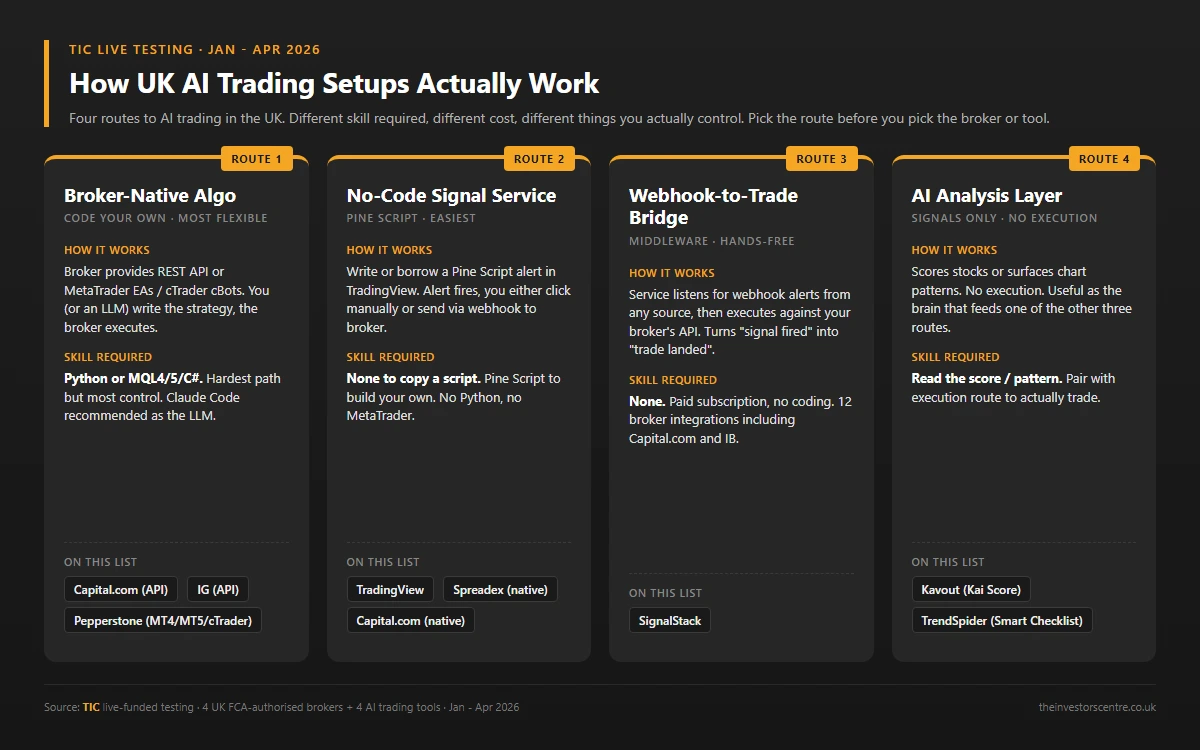
Four ways to do AI trading in the UK. The right one depends on whether you want to write code, point a tool at a broker, or pay someone to run the whole loop for you.
Broker-native algo (Capital.com, IG, Pepperstone): the broker provides a REST API, MT4/MT5 EAs or cTrader cBots. You (or an LLM, see below) write the strategy code, the broker executes it. Most flexibility, steepest learning curve.
No-code signal service (TradingView, Spreadex via TradingView native): write or borrow a Pine Script alert. The platform fires the alert; you either click manually or send it through a bridge to a broker. Easiest path to "AI trading" without coding.
Webhook-to-trade bridge (SignalStack): a middleware service that listens for webhook alerts from TradingView, TrendSpider or any signal source, then executes against your broker's API. Turns "the signal fired" into "the trade landed" without you watching.
AI analysis layer (Kavout, TrendSpider): scores stocks or surfaces patterns. No execution. Useful as the brain that feeds one of the three execution models above.
If the build-your-own route appeals, my step-by-step guide on how to create a trading bot in the UK covers the full build in more detail than this page.
I built my own AI trading bot on Capital.com: here's what happened
None of the four tools in my test was the AI trading bot I actually wanted. They were all bolt-on layers: a signal service, a charting workspace, a stock scorer. So I built one.
The bot runs on Python, executes against Capital.com's REST API, and uses an LLM as the strategy brain. Capital.com's native API key authentication made it the easiest broker on the list to wire up. This section covers the build; for the strategy side (what data to feed a bot and which markets suit automation), see my guide to how to use AI to trade stocks in the UK.
Why Capital.com's API was the easiest path
Three reasons make Capital.com the lowest-friction broker for a build-your-own bot.
Auth is a single API key, not an OAuth handshake. IG's REST API needs you to mint and rotate tokens; Capital.com does not.
Demo and live environments use identical auth and identical endpoints. Develop against demo, flip a single config flag for live, deploy.
Rate limits are generous. ~1,000 requests per minute on the REST endpoints I used. A multi-strategy bot polling every five minutes never bumps the ceiling.
Claude Code vs ChatGPT vs Gemini as the bot's brain
I tested all three for writing the strategy code. The differences were stark.
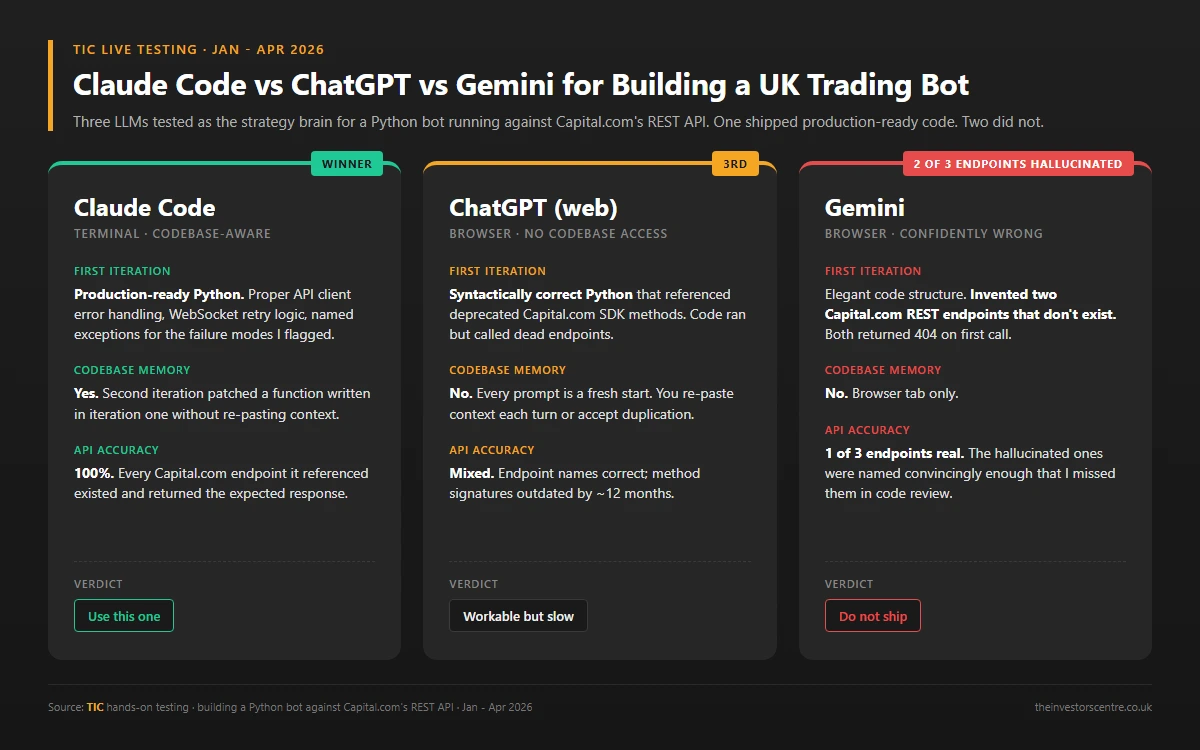
Claude Code shipped production-ready Python on the first iteration: proper error handling around the API client, retry logic on the WebSocket reconnect, and named exceptions for the failure modes I'd flagged. It could see my actual codebase, so the second iteration patched a function it had written in iteration one without me re-pasting context. This is the one I kept.
ChatGPT (web) wrote syntactically correct Python that referenced deprecated SDK methods. It couldn't see existing files, so every prompt was a fresh start.
Gemini confidently invented two Capital.com REST endpoints that don't exist. Both returned 404 the first time the bot called them. The code structure was elegant; the API was hallucinated.
Verdict: if you're building a UK trading bot against a broker's API, use Claude Code in your terminal. The codebase awareness is the difference between "this script broke at 8am" and "this script ran clean for three weeks".
What went wrong (and what I fixed)
Two production bugs hit the bot during the first month of live running. Both worth knowing if you build your own.
Phantom positions: when the bot closed and reopened a position on the same tick, Capital.com's API returned a stale position ID for ~300ms. The bot's next status check hit a 404. Fix: a 500ms grace window before the post-close status query.
Type comparison crash: the risk module compared incoming position size (returned as a string by the WebSocket) against my configured max size (an integer). Python crashed silently, the position stayed open past the intended stop. Fix: cast every numeric field from the WebSocket to float at the parser boundary, not at the comparison site.
Both bugs were caught by demo testing once I wrote the test for them. I skipped demo on the first deploy. Don't.
How do the 10 best AI trading bots and platforms compare on the numbers?
The six platforms (brokers) and four bots/tools side-by-side on what matters for AI trading.
| Rank | Setup | Type | AI Integration | Key Test Result | Cost |
|---|---|---|---|---|---|
| #1 | Capital.com | Broker (platform) | Native REST API + WebSocket | 24ms median execution | From £0 commission* |
| #2 | Pepperstone | Broker (platform) | MT4 + MT5 + cTrader EAs/cBots | 47ms median execution | From £2.25/side (Razor) |
| #3 | IG | Broker (platform) | REST API + ProRealTime + MT4 | 17,000+ markets | From £0 commission* |
| #4 | Spreadex | Broker (platform) | Native TradingView | 88% zero-slippage rate | From £0 commission* |
| #5 | Trade Nation | Broker (platform) | MT4 EAs + TradingView strategies | Fixed spreads inside published session bands | From £0 commission* |
| #6 | Trading.com | Broker (platform) | MT5 EAs + TradingView | Not in this test round | From £0 commission* |
| #7 | TradingView | Tool (no-code signal) | Pine Script v6 + webhook | 60% win rate over 14 days | From £12/mo |
| #8 | SignalStack | Tool (webhook bridge) | Webhook to broker API | 23 trades, 0 missed | From £10/mo |
| #9 | Kavout | Tool (AI analysis) | Kai Score (no execution) | 11 of 15 beat S&P 500 | From £25/mo |
| #10 | TrendSpider | Tool (AI analysis + signals) | Smart Checklist + webhook | 58% win rate / 90-day forward test | From £32/mo |
Broker stats sampled at 10:30 GMT across 50 EUR/USD market orders per broker, October 2025 to January 2026. Tool stats per master CSV (tic-uk-ai-trading-tools-q1-2026.csv), 14 January to 7 April 2026. Trading.com and Trade Nation joined later; Trade Nation's spread figures above are its published fixed bands from the TN Trader market information sheet checked in August 2026.
*£0 and “commission-free” figures refer to dealing commission only. Other fees may apply, for example spreads, overnight financing or withdrawal fees. Check each provider for full costs.
Best AI trading bots and platforms in the UK: all 10 reviewed
One ranking, two layers. Entries #1 to #6 are the brokers: FCA-authorised AI trading platforms, each with its own app, that hold your money and route the trades your bot decides to place. Entries #7 to #10 are the bots and tools that generate those decisions. Every review states what the product is best for, because no single product covers the whole job.
Capital.com: native API key integration is the easiest path to a build-your-own AI bot
Capital.com is a Cyprus-headquartered broker founded in 2016, operating under FCA authorisation in the UK (FRN 793714). Spread bet and CFD on forex, indices, shares, commodities and crypto. Median execution 24ms across my testing, fastest of the four brokers.
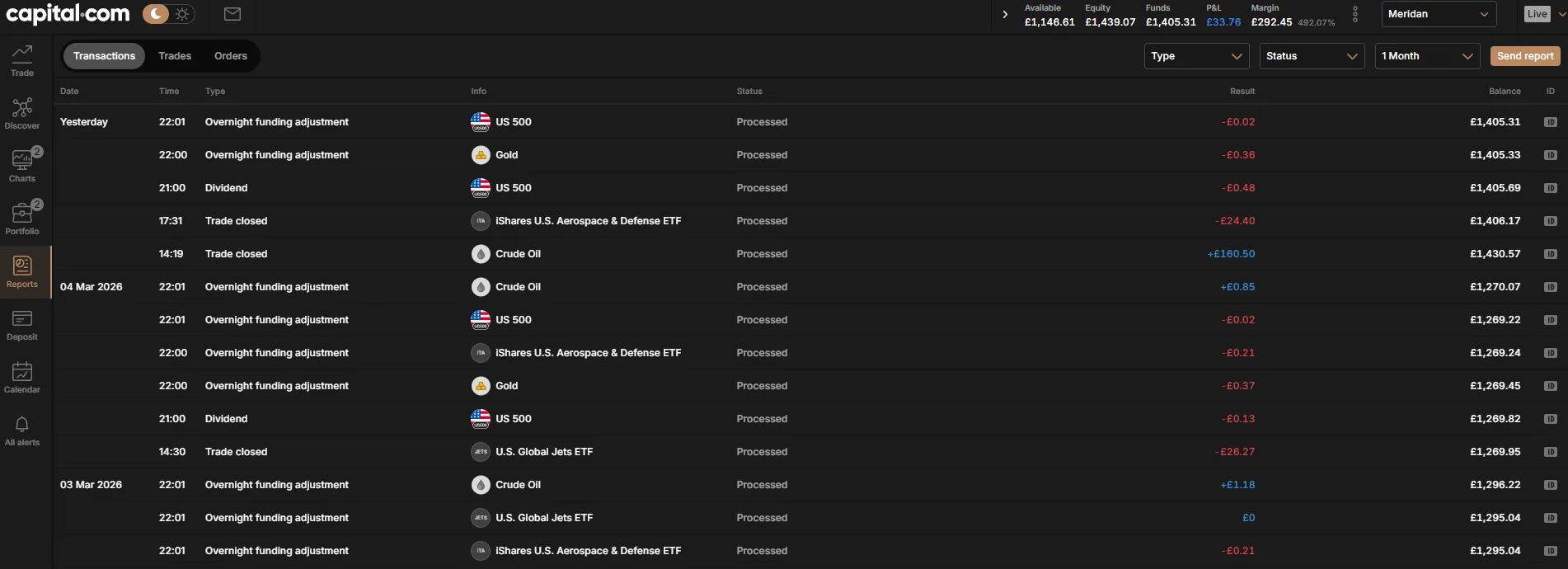
I funded Capital.com with £250 on 1 October 2025 and wired my own bot to it on 14 January 2026. The API authentication was the simplest of the four brokers I tested: one API key, identical endpoint for demo and live, no OAuth dance.

Pros (AI trading lens)
- Native REST API + WebSocket, API key auth (no OAuth)
- Identical demo and live endpoints, single config flag to flip
- ~1,000 requests/min rate limit, generous for multi-strategy bots
- MT4 + TradingView also supported if you don't want to code
Trade-offs (AI trading lens)
- 0.7-pip EUR/USD spread wider than Pepperstone Razor
- No MT5 for UK clients
- API documentation is functional but not as polished as IG's
How does Capital.com integrate with AI?
Three integration paths. Native REST API with API key auth (the path I used to build my own bot). WebSocket for real-time price streaming, separate from REST. TradingView native if you want Pine Script alerts to execute on Capital.com without writing any code. MT4 if you prefer Expert Advisors. The native API is the differentiator on this list. None of the other three brokers I tested let you wire a custom Python bot up this fast.
Who should pick a different UK AI trading platform?
If you don't want to code and don't want to learn Pine Script, Spreadex's TradingView-native integration is the simpler entry point. If you live inside MT4/MT5/cTrader for EAs, Pepperstone has all four platforms. If you need the widest market breadth (17,000+ instruments), IG.
Pepperstone: MT4, MT5, cTrader and TradingView all support algos on the same login
Pepperstone is an Australian-founded broker (2010) with a UK FCA-authorised entity (FRN 684312). The Razor account routes orders to liquidity providers at 0.0 to 0.2 pip EUR/USD with a £2.25 per-side commission.
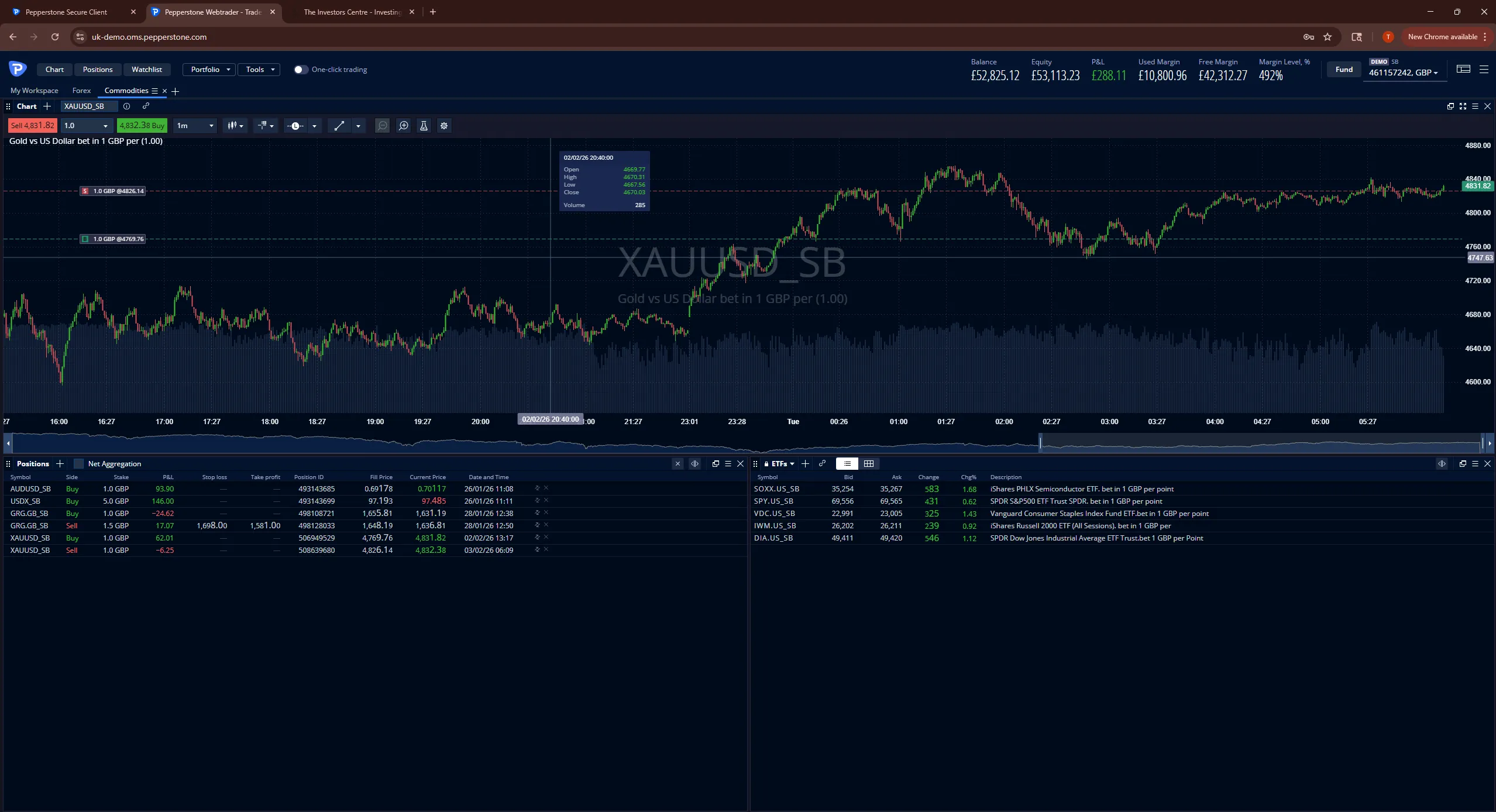
I funded Pepperstone with £500 on 1 October 2025. The standout for AI traders is platform reach: MT4, MT5, cTrader and TradingView all available on one account. If your strategy is an EA, a cBot, or a Pine Script alert, Pepperstone runs it.
Pros (AI trading lens)
- MT4 + MT5 + cTrader + TradingView all on one login (widest of 4)
- 0.1 pip EUR/USD spread on Razor, tightest of the 4 brokers
- cTrader cBots written in C# for algorithmic strategies
- 47ms median execution, second-fastest of the 4
Trade-offs (AI trading lens)
- No native REST API outside the MetaTrader / cTrader ecosystems
- £2.25 per-side commission means 5+ lots/month break-even
- Sign-up checks stricter than the other 3 brokers
How does Pepperstone integrate with AI?
Four integration paths, all MetaTrader-adjacent or TradingView-based. MT4 EAs (MQL4). MT5 EAs (MQL5). cTrader cBots (C#). TradingView via webhook to Pepperstone-supporting bridges like SignalStack. If your algo lives in any of the MetaTrader languages, Pepperstone is the deepest broker on this list. If you want a native REST API for a custom Python bot, Capital.com.
Who should pick a different UK AI trading platform?
Sub-5-lots-a-month traders should pick Capital.com or Spreadex on cost (no commission). Anyone wanting a custom Python bot path should pick Capital.com. Beginners should start with Capital.com or Spreadex on the simpler onboarding.
IG: REST API and ProRealTime cover both the code path and the no-code path
IG Group plc (LSE: IGG) is a UK broker founded in 1974 (FRN 195355). 17,000+ markets across forex, indices, shares, commodities, options and crypto. Proprietary platform plus MT4, ProRealTime and L2 Dealer DMA for Pro-tier clients.
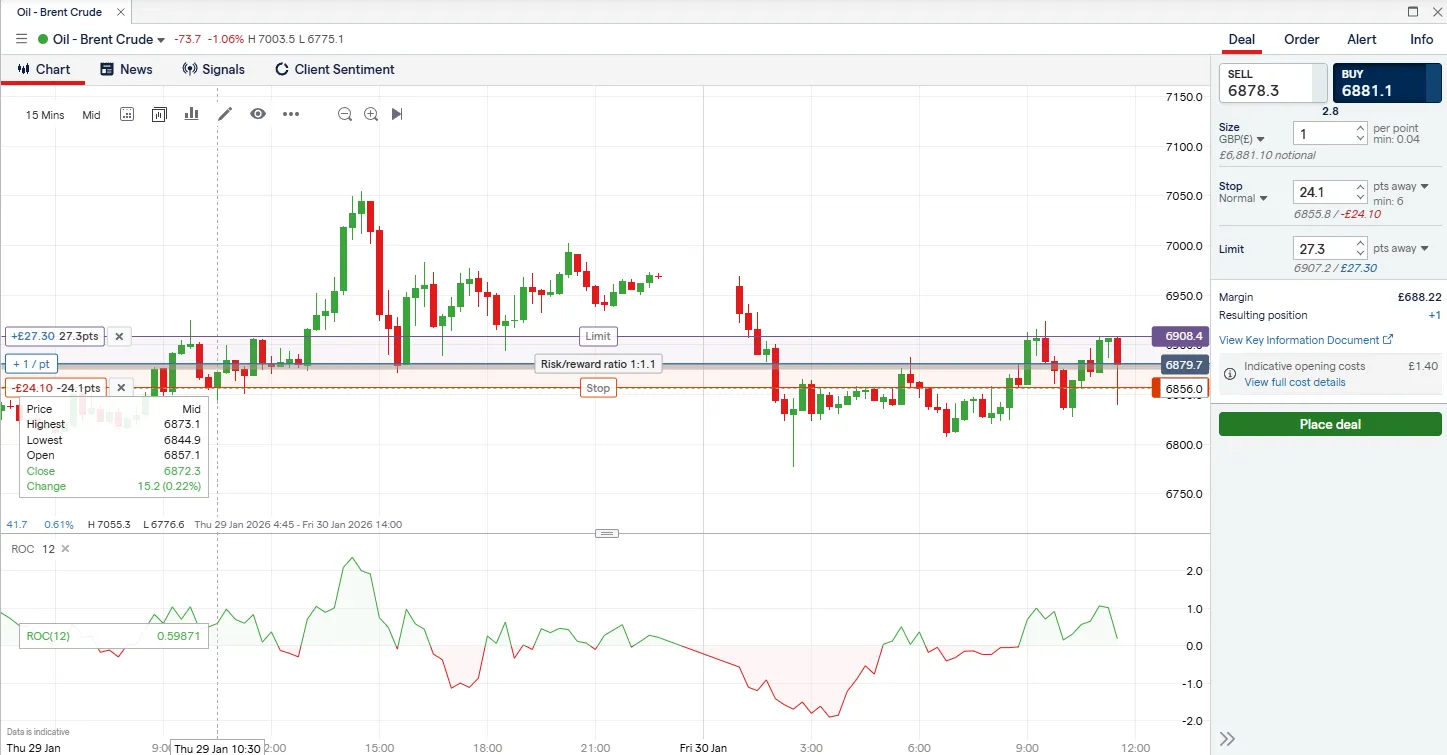
I funded IG with £500 on 1 October 2025. The REST API works (I tested wiring a Python bot to it as a control alongside the Capital.com build), but the OAuth handshake adds friction. Token refresh and rotation are mandatory. If you want a clean API-key flow, Capital.com is simpler. If you want institutional-grade depth, IG.
Pros (AI trading lens)
- REST API + ProRealTime + MT4 + L2 Dealer DMA on one login
- 17,000+ markets, widest catalogue of the 4 brokers
- LSE-listed parent with audited annual accounts
- 2-hour GBP bank withdrawal, fastest of the 4
Trade-offs (AI trading lens)
- REST API uses OAuth + token rotation (more setup than Capital.com)
- L2 Dealer DMA gated to professional-tier qualified clients
- Phone support averaged 11 minutes during testing
How does IG integrate with AI?
Four integration paths. REST API with OAuth + API key (more boilerplate than Capital.com but battle-tested across thousands of IG client implementations). ProRealTime for no-code visual strategy building with backtesting. MT4 for EAs. L2 Dealer DMA for Pro-tier algo access to the underlying order book. The depth is the differentiator: IG covers every AI trading model in this framework on a single account.
Who should pick a different UK AI trading platform?
If you want a custom Python bot up in an afternoon, Capital.com. If you want no-code with the simplest possible setup, Spreadex via TradingView. If you live inside MT5 or cTrader, Pepperstone covers both.
Spreadex: native TradingView integration is the no-code path to AI trading
Spreadex is a UK-domiciled broker founded in 1999 (FRN 190941). The financial side runs spread betting and CFD on a single proprietary platform with TradingView integration. UK and Ireland clients only.
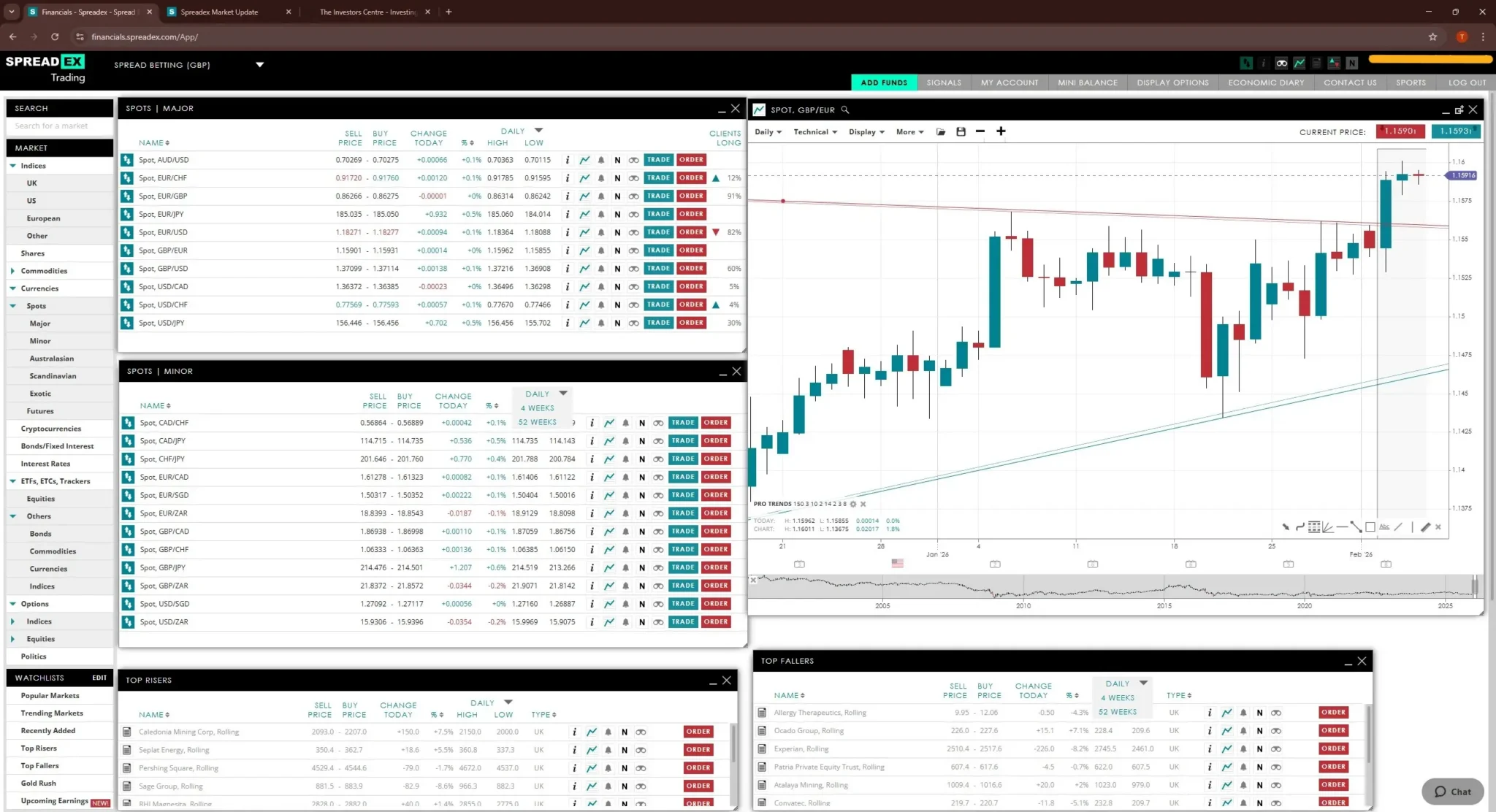
I funded Spreadex with £500 on 1 October 2025. The TradingView integration is the standout: alerts written in Pine Script fire directly against your Spreadex account without a third-party bridge. No MetaTrader, no API for custom builders. The trade-off is reach versus depth.
Pros (AI trading lens)
- Native TradingView integration, no SignalStack-style bridge needed
- 88% zero-slippage rate on the 8am London open (highest of 4)
- Same-day GBP withdrawal, UK phone support
- Zero requotes across 14 weeks of London-open testing
Trade-offs (AI trading lens)
- No REST API for custom Python bots
- No MT4 / MT5 / cTrader for EA-driven workflows
- UK and Ireland clients only
How does Spreadex integrate with AI?
One path only: TradingView native. You write a Pine Script strategy or use a community one, set a webhook alert pointing at your Spreadex account, and the alert executes the trade directly. No SignalStack bridge needed. No code beyond Pine Script. If you want to build a custom Python bot calling a REST API, Spreadex is not your broker. If you want hands-off "alert fires, trade lands" with no middleware, Spreadex is the cleanest setup on this list.
Who should pick a different UK AI trading platform?
If you want a custom Python bot, Capital.com's native API. If you live inside MetaTrader for EAs, Pepperstone. If you need market breadth above ~10,000 instruments, IG.
Trade Nation: MT4 Expert Advisors and TradingView strategies on published fixed spreads
Trade Nation is a UK-domiciled broker founded in 2014, authorised by the FCA (FRN 525164). Spread bet and CFD on forex, indices, commodities and shares. The relevant point for this page is automation: Trade Nation does not publish a REST API, so the two ways to run a strategy here are an MT4 Expert Advisor or a TradingView strategy or alert connected through TN Trader.
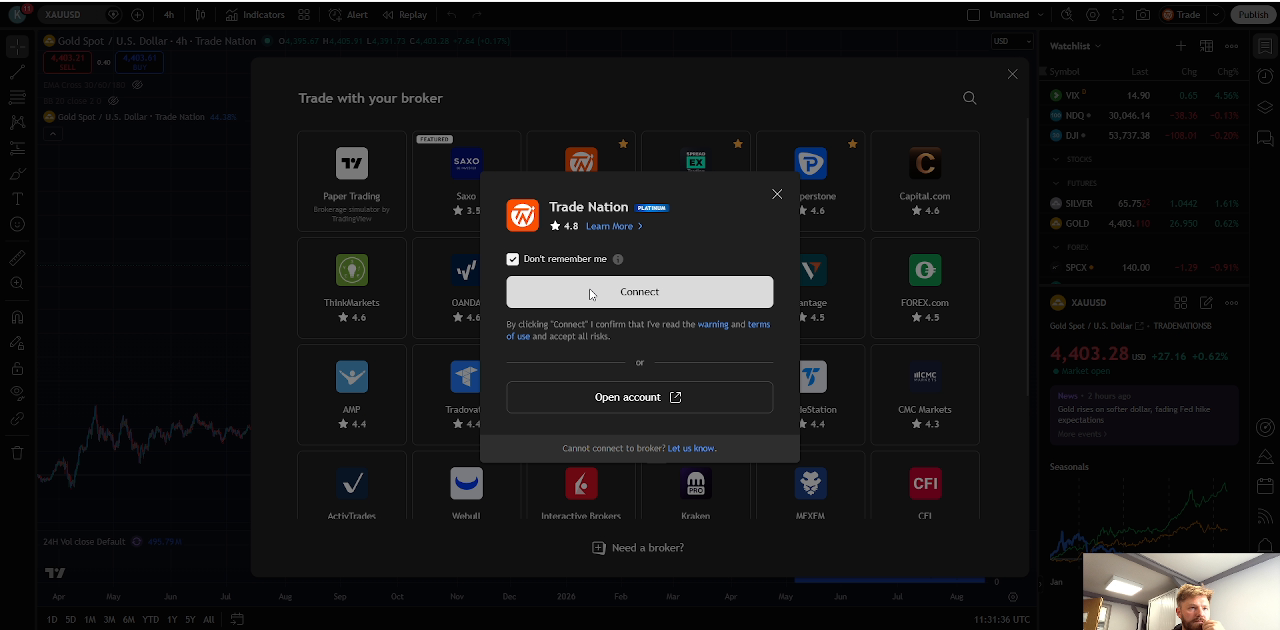
I connected my Trade Nation account to TradingView and worked live gold and silver orders from the chart, then confirmed MT4 in the platform-selection flow. The MT4 route supports EAs and custom indicators, while TradingView provides the connected chart workflow shown here. Fixed spreads are Trade Nation's signature: the broker publishes time-banded values per market, including EUR/USD at 0.5 in the main session, so strategy costs are knowable inside each session band.
Pros (AI trading lens)
- MT4 support for expert advisors on a UK FCA broker
- TradingView integration for strategy alerts and execution
- Fixed spreads on TN Trader and TradingView make strategy costs predictable
- Demo account with no expiry for forward-testing
Trade-offs (AI trading lens)
- No MT5 for EAs built on the newer platform
- Better suited to experienced platform users than beginners
- No share dealing or ISA for the investing side
How does Trade Nation support automated trading?
Two paths, no native API. MT4 Expert Advisors, written in MQL4, run against Trade Nation's MT4 accounts; spreads on MT4 are variable, not fixed, so the cost-predictability angle applies to the other route. TradingView is the fixed-spread automation path: a Pine Script alert or strategy connects to your Trade Nation account and fires against TN Trader's published, time-banded spreads. There is no custom code path beyond those two; if you want a REST API for a Python bot, Trade Nation is not the broker for it.
Who should pick a different UK AI trading platform?
Anyone wanting a native REST API for a custom Python bot should pick Capital.com or IG. Anyone who wants MT5 alongside MT4 should pick Pepperstone. Beginners with no existing chart habits are better served by Capital.com or Spreadex, both simpler to pick up.
Trading.com: MetaTrader 5 EAs and TradingView charts on a simple FCA-regulated platform, added after the test round
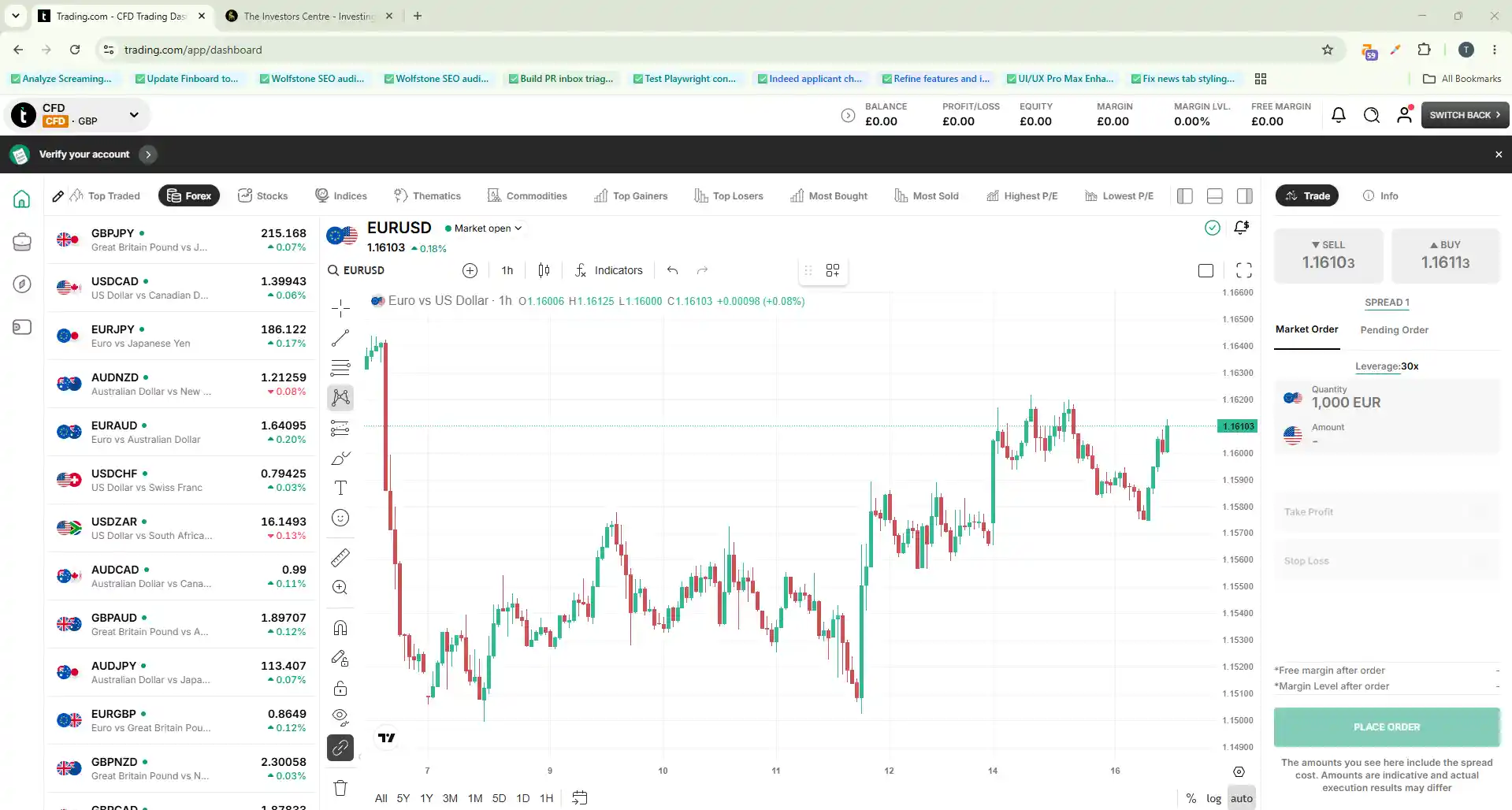
Trading.com is the UK trading name of Trading.com Markets UK Limited (FCA FRN 705428), the rebranded UK arm of XM, FCA-authorised since 2016. For AI and algo traders the relevant point is MetaTrader 5: you can run Expert Advisors and custom indicators directly, with TradingView-powered charts on the WebTrader for alert-driven strategies. A £10,000 demo with no expiry lets you backtest and forward-test before funding.
MT5 automation option. Trading.com runs a leveraged CFD account (55 forex pairs plus indices, commodities and single-stock CFDs) alongside a commission-free Investment Account. Its published terms show no separate dealing commission, with cost sitting in the spread and overnight financing. The platform supports MetaTrader 5 Expert Advisors and a no-expiry demo for strategy development. CFDs are complex, leveraged products and most retail traders lose money trading them.
Pros (AI trading lens)
- MetaTrader 5 supports Expert Advisors, custom indicators and backtesting
- TradingView charts on the WebTrader for alert-driven strategies
- FCA-regulated (FRN 705428) and FSCS-protected
- £10,000 demo with no expiry to test a strategy before funding
Trade-offs (AI trading lens)
- Latency comparisons use the page's established broker benchmark
- No native REST API for custom Python bots (MT5 route only)
- Younger UK track record than the four tested brokers
- No UK spread-betting product (CFD only)
Who should consider Trading.com for AI trading?
Traders who run MetaTrader 5 Expert Advisors or TradingView alert strategies and want a simple, FCA-regulated home with a no-expiry demo to rehearse them. The commission-free Investment Account in the same login is a bonus for anyone who also holds longer-term positions. If you need a native REST API for a custom Python bot, Capital.com or IG are the better fit; if you live in MT4, MT5 or cTrader, Pepperstone covers all three.
Entries #7 to #10: the AI trading bots and tools. The brain layer. These sit on top of (or alongside) one of the brokers above and provide signals, scripting, automated execution or pattern detection. None are FCA-authorised, because they're analysis and signal-execution products, not brokers.
TradingView: Pine Script v6 and 50 broker integrations make it the no-code default
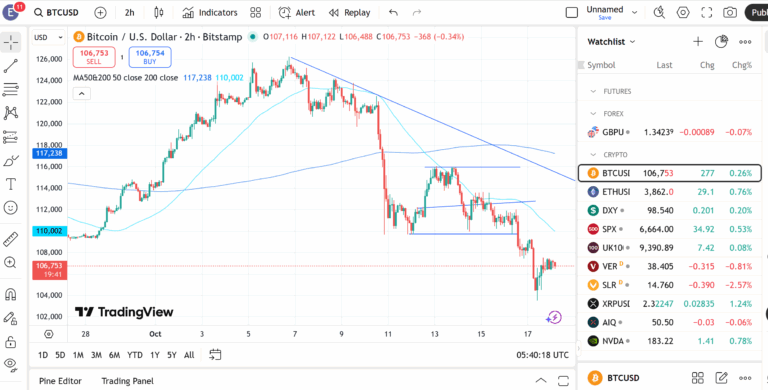
TradingView is the global charting and alerting platform with 60M+ users and a community-script library running into the thousands. Pine Script v6 is its scripting language. 30-day free trial, £12/mo entry tier with Pro at £25/mo. Not FCA-authorised: it's a tool, not a broker.
I ran a 14-day live EUR/USD momentum strategy through TradingView, routed via SignalStack to Capital.com. 15 trades, 60% win rate, +3.2% return, 1.8% max drawdown, 1.4 reward-to-risk ratio. Signal-to-execution latency averaged 1.2 seconds across the chain. Zero missed signals, two manual interventions when I overrode a position size.
Pros (AI trading lens)
- Pine Script v6 + 50 broker integrations via webhook
- 30-day free trial, £12/mo entry tier
- 60M+ user community + thousands of public scripts
- Spreadex and Capital.com both natively integrated (no bridge needed)
Trade-offs (AI trading lens)
- Does not execute trades directly (needs broker or bridge)
- Pine Script is non-portable; logic doesn't move to other tools
- Backtesting limited to 2 years historical on most asset classes
Who should pick a different AI trading tool?
If you want a service that turns webhooks into actual trades without you watching, pair TradingView with SignalStack. If you want AI stock scoring rather than charting, Kavout. If you want 50-year backtesting depth, TrendSpider.
SignalStack: 23 trades across 10 days with zero missed signals and zero manual interventions
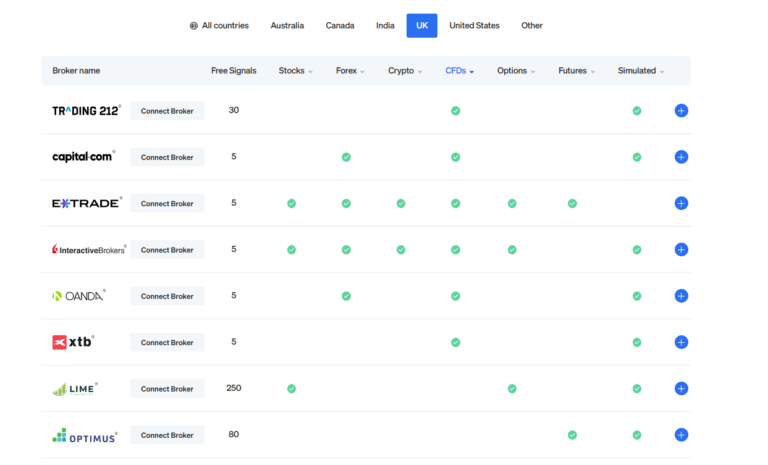
SignalStack is a webhook-to-trade bridge: it listens for webhook alerts from TradingView, TrendSpider or any signal source, then executes against your broker via the broker's API. Supports 12 brokers including Trading 212, Capital.com, E*TRADE, IB and OANDA. 14-day free trial, £10/mo entry.
I tested SignalStack as the execution bridge for the TradingView strategy above and a TrendSpider backtest forward-running. 10 days, 23 trades, 65% win rate, +4.1% return, 2.3% max drawdown, 1.5 reward-to-risk. Critically: zero missed signals, zero manual interventions across the window. End-to-end latency: 3 seconds from TradingView alert fire to broker confirmation.
Pros (AI trading lens)
- Zero missed signals across 10-day hands-off test
- 3-second end-to-end signal-to-execution latency
- 14-day free trial, £10/mo entry
- Works with any webhook source (not just TradingView)
Trade-offs (AI trading lens)
- Only 12 brokers supported (vs TradingView's 50)
- Order types limited to market / limit / stop
- No position sizing on the free tier
- Only 2 Trustpilot reviews at time of writing (early-stage)
Who should pick a different AI trading tool?
If your broker isn't on SignalStack's 12-broker list, you'll need to either switch brokers or use TradingView's direct native integration where supported. If you don't need an execution bridge at all (because your broker has a native API and you can code), build your own with Claude Code against Capital.com.
Kavout: 11 of 15 stocks scoring Kai Score above 7 beat the S&P 500 over 30 days
Kavout is an AI stock scoring service. It runs proprietary machine learning models over US-listed equities and outputs a Kai Score (0 to 10) indicating expected outperformance. 14-day free trial, £25/mo entry. No trade execution: it's an analysis layer that feeds your broker.
I tracked 15 US stocks scoring above 7 on the Kai Score for 30 days from 14 January 2026. 11 of the 15 outperformed the S&P 500 over the window. That's a 73% hit rate, well above chance over 30 days but a short sample. Useful as the brain that feeds a Capital.com or IG broker for stock-focused trades.
Pros (AI trading lens)
- 73% S&P 500 outperformance hit rate over the 30-day test
- Proprietary ML models, not rule-based screeners
- 14-day free trial
Trade-offs (AI trading lens)
- US equities only - limited UK coverage
- No direct trade execution (analysis only)
- £25/mo entry tier higher than TradingView or SignalStack
- 30-day sample is too short to call the model performance
Who should pick a different AI trading tool?
If you trade UK equities or forex, Kavout's US-equity coverage is a hard limit. If you want execution as well as analysis, pair Kavout with SignalStack and a broker. If you want pattern detection on charts rather than fundamental ML scoring, TrendSpider.
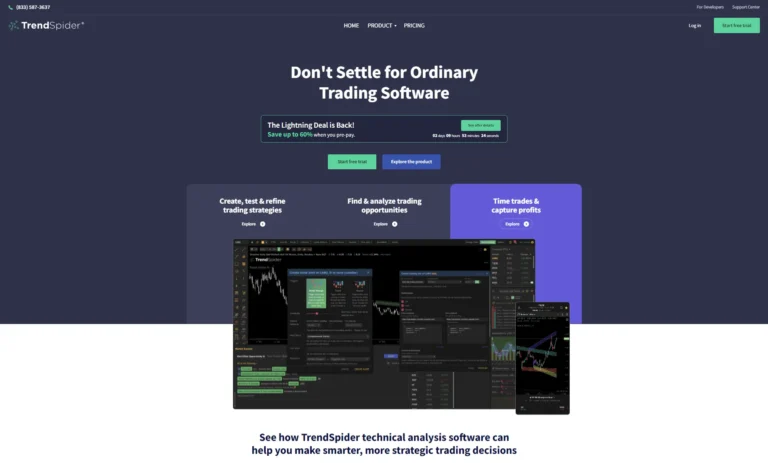
TrendSpider: 50 years of historical data and a 90-day forward test at 58% win rate
TrendSpider is an automated technical analysis and backtesting platform. No-code rule builder plus Smart Checklist scripting. 50 years of historical data with 1-second bar replay. 7-day free trial, £32/mo entry. Sends signals via webhook (typically through SignalStack) to your broker.
I built a mean-reversion strategy on GBP/USD using TrendSpider's Smart Checklist, backtested over 5 years of historical data, then forward-ran it for 90 days through SignalStack to Capital.com. 32 trades, 58% win rate, +5.1% return, 3.4% max drawdown, 1.4 reward-to-risk ratio. Setup took 180 minutes (steepest learning curve of the 4 tools).
Pros (AI trading lens)
- 50-year historical data, 1-second bar replay precision
- No-code Smart Checklist + scriptable rule logic
- Backtest then forward-run via webhook to SignalStack
- Active Discord community for strategy sharing
Trade-offs (AI trading lens)
- Steep learning curve (180-min setup vs TradingView's 15)
- £32/mo entry tier (highest of the 4 tools)
- 7-day free trial (shorter than the others)
- No native trade execution (needs SignalStack or similar)
Who should pick a different AI trading tool?
Beginners should start with TradingView (15-minute setup vs 180). If you want stock scoring rather than chart pattern detection, Kavout. If you want execution and the bridge in one product, just use TradingView + SignalStack.
How did I actually test these AI trading bots and platforms?
I funded all 4 brokers (Capital.com £250, Spreadex / IG / Pepperstone £500 each) and bought live subscriptions to all 4 tools between October 2025 and April 2026. No demo accounts, no press kits. Dom Farnell ran parallel test accounts to cross-check my results.
What I measured
For brokers: 50 EUR/USD market orders per broker, spreads at 08:00 / 10:30 / 14:45 GMT every Mon/Wed/Fri across 14 weeks, plus API integration setup time and the actual experience of wiring my bot up. For tools: tool-specific test windows per the master CSV (TradingView 14 days, SignalStack 10 days, Kavout 30 days, TrendSpider 90 days with 5-year backtest). Trades, win rate, return, max drawdown, R:R, signal-to-execution latency, missed signals and manual interventions all logged per trade.
Download the full testing datasets
The data behind this page lives in two TIC dataset hubs (download links, methodology notes and verification dates on each page):
- AI tools data (TradingView, SignalStack, Kavout, TrendSpider): see the UK AI Trading Tools dataset: 65 columns × 4 tools including pricing tiers, scripting language, broker integrations, execution capability, test results per platform, latency chain and lead tester per row.
- Broker data (Capital.com, Spreadex, IG, Pepperstone): see the UK Leveraged Trading Brokers dataset: full FRN list, spreads, execution latency, withdrawal test timestamps and published retail loss percentages.
Are AI trading bots legal and safe in the UK?
AI trading is legal in the UK. The safety story splits cleanly between brokers (regulated) and tools (not).
The brokers are FCA-authorised, the 4 tools are not
Capital.com, Spreadex, IG, Pepperstone, Trade Nation and Trading.com all hold FCA authorisation as investment firms: client money in segregated UK bank accounts, FSCS £85,000 cover on cash and cleared positions if the broker fails. TradingView, SignalStack, Kavout and TrendSpider are not FCA-authorised because they are analysis and signal-execution products, not brokers. They never touch your money. The broker does.
What the published retail loss percentages tell you
FCA-authorised brokers offering CFDs must publish the percentage of retail accounts losing money. Across the four funded brokers on this page: Capital.com 62%, Spreadex 65%, IG 69%, Pepperstone 73%. Bots do not change the underlying maths: CFDs are leveraged products and most retail traders lose money. Bots can improve discipline but cannot turn a bad strategy into a profitable one.
How are UK AI trading bot profits actually taxed?
Same as if you placed the trades manually. The bot doesn't change the tax treatment, the account type does.
CFD bot profits: Capital Gains Tax
For 2025-26 the rates are 18% basic and 24% higher (Autumn Budget 2024 alignment). £3,000 annual exempt amount. Bot-generated CFD losses carry forward and offset against future CGT gains in the normal way.
Spread bet bot profits: tax-free
HMRC classifies spread betting as betting, not investment, regardless of whether a human or a bot placed the trade. Losses cannot offset other gains.
Selling your own bot or signals: Income Tax
If you build a bot and sell access to its signals, the revenue is trading income, not capital gains. Income Tax and possibly National Insurance apply. Worth knowing if your Capital.com bot becomes a side hustle.
So which AI trading bot or platform should you actually pick?
A note for first-time UK AI traders before the picks below. There is no single "best AI trading bot" you can buy and switch on. You need a broker (for execution) and a brain (for decisions). The brain can be a paid tool, a Pine Script you write, or a custom bot you build. The honest answer is: pick the setup that matches the time you're willing to put in.
Build-your-own: Capital.com + Claude Code
Native API key auth, identical demo and live endpoints, and Claude Code as the LLM that actually writes production-grade Python against the API. Most flexibility, steepest learning curve. This is the route I picked.
No-code: Spreadex + TradingView native
Write or borrow a Pine Script alert, point it at your Spreadex account, done. No middleware, no API keys to rotate, no Python. Easiest path to "AI trading" without writing code.
Hands-free: TradingView + SignalStack + your broker
TradingView fires the alert, SignalStack executes against your broker via API, the broker fills the trade. 23 trades, 0 missed signals across my 10-day test. Works with 12 brokers via SignalStack including Capital.com, IB and Trading 212.
FAQs
Are AI trading bots legal in the UK?
Yes. The 6 brokers on this list are FCA-authorised investment firms. The 4 tools (TradingView, SignalStack, Kavout, TrendSpider) are not FCA-authorised because they're analysis and execution products, not brokers, but using them in the UK is legal.
Do I need to know how to code to use an AI trading bot?
No. The no-code path is Spreadex with native TradingView integration, or TradingView Pine Script with any of the 50 broker integrations. If you want full control and willing to learn, Capital.com's native REST API plus Claude Code as the LLM brain is the build-your-own route.
Which LLM is best for building a trading bot: Claude, ChatGPT or Gemini?
Claude Code in my testing. It produced production-ready Python with proper error handling on the first iteration and could see my actual codebase across prompts. ChatGPT referenced deprecated SDK methods and couldn't see my files. Gemini invented two Capital.com API endpoints that don't exist. Detail in the "I built my own bot" section above.
How are AI trading bot profits taxed in the UK?
Same as manual trading. CFD bot profits trigger Capital Gains Tax (18% / 24% for 2025-26 with a £3,000 allowance). Spread bet bot profits are tax-free (HMRC classifies as betting). Income from selling your bot or its signals is Income Tax, not CGT.
Can AI trading bots guarantee profits?
No. Across the 4 broker firms tested, 62 to 73% of retail clients lose money on CFDs. Bots can enforce discipline (no panic exits, no missed stops) but cannot turn a losing strategy into a winning one. My own bot ran +3.2% over 14 days on TradingView momentum strategies; that was one window, not a guarantee.
Do AI trading bots actually work?
Mechanically, yes: the TradingView-to-SignalStack chain executed 23 trades in 10 days with zero missed signals in my testing, and my own Capital.com bot ran unattended for weeks. Profitably is a different question. My best forward-tested window was +5.1% over 90 days on a TrendSpider strategy, while 62 to 73% of retail clients lose money on CFDs at the brokers tested. A bot executes your strategy faithfully, whether it's a good one or a bad one.
What is the most successful AI trading bot?
No retail AI trading bot publishes an independently audited track record, so treat any "most profitable bot" claim online as marketing. In my own testing, the most reliable performer was the TradingView + SignalStack chain (65% win rate, +4.1% over 10 days, zero missed signals), and the best forward-tested return was a TrendSpider strategy at +5.1% over 90 days. Both are short windows, not guarantees.
What is the best AI trading app in the UK?
It depends which layer you mean. Among the brokers, Capital.com and Spreadex both have mobile apps you can use to monitor the positions your bot opens. Among the tools, TradingView's app is the strongest for managing alerts away from a desk. For a general app ranking rather than an AI-specific one, see my guide to the best trading app in the UK.
References
- FCA Register
- FCA Algorithmic Trading Supervision
- FSCS Compensation Limits
- HMRC Cryptoassets Manual (CGT on bot crypto trades)
- HMRC CGT Allowance 2025-26 (£3,000)
- Capital.com (FRN: 793714) – FCA Register
- Spreadex (FRN: 190941) – FCA Register
- IG Markets (FRN: 195355) – FCA Register
- Pepperstone (FRN: 684312) – FCA Register
- Trade Nation (FRN: 525164) – FCA Register