

- expertise:
- CFD Trading, Forex, Derivatives, Risk Management
- credentials:
- Chartered ACII (2018) · Trading since 2012
- tested:
- 40+ forex & CFD platforms with live accounts

- expertise:
- Broker Comparison, ISA Strategy, Portfolio Management
- credentials:
- Active investor since 2013 · 11+ years experience
- tested:
- 40+ brokers with funded accounts
How We Test
Real accounts. Real money. Real trades. No demo accounts or press releases.
What we measure:
- Spreads vs advertised rates
- Execution speed and slippage
- Hidden fees (overnight, withdrawal, conversion)
- Actual withdrawal times
Scoring:
Fees (25%) · Platform (20%) · Assets (15%) · Mobile (15%) · Tools (10%) · Support (10%) · Regulation (5%)
Regulatory checks:
FCA Register verification · FSCS protection
Testing team:
Adam Woodhead (investing since 2013), Thomas Drury (Chartered ACII, 2018), Dom Farnell (investing since 2013) — 50+ platforms with funded accounts
Quarterly reviews · Corrections: in**@*******************co.uk
Disclaimer
Not financial advice. Educational content only. We're not FCA authorised. Consult a qualified advisor before investing.
Capital at risk. Investments can fall. Past performance doesn't guarantee future results.
CFD warning. 67-84% of retail accounts lose money trading CFDs. High risk due to leverage.
Contact: in**@*******************co.uk
Choosing between Ledger and Trezor is one of the most common decisions UK crypto investors face when securing their digital assets. Both manufacturers have evolved significantly in 2026, with new models, improved security, and expanded features.
Quick Answer – Should You Choose Ledger or Trezor?
Ledger offers the best overall package for most UK investors with superior mobile support, native staking, and seamless NFT management. However, Trezor wins on transparency and value with fully open-source firmware and lower prices.
| Feature | Ledger | Trezor |
|---|---|---|
| Models | Nano S Plus, Nano X, Flex, Stax | Safe 3, Safe 5, Safe 7 |
| Coins Supported | 5500+ | 9000+ |
| Secure Element | CC EAL5+/EAL6+ | EAL6+ (Safe 3/5/7) |
| Open Source | Partial | Fully open source |
| Mobile App | iOS + Android | Android only (limited) |
| Bluetooth | Nano X, Flex, Stax | Safe 7 only |
| Native Staking | 14+ coins | 7 coins |
| Price Range | £69–£399 | £59–£169 |
How Do Ledger and Trezor Compare at a Glance?
| Nano X | Safe 5 | Nano S Plus | Safe 3 | Flex | Stax | Safe 7 | |
|---|---|---|---|---|---|---|---|
| Brand | Ledger | Trezor | Ledger | Trezor | Ledger | Ledger | Trezor |
| Price | £149 | ~£135 | £69 | ~£63 | ~£215 | ~£345 | ~£200+ |
| Coins Supported | 5,500+ | 9,000+ | 5,500+ | 9,000+ | 5,500+ | 5,500+ | 9,000+ |
| Secure Element | EAL5+ | EAL6+ | EAL5+ | EAL6+ | EAL6+ | EAL6+ | EAL6+ |
| Open Source | Partial | Full | Partial | Full | Partial | Partial | Full |
| Mobile App | iOS + Android | Android only | No | Android only | iOS + Android | iOS + Android | Android only |
| Bluetooth | Yes | No | No | No | Yes | Yes | Yes |
| Native Staking | 14+ coins | 7 coins | 14+ coins | 7 coins | 14+ coins | 14+ coins | 7 coins |
| Buy Now | Buy Now | Buy Now | Buy Now | Buy Now | Buy Now | Buy Now |
Table 1: Quick comparison of Ledger vs Trezor key specifications and features for 2026.
What Are the Current Ledger and Trezor Product Lineups?
Both manufacturers have refreshed their ranges significantly. Trezor discontinued the Model One and Model T in favour of the Safe series, while Ledger expanded upmarket with premium touchscreen devices.
For more see our in depth investigation of the best crypto wallets for 2026
What Wallets Does Ledger Offer in 2026?
Ledger offers four hardware wallets ranging from the entry-level Nano S Plus (£69) to the premium Stax (€399). All devices connect to Ledger Live for buying, selling, staking, and NFT management across 5,500+ cryptocurrencies.
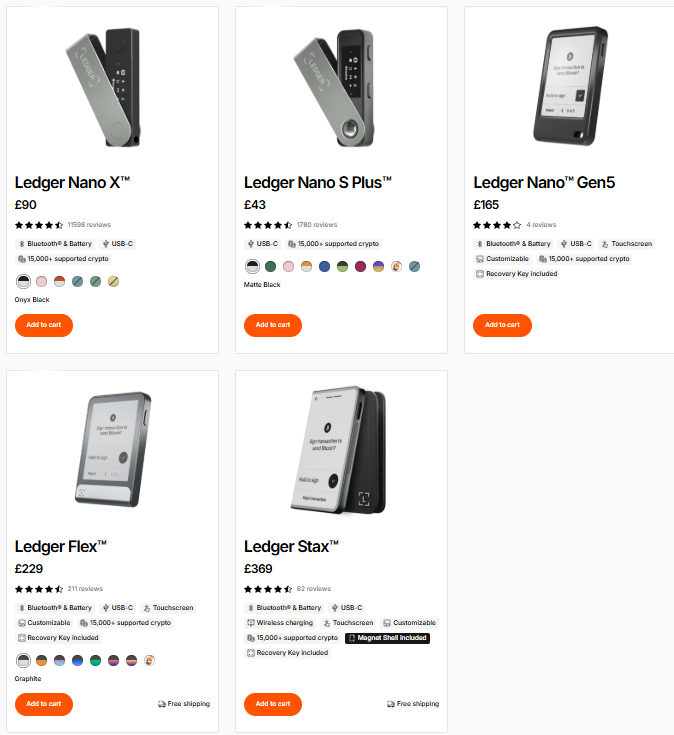
| Model | Price | Display | Connectivity | Best For |
|---|---|---|---|---|
| Nano S Plus | £69 | 128×64 OLED | USB-C | Budget / desktop users |
| Nano X | £149 | 128×64 OLED | USB-C + Bluetooth | Mobile users |
| Flex | €249 | 2.84 inch E Ink touch | USB-C + BT + NFC | Premium experience |
| Stax | €399 | 3.7 inch curved E Ink | USB-C + BT + NFC + Qi | Collectors / NFT fans |
Which Ledger Model Has the Best Security Certification?
The Flex and Stax feature CC EAL6+ certified secure elements—an upgrade from the EAL5+ certification on Nano S Plus and Nano X. For maximum hardware security, the newer models offer enhanced protection.
We recommend purchasing directly from official stores: Ledger Official or Trezor Official
What Wallets Does Trezor Offer in 2026?
Trezor’s Safe series represents a complete refresh with EAL6+ secure elements across all models. The range spans from the compact Safe 3 ($79) to the flagship Safe 7 with Bluetooth and quantum-ready architecture.
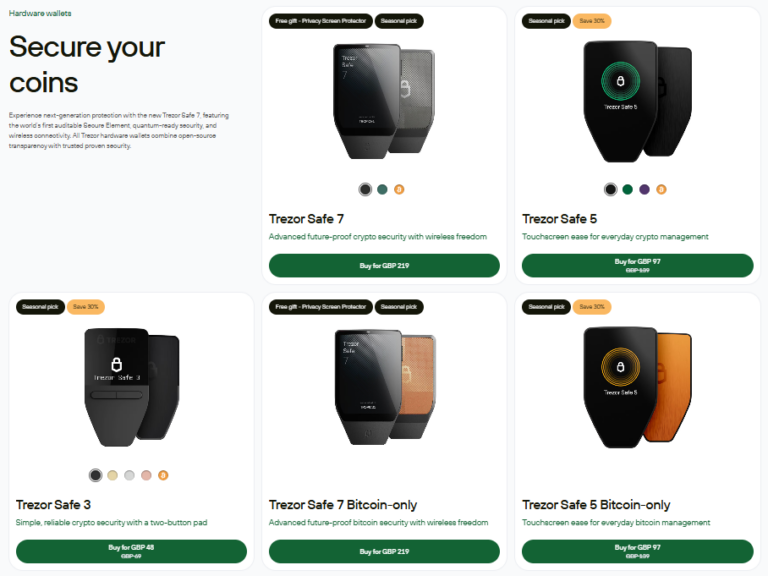
| Model | Price | Display | Key Features | Best For |
|---|---|---|---|---|
| Safe 3 | $79 (~£63) | OLED + buttons | EAL6+ SE / compact | Budget / Bitcoin focus |
| Safe 5 | $169 (~£135) | 1.54 inch colour touch | Gorilla Glass 3 / haptic | Mainstream users |
| Safe 7 | TBC (~£200+) | 2.5 inch colour touch | Dual SE + Bluetooth + Qi | Future-proofing |
What Makes the Trezor Safe 7 Different?
The Safe 7 introduces groundbreaking features including the open-source TROPIC01 secure element and quantum-ready cryptography. It’s the only Trezor with Bluetooth connectivity and wireless charging, positioning it as the premium choice.
Are Bitcoin-Only Firmware Versions Available?
Yes, Trezor offers Bitcoin-only firmware for all Safe models. These versions have a smaller attack surface and are preferred by Bitcoin maximalists who don’t need altcoin support. Ledger does not offer equivalent Bitcoin-only firmware.
We recommend purchasing directly from official stores: Ledger Official or Trezor Official
How Does Security Compare Between Ledger and Trezor?
Security is the primary reason for using a hardware wallet. Ledger prioritises hardware-level protection with proprietary systems, while Trezor emphasises transparency through fully open-source development.
Does Ledger Use a Secure Element Chip?
Yes, all Ledger devices use certified Secure Element chips similar to those in passports and credit cards. Private keys are generated and stored exclusively within this chip and never leave the device during transactions.
Is Ledger’s Firmware Open Source?
No. Ledger Live (the companion app) is open source, but the device firmware remains closed source. Ledger argues this prevents attackers from finding vulnerabilities, though critics note it requires users to trust the company implicitly.
Does Trezor Use a Secure Element Chip?
Yes—this is a major change from earlier models. The Safe 3, Safe 5, and Safe 7 all include EAL6+ certified Secure Elements, addressing a longstanding criticism of the brand.
Why Did Trezor Add Secure Elements?
Previously, Trezor relied solely on general-purpose microcontrollers. Security researchers demonstrated physical attacks that could extract seed phrases from these older devices. The Safe series addresses this vulnerability with dedicated security chips.
Which Wallet Has Better Open-Source Transparency?
Trezor is fully open source—all firmware, bootloader, and hardware schematics are publicly available on GitHub. Anyone can audit the code, verify builds, and identify vulnerabilities. Ledger’s closed firmware requires trusting the company.
Is Trezor Better for Simplicity?
Trezor Suite prioritises clarity and ease of use. The desktop app is minimal, easy to navigate, and designed with security in mind. Perfect for beginners who value transparency and a streamlined interface without distractions or overcomplicated features.
What Can You Actually Do with Each Wallet?
Ledger supports native staking via Ledger Live for coins like ETH, DOT, ADA, and more. Trezor does not offer native staking; you’ll need to use third-party tools like Exodus or external validators, which adds complexity and potential risk.
How Do They Handle NFTs & Web3?
Ledger has built-in NFT support through Ledger Live, allowing users to view and manage NFTs directly. Trezor users must connect to third-party apps like MetaMask or NFT platforms, making it less convenient but still functional with Web3.
Have Ledger or Trezor Ever Been Hacked?
Both companies have faced security incidents. It’s important to distinguish between device hacks (compromising hardware) and data breaches (exposing customer information). Neither has had funds stolen through remote hardware attacks.
What Happened in the Ledger 2020 Data Breach?
In July 2020, hackers exploited Ledger’s e-commerce database, exposing personal information of approximately 270,000 customers including names, emails, phone numbers, and physical addresses.
Were Any Funds Stolen in the Ledger Breach?
No private keys or cryptocurrency funds were compromised—the breach affected Ledger’s marketing database, not the devices. However, affected customers reported phishing attempts and scam emails in the following months.
Has Anyone Hacked a Trezor Device?
Yes, but only through sophisticated physical attacks requiring direct device access. Kraken Security Labs (2020) demonstrated voltage glitching attacks on older models. Ledger Donjon (2025) found similar vulnerabilities in Safe 3 and Safe 5 microcontrollers.
How Can You Protect Against Physical Attacks?
Trezor recommends using a strong passphrase (the optional “25th word”) which remains off-device and protects against physical extraction attacks. The Safe 5’s upgraded STM32U5 microcontroller has no publicly known fault injection vulnerabilities.
What Is the Ledger Recover Controversy?
In May 2023, Ledger announced an optional subscription service ($9.99/month) that backs up seed phrases with third-party custodians. The service splits encrypted fragments among Ledger, Coincover, and an independent provider.
Why Did Ledger Recover Cause Backlash?
Critics argued the feature undermines hardware wallets’ core principle—that seed phrases never leave the device. Requiring KYC verification links wallet ownership to real identity, and governments could potentially subpoena custodians.
Is Ledger Recover Mandatory?
No, Ledger Recover is entirely optional—users who don’t subscribe continue managing seed phrases independently. However, the controversy damaged trust among security-conscious users and drove some to switch to Trezor.
Which Wallet Is Easier to Set Up and Use?
Both wallets have invested heavily in user experience. Ledger offers a more polished, integrated experience for mainstream users, while Trezor provides straightforward simplicity that appeals to those who prefer minimal complexity.
Is Ledger Easy for Beginners?
Yes, Ledger devices are beginner-friendly, particularly with the Ledger Live mobile app. Setup guides users through seed phrase generation, PIN setting, and app installation. One-click staking and NFT management simplify advanced features.
What Is Ledger’s Main Learning Curve?
App management can confuse newcomers. Ledger devices have limited storage, so users may need to install and uninstall cryptocurrency apps depending on which coins they’re using. Funds remain safe on the blockchain regardless.
Is Trezor Easy for Beginners?
Yes, Trezor Suite offers a clean interface many find less overwhelming than Ledger Live. Setup is straightforward: connect, generate seed phrase, set PIN. Most cryptocurrencies work without installing separate applications.
Does the Safe 5 Touchscreen Improve Usability?
Significantly. Transaction verification, PIN entry, and seed phrase confirmation all happen on the colour touchscreen. This is a major upgrade from button-based navigation on older Trezor models and the Safe 3.
Which Has Better Mobile Support?
Ledger offers significantly better mobile support. Ledger Live works fully on iOS and Android with buying, selling, staking, and NFT features. The Nano X, Flex, and Stax support Bluetooth for wireless mobile use.
Can You Use Trezor on Mobile?
Limited functionality only. Trezor Suite for Android allows viewing balances and verifying addresses but doesn’t support sending transactions. Only the Safe 7 has Bluetooth—Safe 3 and Safe 5 require USB-C connections.
What Features Does Each Wallet Support?
Can You Stake Crypto on Ledger and Trezor?
Both support staking, but Ledger offers more comprehensive integration. Ledger Live supports native staking for 14+ coins including ETH, SOL, DOT, and ADA. Trezor Suite supports 7 coins natively, with others requiring third-party validators.
| Feature | Ledger | Trezor |
|---|---|---|
| Staking Method | Native in Ledger Live | Trezor Suite + third parties |
| Coins Supported | ETH / SOL / DOT / ADA / ATOM / XTZ + 8 more | SOL / ADA / ATOM / XTZ / ALGO / ONT / VET |
| Ease of Use | One-click staking | May require external setup |
Table 4: Staking feature comparison between Ledger and Trezor wallets.
How Do They Handle NFTs and Web3?
Ledger Live displays NFT collections natively, and the Stax can show NFTs on its lock screen. Both Flex and Stax support clear signing for NFT transactions. Trezor requires third-party integrations like MetaMask for NFT management.
Do Both Wallets Support WalletConnect?
Yes, both support WalletConnect for connecting to decentralised applications across Ethereum, Polygon, and other networks. For DeFi users, either wallet works with most protocols through this standard.
Which Supports More Cryptocurrencies?
Trezor supports 9,000+ cryptocurrencies versus Ledger’s 5,500+, though many of Trezor’s require third-party wallet integrations. Both support all major coins including Bitcoin, Ethereum, Solana, and Cardano.
Which Has Better Native Coin Support?
Ledger excels at native support—more coins work directly in Ledger Live without external software. Trezor users may need MetaMask or Exodus for certain assets. For practical everyday use, the difference is minimal.
Which Models Should You Compare Head-to-Head?
Ledger Nano X vs Trezor Safe 5: Which Is Better?
These mid-range models represent each brand’s sweet spot between features and price. The Nano X offers Bluetooth and superior mobile integration, while the Safe 5 provides a colour touchscreen and fully open-source firmware.
| Specification | Ledger Nano X | Trezor Safe 5 |
|---|---|---|
| Price | £149 | $169 (~£135) |
| Display | 128×64 OLED | 1.54 inch colour touchscreen |
| Connectivity | USB-C + Bluetooth | USB-C only |
| Secure Element | CC EAL5+ | EAL6+ |
| Open Source | Partial | Fully open source |
| Mobile App | Full iOS + Android | Android (view only) |
| Native Staking | 14+ coins | 7 coins |
Table 5: Head-to-head comparison of Ledger Nano X vs Trezor Safe 5 specifications.
Should You Choose Nano X or Safe 5?
Choose Nano X for mobile use, staking, and broader ecosystem integration. Choose Safe 5 for open-source transparency, the superior touchscreen experience, and EAL6+ security certification at a lower price.
Ledger Flex vs Trezor Safe 5: Premium Comparison
The Flex costs £80 more than the Safe 5 but offers a significantly larger 2.84 inch E Ink touchscreen, NFC connectivity, and Ledger’s clear signing feature that displays human-readable transaction details.
| Specification | Ledger Flex | Trezor Safe 5 |
|---|---|---|
| Price | €249 (~£215) | $169 (~£135) |
| Display | 2.84 inch E Ink touchscreen | 1.54 inch colour touchscreen |
| Security Cert | CC EAL6+ | EAL6+ |
| Clear Signing | Yes | Limited |
| NFC | Yes | No |
| Open Source | Partial | Fully open source |
Table 6: Premium device comparison between Ledger Flex and Trezor Safe 5.
Is the Ledger Flex Worth the Extra Cost?
For most users, the Safe 5 offers better value with full open-source transparency. The Flex justifies its premium for users who prioritise clear signing, the larger display, and NFC functionality for contactless interactions.
Ledger Nano S Plus vs Trezor Safe 3: Best Budget Option?
Both entry-level devices offer excellent security at similar prices. The Safe 3 features EAL6+ certification (higher than Nano S Plus’s EAL5+) and full open-source firmware at a slightly lower price point.
| Specification | Ledger Nano S Plus | Trezor Safe 3 |
|---|---|---|
| Price | £69 | $79 (~£63) |
| Secure Element | CC EAL5+ | EAL6+ |
| Open Source | Partial | Fully open source |
| Native Staking | 14+ coins in Ledger Live | Via third parties |
| Coins Supported | 5500+ | 9000+ |
Table 7: Budget hardware wallet comparison for entry-level buyers.
Which Budget Wallet Should You Buy?
For pure security and value, the Safe 3 edges ahead with EAL6+ certification and open-source firmware. The Nano S Plus wins for users who want native staking integration through Ledger Live without third-party setup.
How Do Ledger and Trezor Prices Compare?
Hardware wallet prices range from £60 for entry-level to nearly £400 for premium models. Both companies offer discounts during Black Friday and Christmas sales. Always buy directly from official websites.
| Brand | Model | Price | Best For |
|---|---|---|---|
| Trezor | Safe 3 | $79 (~£63) | Budget / Bitcoin-focused |
| Ledger | Nano S Plus | £69 | Budget / staking users |
| Trezor | Safe 5 | $169 (~£135) | Mainstream / open-source |
| Ledger | Nano X | £149 | Mobile / Bluetooth needed |
| Ledger | Flex | €249 (~£215) | Premium / large display |
| Trezor | Safe 7 | TBC (~£200+) | Future-proofing |
| Ledger | Stax | €399 (~£345) | Collectors / NFT display |
Table 8: Complete 2026 pricing comparison for all Ledger and Trezor hardware wallets.
How Do Backup and Recovery Options Compare?
Losing access to a hardware wallet shouldn’t mean losing your crypto. Both manufacturers offer recovery options, though they take fundamentally different philosophical approaches to seed phrase backup.
What Is Trezor’s Shamir Backup?
Shamir Backup (SLIP39) splits your recovery information into multiple shares (up to 16) instead of a single 24-word seed phrase. You configure a threshold—for example, 3 of 5 shares required for recovery.
Why Is Shamir Backup More Secure?
You can store shares in different locations (home safe, bank, trusted family). If someone steals one share, they cannot access funds without reaching the threshold. It eliminates single points of failure while remaining fully self-custodial.
Which Trezor Models Support Shamir Backup?
Shamir Backup is available on Safe 5 and Safe 7 models. The entry-level Safe 3 uses standard 24-word seed phrases only. This advanced recovery feature is a key differentiator for Trezor’s mid-range and premium devices.
How Does Ledger Recover Work?
Ledger Recover ($9.99/month) encrypts your seed phrase, splits it into three fragments, and distributes them to Coincover, Ledger, and an independent provider. Recovery requires identity verification via passport or national ID.
Is Ledger Recover Safe to Use?
Opinions vary. The fragments are encrypted and useless individually. However, it introduces custodial trust, KYC requirements, and potential government access via subpoena. Many crypto users prefer to avoid these trade-offs.
Which Recovery System Is Better?
For security purists, Trezor’s Shamir Backup is superior—self-custodial, no identity verification, no third parties. For users worried about losing paper backups, Ledger Recover provides a safety net at the cost of privacy principles.
What Are the Pros and Cons of Each?
Ledger Pros & Cons
Pros:
- Superior mobile experience with full iOS and Android apps
- Native staking for 14+ cryptocurrencies in Ledger Live
- Excellent NFT management and display features
- Bluetooth on multiple models (Nano X / Flex / Stax)
- Clear signing on premium devices shows readable transactions
- No successful remote hacks of hardware security
Cons:
- Closed-source firmware requires trusting Ledger
- 2020 data breach exposed customer personal information
- Ledger Recover controversy damaged community trust
- Premium models significantly more expensive than Trezor
- App storage limitations require managing installed apps
Trezor Pros & Cons
Pros:
- Fully open-source firmware and hardware schematics
- EAL6+ secure elements across entire Safe lineup
- Shamir Backup eliminates single points of failure
- Excellent value—Safe 5 touchscreen at competitive pricing
- Native Tor support for enhanced transaction privacy
- Bitcoin-only firmware reduces attack surface
- No controversial cloud backup services
Cons:
- Limited mobile support—Android only with restricted features
- Bluetooth only on Safe 7 (most expensive model)
- Physical vulnerability attacks demonstrated by researchers
- Fewer native staking options compared to Ledger
- NFT management requires third-party integrations
Final Verdict – Ledger or Trezor in 2026?
Both Ledger and Trezor produce excellent hardware wallets that will keep your cryptocurrency significantly safer than leaving it on an exchange. The right choice depends entirely on your priorities and use case.
When Should You Choose Ledger?
Choose Ledger if you want the best mobile experience, plan to stake multiple cryptocurrencies, collect NFTs, or prefer an all-in-one solution. The Nano X offers the best feature-to-price balance for most users.
When Should You Choose Trezor?
Choose Trezor if you prioritise open-source transparency, want Shamir Backup recovery, prefer not to trust closed-source firmware, or want excellent security at lower prices. The Safe 5 offers outstanding value.
What’s the Most Important Security Step?
Whichever wallet you choose, store your seed phrase securely offline in multiple locations. Consider a metal backup for fire and water protection. The hardware wallet investment is insignificant compared to proper seed phrase security.
Best Value: Trezor Safe 5 — Best for security-focused investors who value open-source transparency. Buy Trezor Safe 5
Our Top Pick: Ledger Nano X — Best for UK investors who want mobile access + native staking for 14+ coins. Buy Ledger Nano X
Discuss Ledger vs Trezor
Own a Ledger or Trezor wallet? Share your experience, ask questions, or help other investors decide. Our community earns Equity for quality contributions.
Discussion 0 comments
Be the first to start discussing this topic! Log in or create an account to share your thoughts.
Log In Create Account
No comments yet. Be the first to start discussing this topic!