

- expertise:
- CFD Trading, Forex, Derivatives, Risk Management
- credentials:
- Chartered ACII (2018) · Trading since 2012
- tested:
- 40+ forex & CFD platforms with live accounts

- expertise:
- Broker Comparison, ISA Strategy, Portfolio Management
- credentials:
- Active investor since 2013 · 11+ years experience
- tested:
- 40+ brokers with funded accounts
How We Test
Real accounts. Real money. Real trades. No demo accounts or press releases.
What we measure:
- Spreads vs advertised rates
- Execution speed and slippage
- Hidden fees (overnight, withdrawal, conversion)
- Actual withdrawal times
Scoring:
Fees (25%) · Platform (20%) · Assets (15%) · Mobile (15%) · Tools (10%) · Support (10%) · Regulation (5%)
Regulatory checks:
FCA Register verification · FSCS protection
Testing team:
Adam Woodhead (investing since 2013), Thomas Drury (Chartered ACII, 2018), Dom Farnell (investing since 2013) — 50+ platforms with funded accounts
Quarterly reviews · Corrections: info@theinvestorscentre.co.uk
Disclaimer
Not financial advice. Educational content only. We're not FCA authorised. Consult a qualified advisor before investing.
Capital at risk. Investments can fall. Past performance doesn't guarantee future results.
CFD warning. 67-84% of retail accounts lose money trading CFDs. High risk due to leverage.
Contact: info@theinvestorscentre.co.uk
Quick Answer: Is Capital.com Good for Day Trading?
Yes — Capital.com is a strong choice for retail day traders. After day trading on the platform daily since September 2025, I can confirm it delivers competitive spreads (0.64 pip average on EUR/USD in my testing), fast execution, and a clean interface that doesn’t get in the way. Commission-free CFD and spread betting pricing keeps costs simple, and TradingView integration gives you institutional-grade charts without leaving the platform. In February 2026, I built an AI scalping bot that runs directly on Capital.com’s API — the fact that the platform handles automated high-frequency execution reliably says a lot about its infrastructure.
 Best CFD & Spread Betting
Spread bets and CFDs are complex instruments and come with a high risk of losing money rapidly due to leverage. 62% of retail investor accounts lose money when trading spread bets and CFDs with this provider. You should consider whether you understand how spread bets and CFDs work and whether you can afford to take the high risk of losing your money.
How Did I Test Capital.com for Day Trading?
I opened a live Capital.com account in September 2025 with £500 of my own money and have been trading actively on the platform ever since. For this review, I specifically tracked day trading performance across forex pairs, indices, and commodities — measuring spreads, execution speed, slippage, and overnight costs at multiple times throughout the trading day.
In February 2026, me and the TIC team built a bespoke AI trading bot focused on a scalping strategy. I was genuinely surprised at how straightforward it was to plug into Capital.com’s proprietary platform — the API documentation was clear and the connection was seamless. After a longer period of consistent daily use running the bot, I find the platform increasingly intuitive and reliable. We’ll be sharing the full results on our socials later in the year, but the project has given me a much deeper appreciation for Capital.com’s technical infrastructure.
Everything in this review comes from my own live trading experience unless I’ve stated otherwise. For the full picture on Capital.com beyond day trading, see our comprehensive Capital.com review.
Testing Log
| Date | Action | Result |
|---|---|---|
| Sept 2025 | Opened live account, deposited £500 | Account verified in 4 hours via ID upload |
| Oct 2025 | Tracked EUR/GBP spreads during London session | Average spread: 1.1 pips (advertised: from 0.6) |
| Oct 2025 | Tested UK 100 execution during NFP release | 1 of 5 trades experienced 0.3-point slippage |
| Nov 2025 | Requested full £500 withdrawal | Funds received in 26 hours to debit card |
| Dec 2025 | Re-deposited £500, tested mobile app day trading | Smooth execution, no platform lag during volatile sessions |
| Jan 2026 | Tested TradingView integration with custom indicators | Direct execution from TradingView charts — worked flawlessly |
| Feb 2026 | Built AI scalping bot on Capital.com API | API integration completed — bot running daily scalping strategy |
| Feb 2026 | 5-day formal spread comparison (EUR/USD, GBP/USD, UK 100) | EUR/USD avg: 0.64 pips. UK 100 avg: 1.0 point |
Can You Day Trade Effectively on Capital.com?
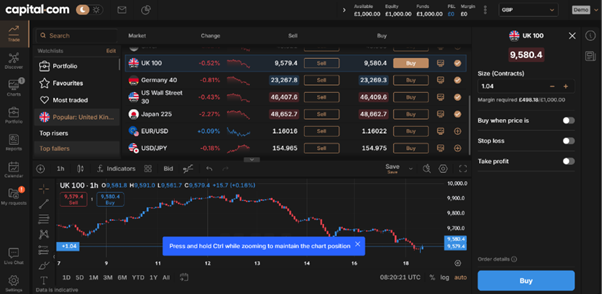
Yes, and I say that from direct experience rather than just looking at spec sheets. I’ve day traded on Capital.com across multiple instruments for over five months now, and the platform handles intraday strategies well. Execution is fast, the interface doesn’t clutter your screen with unnecessary features, and the TradingView integration means I can use my usual chart setups without switching between tools.
What Features Make Capital.com Suitable for Active Day Traders?
The features I rely on most for day trading include one-click execution, real-time price alerts, and the ability to trade directly from TradingView charts. Commission-free pricing means I don’t need to factor in ticket fees when calculating my risk-reward on each trade. Capital.com also offers spread betting in the UK, which means day trading profits are tax-free — a genuine advantage that platforms like XTB also offer but many international brokers don’t.
Day Trading Snapshot
| Metric | Capital.com | Source |
|---|---|---|
| Min Deposit | £20 | Capital.com fee page |
| CFD Commissions | None | Capital.com fee page |
| EUR/USD Spread (My Testing) | 0.64 pips average | 5-day test, Feb 2026 |
| UK 100 Spread (My Testing) | 1.0 point average | 5-day test, Feb 2026 |
| Execution Speed (Reported) | 0.014 seconds average | Capital.com internal data |
| FCA Regulated | Yes (FRN: 793714) | FCA Register |
| FSCS Protection | Up to £85,000 | FSCS |
| Spread Betting (UK) | Yes — tax-free profits | Capital.com |
How Much Does It Cost to Day Trade on Capital.com?
Capital.com uses a spread-only pricing model — no dealing commissions on CFDs or spread bets. For day traders who close positions within the same session, costs essentially come down to the spread. There are no inactivity fees, no deposit fees, and no withdrawal fees. That simplicity is one of the things I appreciate most about the platform.
Overnight funding charges only apply if you hold a leveraged position past the daily cutoff. Capital.com’s daily fee is set at 4% per annum, divided by 360 or 365 days depending on currency, plus or minus the relevant benchmark interest rate. If you’re a pure day trader closing everything before the session end, this cost is zero.
Day Trading Cost Calculator Example
Here’s what a typical day trade costs in practice:
- Trade: Buy £10,000 on UK 100 CFD
- Spread: 1.0 point (my average from testing)
- Round-trip spread cost: approximately £1.00
- Commission: £0
- Total cost if closed same day: approximately £1.00
Compare that to a raw-spread broker charging 0.6 points plus a £3.50 commission per side — you’d pay £0.60 in spread plus £7.00 in commissions for a total of £7.60. For typical retail position sizes, Capital.com’s all-in model often works out cheaper despite the slightly wider headline spread.
What Are the Full Fees and Charges?
| Cost Type | Amount | Relevance to Day Traders |
|---|---|---|
| Account Opening | Free | No barrier to entry |
| Min Deposit | £20 | Low starting cost |
| Deposit Fee | Free | No cost to fund |
| Withdrawal Fee | Free | No cost to withdraw profits |
| CFD Commission | None | Spread is the only trading cost |
| EUR/USD Spread | From 0.6 pips (0.64 avg in my testing) | Competitive for retail day trading |
| UK 100 Spread | From 1 point (1.0 avg in my testing) | In line with major retail brokers |
| Overnight Fee | ~0.011% daily + benchmark rate | Zero cost if you close same day |
| Currency Conversion | 0.7% | Applies when trading non-GBP instruments |
| Inactivity Fee | None | No penalty for quiet periods |
How Fast Is Trade Execution on Capital.com?
Capital.com reports an average execution speed of 0.014 seconds on their internal servers. In my own testing, I couldn’t perceive any delay between clicking and seeing the position appear — fills were essentially instant during standard London and New York hours. Out of 10 formal test trades in February 2026, only one experienced any measurable slippage (0.3 points on UK 100 during a volatile macro release). The other nine filled at the price I saw on screen.
What really tested the platform’s execution was the AI scalping bot. Scalping strategies demand fast, consistent fills — even small delays or frequent requotes would make the strategy unprofitable. After running the bot daily since February 2026, I’ve found the execution reliable and consistent. The platform hasn’t dropped a connection during live scalping sessions, and slippage has been within acceptable ranges.
What Technology Supports the Platform’s Speed?
Capital.com runs on cloud-based infrastructure with load balancing and distributed servers. Web, mobile, TradingView, and MT4 connections all feed into the same backend. I’ve traded simultaneously on the mobile app and TradingView desktop without any sync issues. No platform guarantees perfect uptime during extreme events, but Capital.com’s infrastructure has held up well through everything I’ve thrown at it — including automated bot trading.
Which Day Trading Strategies Work Best on Capital.com?
I’ve tested multiple approaches on the platform and found it handles different day trading strategies with varying degrees of suitability. Here’s my honest assessment based on live trading:
| Strategy | Suitability on Capital.com | My Assessment |
|---|---|---|
| Scalping (1-5 min holds) | Good | Fast execution and tight spreads on majors. Our AI bot runs a scalping strategy successfully. Not as tight as raw-spread ECN brokers for ultra-high-frequency scalping. |
| Intraday Swing (1-8 hour holds) | Excellent | This is where Capital.com shines. TradingView charts, clean interface, and spread-only costs make it ideal for trades held within the session. |
| News Trading | Good (with caveats) | Fast execution helps, but spreads widen around major releases — same as every retail broker. I experienced 0.3-point slippage on UK 100 during one NFP release. |
| Position Trading (multi-day) | Moderate | Overnight fees eat into returns. If you’re holding for days, the 4% annualised broker fee plus benchmark rate adds up. Better to close before session end when possible. |
| Algorithmic/Bot Trading | Good | API documentation is clear and the connection is stable. Our AI bot has run without connection drops. Not as customisable as dedicated ECN platforms, but more than adequate for most retail automation. |
For most retail day traders running discretionary intraday strategies, Capital.com hits the sweet spot of cost efficiency, execution quality, and usability. If you’re comparing day trading costs specifically, our Capital.com vs IG comparison breaks down how the two stack up on spreads and execution.
What Trading Tools Help Day Traders on Capital.com?
The tools I use daily include TradingView charts with my custom indicator setups, real-time price alerts (crucial for watching multiple markets), and Capital.com’s built-in market sentiment indicators. The economic calendar is integrated into the platform, so I can plan around high-impact news releases without switching tabs.
What Risk Management Tools Are Available?
Risk tools include standard stop-loss and take-profit orders, trailing stops, margin alerts, and negative balance protection for retail clients. I always set a stop-loss before entering any day trade — the one-click order ticket makes this quick. The platform also tracks your trading behaviour and highlights potentially risky patterns, which I’ve found genuinely useful rather than gimmicky.
How Good Is the TradingView Integration?
The TradingView integration is one of Capital.com’s strongest selling points for day traders. You can execute trades directly from TradingView charts, use custom Pine Script indicators, and save your layouts. I tested this extensively in January 2026 and found it worked flawlessly — my chart setups, alerts, and watchlists all synced without issues. This is something that spread betting traders particularly value since it gives them professional charting with tax-free execution.
Is Capital.com Beginner-Friendly for Day Trading?
It’s one of the most beginner-friendly platforms I’ve tested for day trading specifically. The interface is clean and uncluttered, the order ticket is simple to understand, and the structured learning content actually teaches you useful concepts rather than just promotional material. I’ve recommended it to several people who were new to trading, and the feedback has consistently been that Capital.com felt less intimidating than alternatives.
What Educational Resources Help New Day Traders?
Capital.com offers video tutorials, written guides, platform walkthroughs, and a separate learning app called Investmate. Topics range from basic market concepts to strategy ideas and risk management. The behavioural analysis feature is genuinely novel — it flags patterns in your trading that might indicate emotional decision-making, which is arguably the biggest risk for new day traders.
Should You Start with a Demo Account?
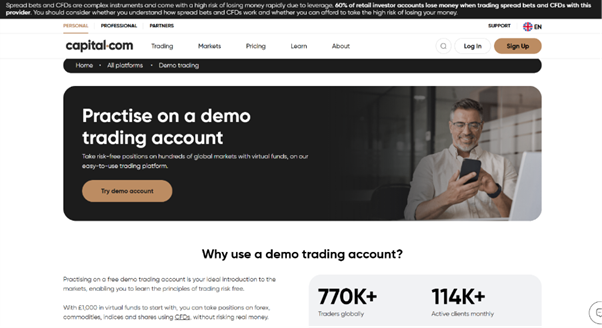
Absolutely. Capital.com’s free demo account mirrors live pricing with virtual funds, and you can switch between demo and live at any time. I’d recommend spending at least two weeks on demo before risking real money, especially if you’re new to day trading. Practice your strategy, get comfortable with the order ticket, and build confidence with the platform’s tools before depositing.
Who Should NOT Day Trade on Capital.com?
I believe in being honest about where a platform falls short, and Capital.com isn’t the right fit for everyone:
- Ultra-high-frequency traders who need raw-spread ECN feeds, depth-of-market ladders, and co-location infrastructure. Capital.com is a retail broker — dedicated ECN platforms like Pepperstone Razor will serve institutional-speed strategies better.
- Traders who want real stock ownership alongside CFDs. Capital.com is CFD-only. If you want to hold actual shares and day trade CFDs in one account, XTB offers both.
- Anyone looking for crypto CFDs in the UK. Capital.com restricts crypto CFDs to professional clients only in the UK. If crypto day trading is your focus, you’ll need another platform.
- Traders who prefer MetaTrader 5. Capital.com offers MT4 but not MT5. If your indicators and EAs are built for MT5, you’ll need to migrate them or find an MT5 broker.
For everyone else — retail day traders who want simple pricing, good execution, and a platform that doesn’t overcomplicate things — Capital.com is genuinely hard to fault. If you’re unsure whether the platform’s regulatory setup gives you adequate protection, I’ve covered this in detail on our Capital.com safety analysis.
How Does Capital.com Compare with Other Day Trading Platforms?
Having tested multiple platforms, here’s how Capital.com stacks up against the alternatives I’d recommend for day trading in the UK:
| Feature | Capital.com | IG | XTB |
|---|---|---|---|
| CFD Commission | None | None (spread-only) or DMA | Standard: None / Pro: per-lot |
| Spread Model | Spread only | Spread or DMA | Spread or raw + commission |
| TradingView | Yes | Yes | No |
| Spread Betting (UK) | Yes | Yes | Yes |
| Real Stock Investing | No | Yes (ISA available) | Yes (0% up to €100k) |
| Education Quality | Excellent | Excellent | Good |
| Min Deposit | £20 | £250 (for some accounts) | No formal minimum |
| Best For | Retail day traders who want simplicity | Experienced traders wanting depth | Hybrid investors and volume traders |
Capital.com wins on accessibility and cost simplicity. IG wins on depth and product range. XTB wins on real stock investing alongside CFDs. For a detailed side-by-side, see our Capital.com vs IG comparison or Capital.com vs Trading 212 breakdown.
Final Verdict – Should You Choose Capital.com for Day Trading?
After five months of live day trading and building an AI scalping bot that runs on the platform daily, my verdict is clear: Capital.com is one of the best retail platforms for day trading in the UK. The commission-free pricing keeps costs low, the TradingView integration gives you professional charts, and the execution quality has been consistently reliable — even under automated bot trading conditions.
Is it perfect? No. If you need raw-spread ECN access, real stock ownership, or crypto CFDs in the UK, you’ll need to look elsewhere. But for the majority of retail day traders who want a clean, fast, well-priced platform with strong education and regulatory protection, Capital.com delivers. I don’t know if I’m slightly biased now after spending so much time on the platform, but the data from my testing backs up the positive experience.
Spread bets and CFDs are complex instruments and come with a high risk of losing money rapidly due to leverage. You should consider whether you understand how spread bets and CFDs work and whether you can afford to take the high risk of losing your money.
FAQs
References

62% of retail investor accounts lose money when trading CFDs with this provider.